

A campaign naming convention is a fixed set of rules for naming campaigns, ad sets (or ad groups), and ads. Every name carries the same information, in the same order, every time. Done right, it turns a messy, unsearchable account into clean data you can filter, report on, and trust.
Most guides treat naming as tidiness. It's more than that. Your naming convention is the spec your dashboards, and increasingly your AI agents, read to make sense of your account. They can't guess what Summer sale FINAL means, and neither can the teammate who inherits the account.
| ❌ Without a convention | ✅ With a convention |
|---|---|
Summer sale FINAL | Meta_Conv_2026-07_BOF_RTG_US |
summer-sale-2 (copy) | Meta_Conv_2026-07_TOF_Broad_US |
TEST don't touch | Google_Leads_2026-07_NonBrand_UK |
FB campaign new | Google_Leads_2026-07_Brand_UK |
Copy of Copy of Q3 | TikTok_Aware_2026-07_TOF_US |
The same campaigns, named two ways. Only one of them lets you filter and report.
What is a campaign naming convention?
Three things get blurred together, so it helps to separate them:
- Taxonomy: what you decide to track (objective, audience, geo, and so on).
- Convention: how you write it down (which fields, in what order, with which separator).
- Name: the result that shows up in your ad account.
A name is what you see in your tools. The convention is the blueprint that makes every name consistent enough to analyse later. Here are two broken into their parts:
| Platform | Objective | Date | Funnel | Audience | Geo |
|---|---|---|---|---|---|
| Meta | Conv | 2026-07 | BOF | RTG | US |
| Leads | 2026-07 | TOF | NonBrand | UK |
Each field sits in a fixed position, so the name reads like a sentence.
Why campaign naming conventions matter
Naming feels like admin until a report doesn't add up. Then it becomes the difference between a five-minute answer and an afternoon of cleaning data. A good convention buys you four things:
- Cleaner reporting and attribution. When the name encodes objective, audience and geo, your dashboards can roll performance up by any of them.
- Filtering at scale. Type
USorRTGinto the search box and every matching campaign appears at once. - Cross-platform consistency. One shared structure means a Meta campaign and a Google campaign for the same push line up, instead of fragmenting into separate rows you can't match.
- Fewer errors and easier handovers. Anyone, whether a teammate, a new hire or an agency, can read a name and know exactly what it is.
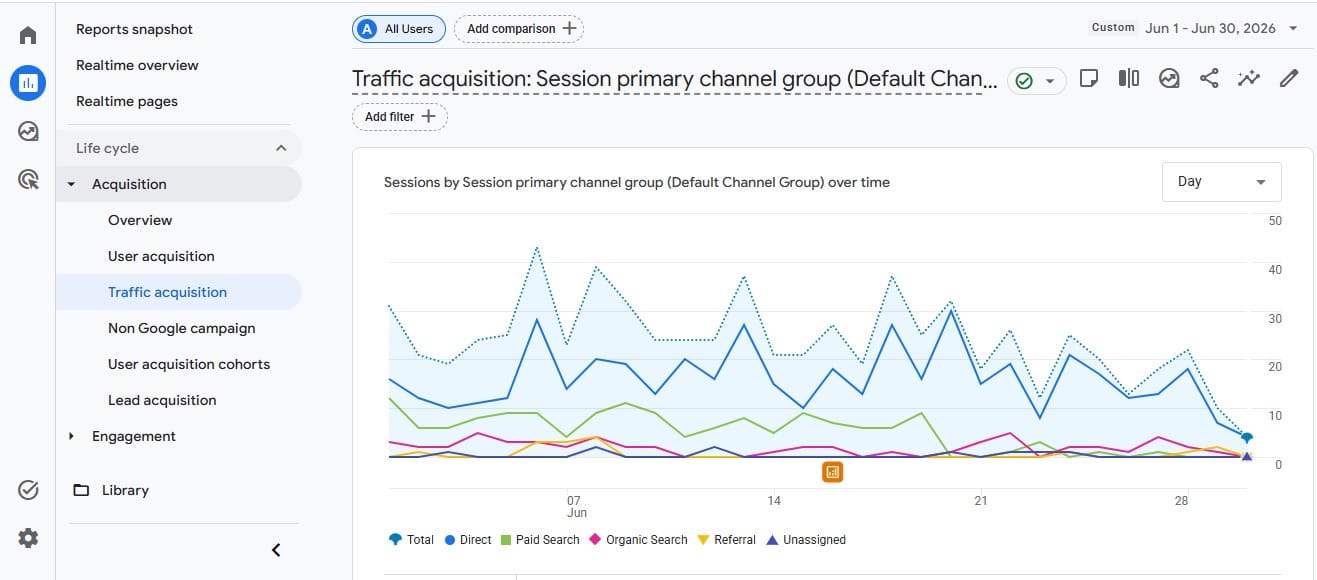
Google Analytics is where your campaign data ends up. Consistent names decide whether you can actually read it.
The structure is also machine-readable. Your dashboards, and increasingly your AI agents, can parse it automatically. More on the agents shortly. (For the bigger picture on how the platforms group this data, see how ad platforms work.)
Here's where that filtering happens in practice. Every ads platform has a search and filter bar above the campaign list. With coded names, typing RTG there surfaces every retargeting campaign at once:
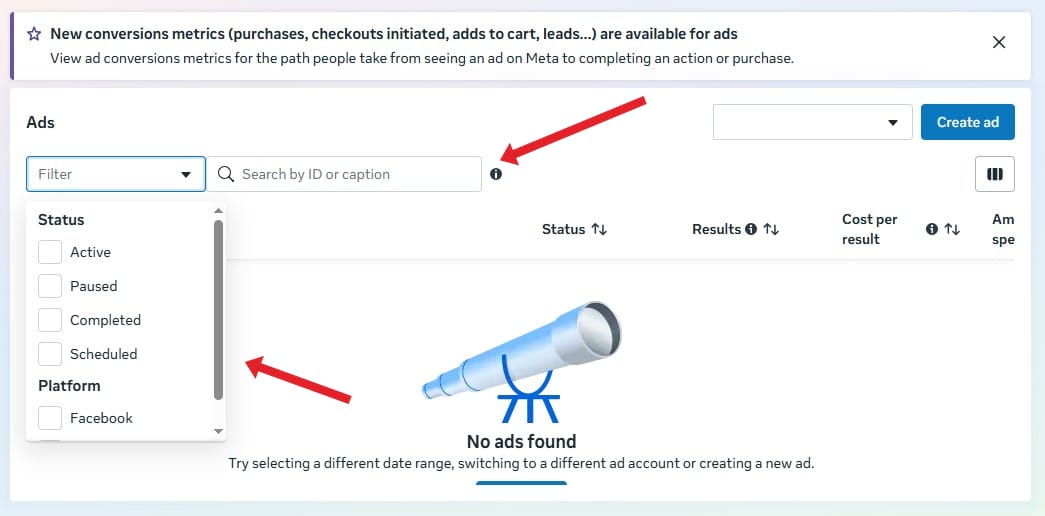
Meta's Ads view. This is where you type a code like RTG, or stack filters, to surface matching campaigns.
Campaign naming convention template (copy-paste)
Want a sensible default to start from? Use this at the campaign level:
[Product]_[Objective]_[YYYY-MM]_[Funnel]_[Audience]_[Geo]
Only one product? Drop the first field. Reports mixing platforms? Prefix [Platform]_ before everything.
Campaign name examples
Filled in, the template looks like this:
RuckPack_Conv_2026-07_BOF_RTG_US
DemoBooking_Leads_2026-07_TOF_NonBrand_UK
Meta_RuckPack_Aware_2026-07_TOF_Broad_US
Try it: Campaign Name Generator
RuckPack_Conv_2026-10_BOF_RTG_US
Long names get cut off in report columns.
Then keep the lower levels lean, since they inherit context from the campaign:
Ad set:  RTG_Cart-Abandoners_7d
Ad:      UGC_Video_HookA_v2
The rest of this guide unpacks the template: what each field means, the formatting rules that keep it parseable, and how to keep names in sync with your tracking.
The building blocks of a campaign name
The template runs on a handful of fields. Pick only the ones you'll actually report on, because every extra field is one more thing to keep consistent.
| Field | What it captures | Example values |
|---|---|---|
| Product / Offer (optional) | What's promoted | RuckPack, FreeTrial |
| Objective | The main goal | Conv, Leads, Aware, Traffic |
| Date | Launch month, year-first | 2026-07 |
| Funnel stage | Where in the journey | TOF, MOF, BOF |
| Audience | Targeting, in short code | RTG, Broad, LAL |
| Geo | Market, as a country code | US, UK, DE |
| Platform (optional) | Where the campaign runs | Meta, Google, TikTok |
A few of those codes, in plain English: TOF, MOF and BOF are top, middle and bottom of funnel; RTG is retargeting; LAL is a lookalike audience.
Two of those are optional. Product / Offer: skip it if you only promote one thing. Platform: inside Meta or Google every campaign already belongs to that platform, so keep the field only if names from several platforms land in the same column, like a blended dashboard or a spreadsheet export with no source column next to it.
Tip: Keep audiences and budgets in coded short-form. Campaign names often end up inside your tracking tags, which are visible in a visitor's browser, so you don't want real audience or client names exposed there.
Formatting rules: delimiters, case, and dates
The fields matter, but the formatting is what keeps names readable by machines. Five rules cover almost everything:
- Use an underscore between fields. Not a space, not a slash, not a pipe. An underscore (
_) is the one separator that survives every platform, every spreadsheet export and every tracking tag without breaking. Keep hyphens (-) for inside a field if you need them. - Avoid spaces and special characters. Slashes, ampersands and punctuation break parsing, some platforms reject them outright, and they corrupt your tracking tags.
- Pick one text case and stick to it. CamelCase or lowercase both work. CamelCase (
SummerSale) reads cleanly without spaces. Mixing cases silently splits your data: analytics tools treatSummerSaleandsummersaleas two different values, so one campaign becomes two rows in every report. - Write dates year-first. Always
YYYY-MMorYYYY-MM-DD(this is the ISO format). Every analytics tool understands it, and it sorts in the right order. - Order fields by how you'd search for the campaign. Campaign lists sort alphabetically, so the first field works like a folder: every campaign sharing it groups together. Start with what you'd scan for when hunting through 80 campaigns, usually the product, then the objective and launch month, and leave the targeting details for the end. Report columns also cut long names off (
RuckPack_Conv_2026-…), and this order keeps the part you need most visible.
| ❌ Avoid | ✅ Use instead |
|---|---|
Summer Sale 2026 | Summer_Sale_2026 |
promo/sale&deal | Promo_Sale_Deal |
café#2026 | Cafe_2026 |
Spaces and special characters break parsing and tracking tags. Stick to underscores and plain characters.
Above all, document your short codes. A one-page sheet listing every allowed value (objectives, audiences, geos) stops five people from inventing five different abbreviations.
Name every level of the hierarchy
Most ad platforms share the same structure: Campaign, then Ad set (or Ad group), then Ad. Each level should name only what is unique to it. Don't repeat information from the level above.
| Level | Example | What it names |
|---|---|---|
| Campaign | Meta_Conv_2026-07_BOF_US | Objective, geo, timeframe |
| Ad set / Ad group | RTG_Cart-Abandoners_7d | Audience and targeting |
| Ad | UGC_Video_HookA_v2 | Creative, format, version |
Each level names only what is unique to it. Never repeat the parent.
Naming conventions by platform
The principles are universal, but platforms split into two families, and each family leans on different fields.
Search platforms: Google and Microsoft Ads
Search platforms use Campaign, then Ad group, then Ad. On search, swap the template's Funnel and Audience fields for Network and Match type, since those are what drive how you read search performance. Microsoft Ads (Bing) mirrors Google's structure, and the same format carries over unchanged.
Google_Search_2026-07_NonBrand_Exact_UK
Microsoft_Search_2026-07_Brand_Exact_UK
Social platforms: Meta, TikTok, LinkedIn, and Reddit
Meta uses Campaign, then Ad set, then Ad. TikTok, Reddit and LinkedIn follow the same three-level shape with their own labels (TikTok and Reddit call the middle level an ad group). Whatever the labels, funnel stage and audience are the fields you'll filter on most when you compare prospecting against retargeting.
On Meta, your campaigns live in Ads Manager, one click from the Ads summary page:
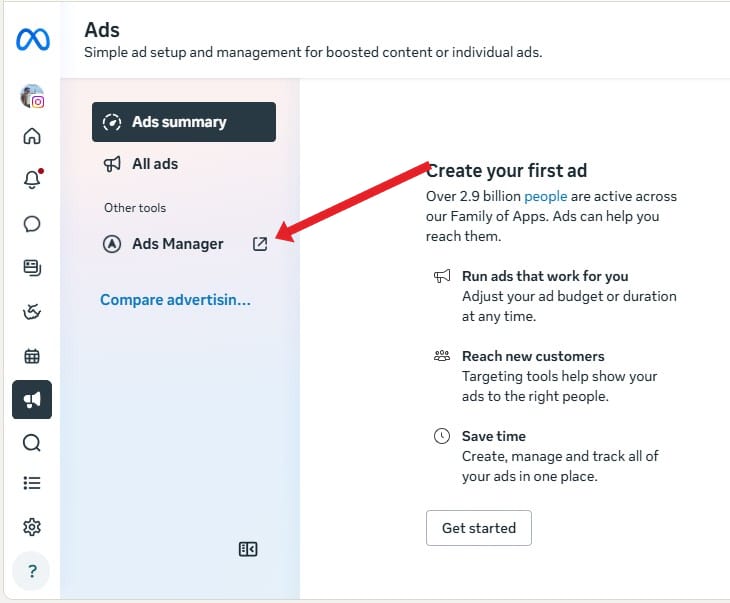
Ads Manager is where your campaign names live on Meta. Everything you name here flows into your reports.
Meta_Conv_2026-07_BOF_RTG_US
TikTok_Aware_2026-07_TOF_Broad_US
One social-specific tip: creative turnover is fast, especially on TikTok, so make sure your ad-level names track format and version. That's how you spot fatigue quickly.
UTM naming conventions: keep names in sync
UTMs are the little tags you add to a link so your analytics knows which campaign a visitor came from. Your utm_campaign value should mirror your campaign name: same fields, same order. When they match, the numbers from your ad platform and the numbers in Google Analytics line up, instead of telling two different stories.
Google's own reference explains each parameter. The one that matters here is utm_campaign:
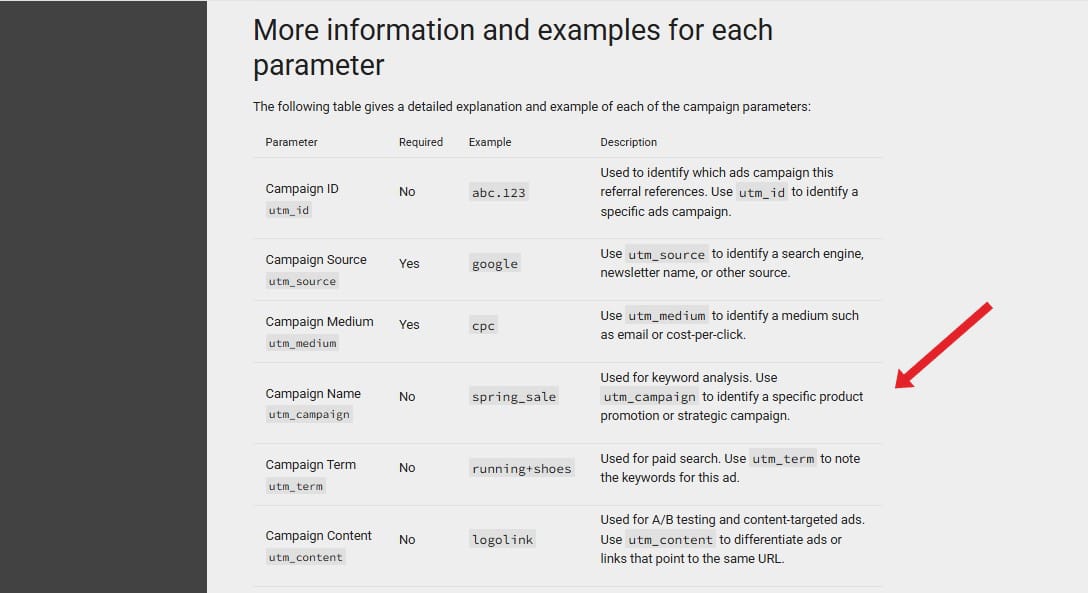
The campaign parameters as Google documents them. utm_campaign is the field your campaign name goes into.
To build the tagged link, drop your exact campaign name into Google's Campaign URL Builder:
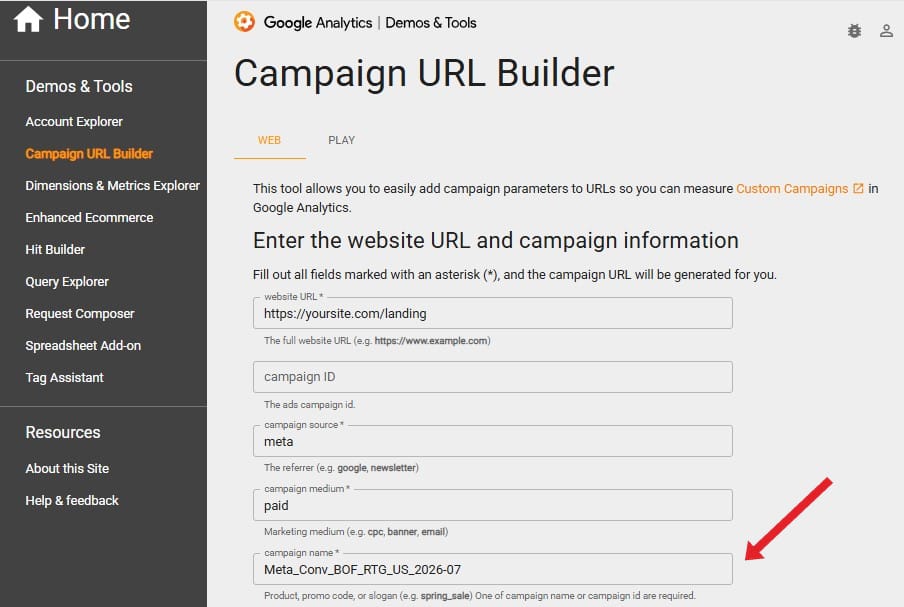
Google's Campaign URL Builder. Paste your exact campaign name into the campaign name field and the tagged URL is generated for you.
Campaign name:  Meta_Conv_2026-07_BOF_RTG_US
utm_campaign:   Meta_Conv_2026-07_BOF_RTG_US
Identical strings mean a clean campaign-level view across your platform reports and your analytics.
Try it: UTM Builder
https://example.com/landing?utm_source=facebook&utm_medium=paid_social&utm_campaign=RuckPack_Conv_2026-07_BOF_RTG_US
And this is where it all lands: the traffic acquisition report in Google Analytics. With matching names, your paid traffic splits cleanly by campaign instead of blurring into one row:
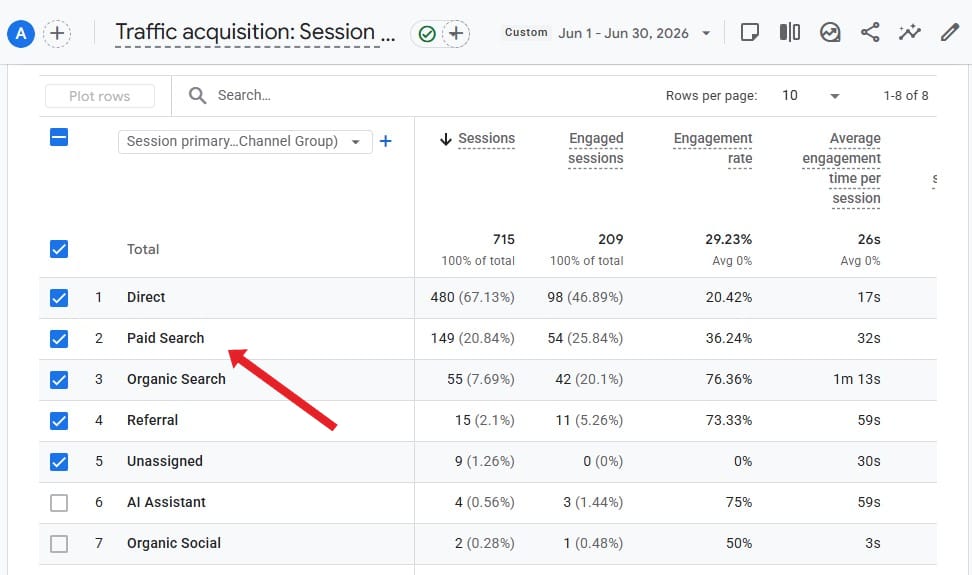
Google Analytics, Reports, Acquisition, Traffic acquisition. Paid Search is where your utm_campaign names show up.
Sidenote: Campaign names go public through dynamic placeholders:
{campaignname}on Google,{{campaign.name}}on Meta. They insert your campaign name into the ad's URL, visible in the visitor's address bar, soCart_Abandoners_HighBudgethands your strategy to anyone who clicks. Either pass the campaign ID instead ({campaignid},{{campaign.id}}), which exposes nothing but leaves raw numbers in your analytics, or keep passing the name and let your coded short-forms do the hiding.
How to roll it out and keep it consistent
A convention is only as good as your discipline in applying it. Four habits keep it alive:
- Document it once. Keep a single source of truth, a shared sheet with the template and every allowed code.
- Assign ownership. Someone needs to own the standard, or it quietly drifts as new people join.
- Don't change it mid-flight. Renaming live campaigns fragments your historical data, so settle the format before you scale.
- Audit periodically. A quick scan for names that don't fit the pattern catches mistakes before they pollute a quarter of reporting.
| Field | Allowed values, documented once |
|---|---|
| Platform | Meta, Google, Microsoft, TikTok, LinkedIn, Reddit |
| Objective | Conv, Leads, Aware, Traffic |
| Funnel | TOF, MOF, BOF |
| Audience | RTG, Broad, LAL, NonBrand |
| Geo | US, UK, DE, FR |
A shared sheet of allowed codes keeps everyone naming from the same list.
Pro tip: Need to retire an old campaign without breaking the convention? Prefix its name with
ZZ_. It drops to the bottom of every sorted list, so you can filter it out in one click instead of deleting history.
Cleaning up an existing account
Don't mass-rename. Renaming a live campaign fragments its history in your reports, so dig out gradually instead:
- Apply the convention forward only. Every campaign created from today follows the format. Old ones stay as they are.
- Prefix old campaigns with
LEGACY_. One filter hides them all, and nobody confuses them with the new system. - Hand-rename only the few old campaigns that still spend real money. For everything else, the cleanup isn't worth the broken history.
The whole convention on one page
Everything above condenses into one block. Copy it and swap in your own codes:
CAMPAIGN NAMING RULES: [your team]

Template:  Product_Objective_YYYY-MM_Funnel_Audience_Geo
           (drop Product_ if you promote one thing;
            prefix Platform_ only if your reports mix platforms)

Codes:     Objective → Conv, Leads, Aware
           Funnel    → TOF, MOF, BOF
           Audience  → RTG, LAL, Broad

Rules:     underscores between fields · one casing, always
           dates year-first (2026-07) · no budgets or client names
           pass campaign IDs, not names, in tracking URLs

Owner:     [name] · log every format change
           old campaigns → LEGACY_ · retired → ZZ_
Pin it in your team wiki. The same block, pasted into an AI agent's instructions, makes every campaign it drafts come out named right.
Naming conventions in the age of AI agents
More and more, you're not the one typing the campaign name. An AI agent is.
When an agent builds campaigns for you (for example, using an Ads MCP), your naming convention stops being a style guide and becomes the specification it follows. Give it the format once, and every campaign it drafts comes out consistent. No human slips, no final_v2.
This is also where one cross-platform convention pays off. A single rule that holds whether the campaign lands on Google, Meta, TikTok or Reddit means the agent produces clean, comparable data everywhere.
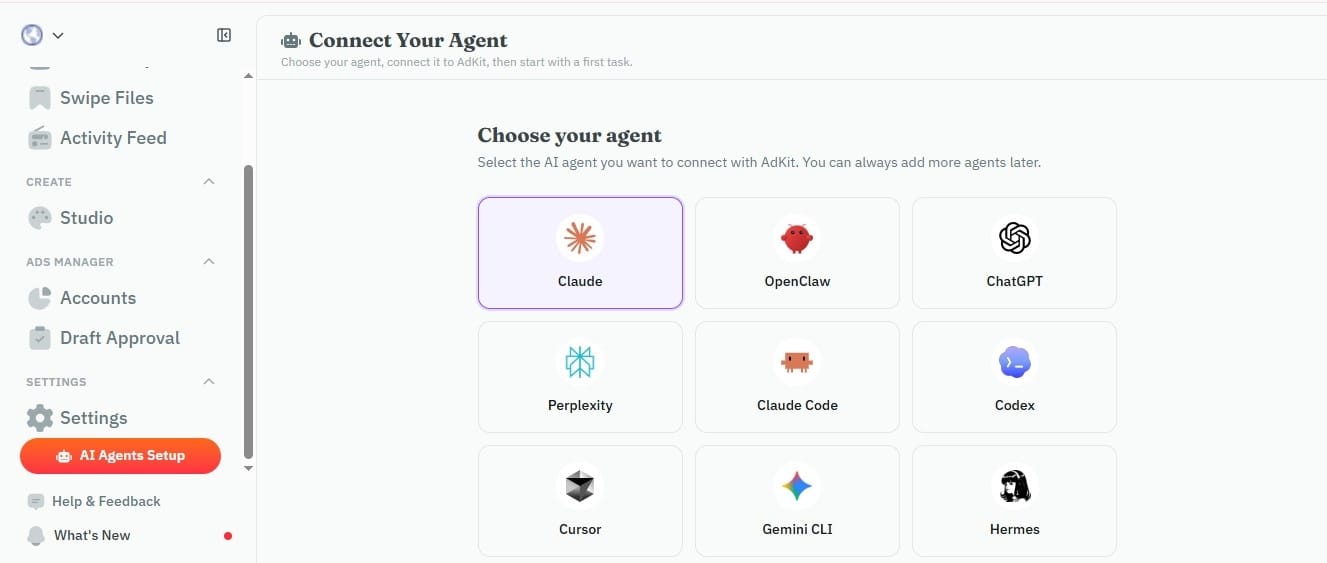
AdKit lets your agent draft campaigns across platforms, draft-first, from one place.
Tools like AdKit are built around this. Your agent researches, drafts and launches campaigns across every platform, draft-first so nothing goes live without your approval, while your naming convention keeps that cross-platform data clean and reportable.
If you want to set one up, the Google Ads MCP and Meta Ads MCP setup guides walk through it step by step. (An "ads MCP" is just the connection that lets the agent work inside your ad accounts.)
Lock it in before you scale
A naming convention is boring right up until the day it saves you. Copy the template above, document your allowed codes in one sheet, and apply it to the next campaign you launch, while your account is still small enough to keep clean. And if an agent does the launching for you, put the convention in its instructions: AI Ad Agents: What They Are and How to Set One Up shows you how.
Frequently asked questions
An underscore between fields. It's reliable to parse and avoids the problems spaces and special characters cause in analytics tools and tracking tags.
Yes. Use the same fields in the same order. Matching strings keep your platform data and your analytics in agreement at the campaign level.
The principles are identical. Only the fields you emphasise change: search leans on match type and network, social leans on funnel stage and audience.
Avoid changing it on live campaigns, since that fragments historical data. If you outgrow your structure, version it and apply the new format to new campaigns only.
No. Names have zero effect on delivery, bidding or the algorithm, so you can fix your naming anytime without touching performance. The value is in reporting speed, clean analytics, and automation.
For campaigns, three styles come up: delimiter-based (Conv_BOF_RTG_US), key-value pairs (obj-conv_aud-rtg_geo-us), and free-form descriptive names. The first two are machine-readable; free-form is what this guide helps you escape.
Good campaign names are structured, not creative. Conv_2026-07_BOF_RTG_US beats SummerBlast because it tells you objective, audience, market and date at a glance. Save the creative naming for the Product or Offer field if you want a memorable touch.