



Run your LinkedIn Ads from  Claude directly
The safest way to connect Claude to LinkedIn Ads
AdKit is the safest way to connect Claude to your LinkedIn Ads account. Build professional audiences, launch Sponsored Content, cut the job titles wasting spend, and write your weekly report by prompt. Every change waits as a draft until you approve it.
Claude Claude CodeClaude Cowork












"My agent analyzed my account using Adkit, found what to optimize, and drafted all the changes on its own. I only had to click 'Approve'. The first 30 minutes already saved me 8 hours of work."

What Claude can do with your LinkedIn Ads

 Claude
Launch these 3 creatives as a Sponsored Content campaign targeting VPs of Sales at companies with 200+ employees. $100/day, lead generation.
Built it as a draft: 1 campaign, 3 ads, VP of Sales targeting at $100/day.
[ Launch Campaigns ]
Launch LinkedIn Ads from one message
Attach your creatives and tell Claude who to reach. It builds the campaign, targeting, and budget as a draft, and nothing goes live until you approve it.
 Claude
Write my weekly LinkedIn report for the client — spend, leads, what's working.
Here's the week, ready to send:
Weekly LinkedIn Ads Report
Jun 23 – Jun 29
Spend
$4.2k
+8%
Leads
52
+15%
CPL
$81
-6%
Cost per lead down 6% week over week
Best audience: VPs of Sales at $61 per lead
[ Reporting ]
Create reports you can share
Ask Claude for the week and it writes the report: spend, leads, cost per lead, and what changed, ready to drop into an email or a client deck. No CSV export, no pivot table.
 Claude
Break down my Sponsored Content campaign by job title. Which titles are wasting spend?
Two titles are clicking but not converting. Here's the breakdown:
Exclude 2 job titles
Drafted — approve to apply
[ Cut Waste ]
Find the job titles burning budget
Claude ranks your job titles by cost per lead and flags the ones producing nothing. Approve the exclusion and it drafts the targeting change.
 Claude
Build me an audience: marketing managers and up, at SaaS companies with 50–500 people.
Assembled it with every seniority tier:
Job titles
Company
Exclude
[ Build Audiences ]
Build your target audience fast
Ad Manager makes you add job titles one at a time. Claude builds the whole audience in one go and shows the estimated reach before you spend a dollar.
ClaudePause any ad group over $120 CPL, and relaunch the 'Enterprise Q3' campaign — it stopped delivering yesterday.
Two moves drafted for approval:
Pause 'Demand Gen — Broad' ad group
CPL hit $148, above your $120 cap
Relaunch 'Enterprise Q3' campaign
Lifetime budget exhausted — reset and resume delivery
[ Budget Control ]
Keep your ad spend under control
LinkedIn can overspend your daily budget by up to 50%, and campaigns can switch themselves off overnight. Claude watches both and drafts the pause or the relaunch for your approval.
"AdKit is such a good product. Onboarding, their MCP, everything works super smoothly!"

Robert Ligthart
Founder of OmniSocials
LinkedIn Ad Manager is wasting your time.
- Build audiences by hand, adding job titles one at a time
- Babysit budgets that overspend or campaigns that die overnight
- Export CSVs and build the same client report every Monday
- ...or use other MCPs that have no guardrails and break your account
- 1. Tell Claude what you wantOne prompt, plain English. 'Build my target audience' or 'cut the titles wasting spend'.
- 2. Review the draftEvery campaign, audience, and budget change lands in AdKit as a draft. Inspect it before LinkedIn sees a thing.
- 3. Publish when readyApprove and the draft ships to LinkedIn Ads. Your live campaigns stay frozen until you sign off.
Connect Claude to your ad accounts in 3 steps
Connect Claude to your ads
Link your ad accounts to AdKit, then connect Claude via MCP or CLI. Takes about two minutes.
Google Ads
2 campaigns
Meta Ads
5 campaigns
TikTok Ads
Connect...
Reddit Ads
Connect...
LinkedIn Ads
Connect...
X Ads
Connect...
Tell Claude what to do
Ask Claude to launch a campaign, pause an ad, or check your results. It drafts every change for you.
ClaudePause my worst-performing ads and show me what's working
I found 3 underperforming ads. I've drafted pause actions for each. You just need to approve it.
Review and approve
Every change sits as a draft in AdKit until you approve it. Nothing goes live without your say.
Pause: Summer Sale
Low CTR · below threshold
Scale: Brand Awareness
Top performer · 3.2x ROAS
Update: Retargeting
New headline copy
"Other tools I found were just small proxies for ad platform APIs. One bad call and you could mess up a live campaign. What I like about AdKit is that everything goes through a draft first. I review before anything goes live. That "buffer" between your agent and Meta is what makes it safe to use."
People like you love AdKit:
Founders & Solopreneurs
You're growing a product and don't have the budget for an agency. You want to run ads yourself without spending your week in Ad Managers UI.
Agencies & Media buyers
You run multiple ad accounts and want a way to manage them faster. 10 accounts = 10x the same work, and every hour wasted in ad managers is time you'll never get back.
Growth Marketers
You already do most of your work with AI agents. Ads should work the same way, not force you into a separate tool with its own learning curve.
Brand Managers
You need to easily keep track of what competitors are doing and get ideas. AdKit lets you track your competitors across platforms and search 500k+.
But I heard...
...letting Claude touch my LinkedIn campaigns is risky 😰
That is exactly why every change is a draft first. Campaigns, audiences, budgets, and creatives sit in your AdKit dashboard until you click approve. Your live account never moves without your sign-off.
...this will get my LinkedIn Ads account restricted 😱
Every call runs through LinkedIn's official Marketing API path, with request validation and rate limiting built in. No scraping, no unofficial endpoints, nothing that trips a policy review.
...wiring up a LinkedIn Ads MCP is too technical 😳
It takes 3 clicks. Connect your LinkedIn ad account, paste one line into Claude, done. No API keys, no Marketing API config. If you can prompt Claude, you can set up AdKit.
...will Claude just guess at my targeting 🤖
You tell Claude exactly who you want to reach. It handles the facet grind: every seniority variation, company size, and industry, then shows you the estimated reach before anything is drafted. You approve the audience before it touches a campaign.
Cheaper than the hour it saves you
Single Project
Every AdKit tool (ads library, AI studio, and MCP) for one brand.
$49
per month
Everything you need:
- Multi-platform Ad Library
- Competitor Tracking
- Activity Alerts
- AI Ads Generator & Cloner
- Swipe File
- 1 Project
- 1 ad account on each platform
- MCP Access for AI Agentsnew
Multiple Projects
Unlimited brands, ad accounts, and creative analytics (soon).
$97
per month
Everything you need:
- Multi-platform Ad Library
- Competitor Tracking
- Activity Alerts
- AI Ads Generator & Cloner
- Swipe File
- Unlimited Projects
- Unlimited ad accounts
- MCP Access for AI Agentsnew
- Creative Analyticssoon
"If you've ever tried any other MCP, you'll quickly realize that they might give you access to your data, but the moment you start creating campaigns, everything will break. Adkit created something that just works like magic."
Get ad-manager hours back
- 45mAudience build
The facet grind: job titles, seniority tiers, company sizes, industries. One prompt instead of forty clicks.
- 1hClient reporting
Spend, leads, and cost per lead across every campaign, written up. No CSV, no pivot table.
- 30mWaste sweep
Pull the demographics report, rank titles by CPL, draft the exclusions before the report caps out.
saved every year
(3h/week x 52 weeks)
Those are hours you get back to spend on strategy, creative, and the parts of the job you care about.
That's a client report and an audience build off your plate, every week.
Every seniority variation, company size, and industry assembled in one prompt instead of forty clicks in Ad Manager.
Claude flags the job titles wasting spend before the demographics report caps out, so less budget burns on titles that never convert.
Is AdKit the right fit for you?
🎯 AdKit is made for you if...
- You run B2B LinkedIn campaigns and you're tired of adding job titles and seniority levels one at a time.
- You send a weekly LinkedIn report to a client or your boss and you'd rather not export another CSV.
- You already use Claude for work and you want your ads to work the same way.
- You run LinkedIn ads for multiple brands or clients and every hour in Ad Manager is margin gone.
- You want to spend your time on offers and creative, not on which nested menu LinkedIn buried a setting in.
🚫 But it might not be a good fit if...
- You don't run LinkedIn ads and aren't planning to
AdKit manages ad accounts, it doesn't post to your feed.
- You want a fully autonomous bot that spends your budget without you looking
AdKit is built the opposite way: you approve every change.
- You only need organic LinkedIn scheduling or social management
That's a different tool.
AdKit vs other MCPs vs the ad manager
  | Other MCP servers | Ad manager UIs | |
|---|---|---|---|
| Platforms | Meta, Google, TikTok, LinkedIn, X, and Reddit from one server. | Usually one platform per server. Need a different setup for each. | Log into each ad manager separately. |
| Safety | Changes are saved as drafts. Nothing goes live until you approve. | Most servers write directly to your live ad account. | You click the buttons, so mistakes are yours to catch. |
| Setup | Connect your ad accounts and start managing from your agent in minutes. | Install the server, set up API credentials, connect to your agent. | No setup needed. You already have your ad manager logins. |
| Competitor research | Ask your agent to pull competitor ads from a library of 500k+ creatives. | Not available. | Open each platform's ad library and search manually. |
| Reporting | Ask your agent how your campaigns are doing across all platforms. | Your agent can pull numbers, but only from one platform at a time. | Log into each platform and check the dashboards yourself. |
Compatible with:










Your full ad workflow, in one place
Research
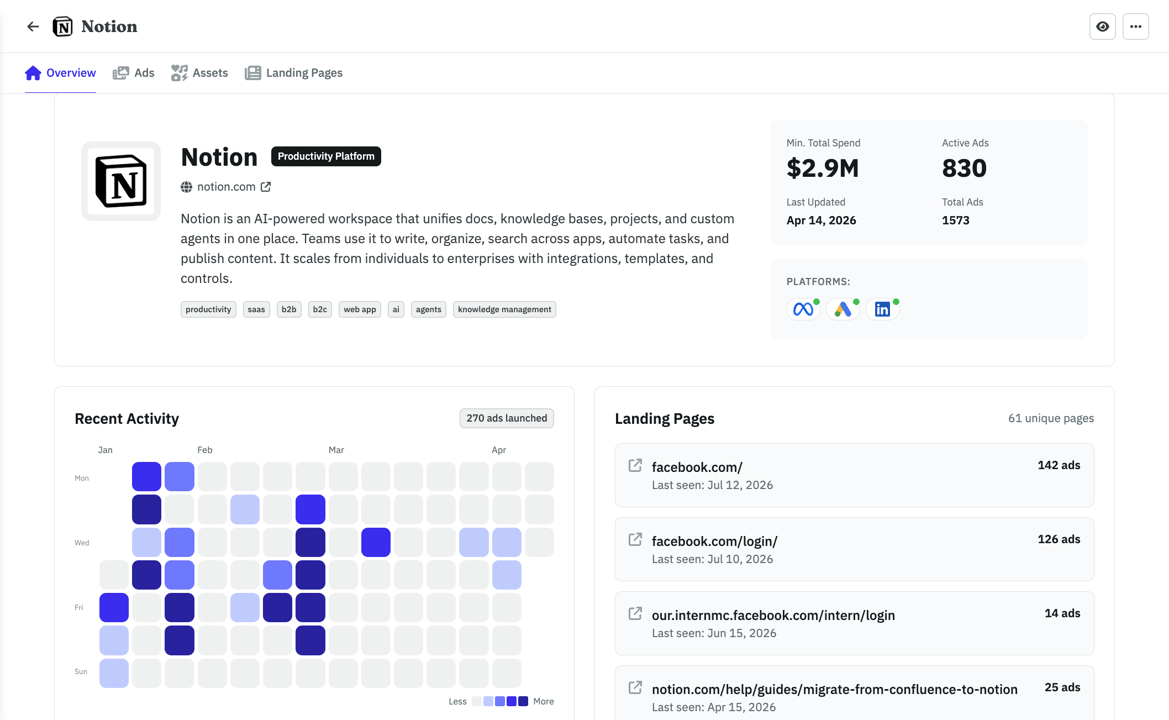
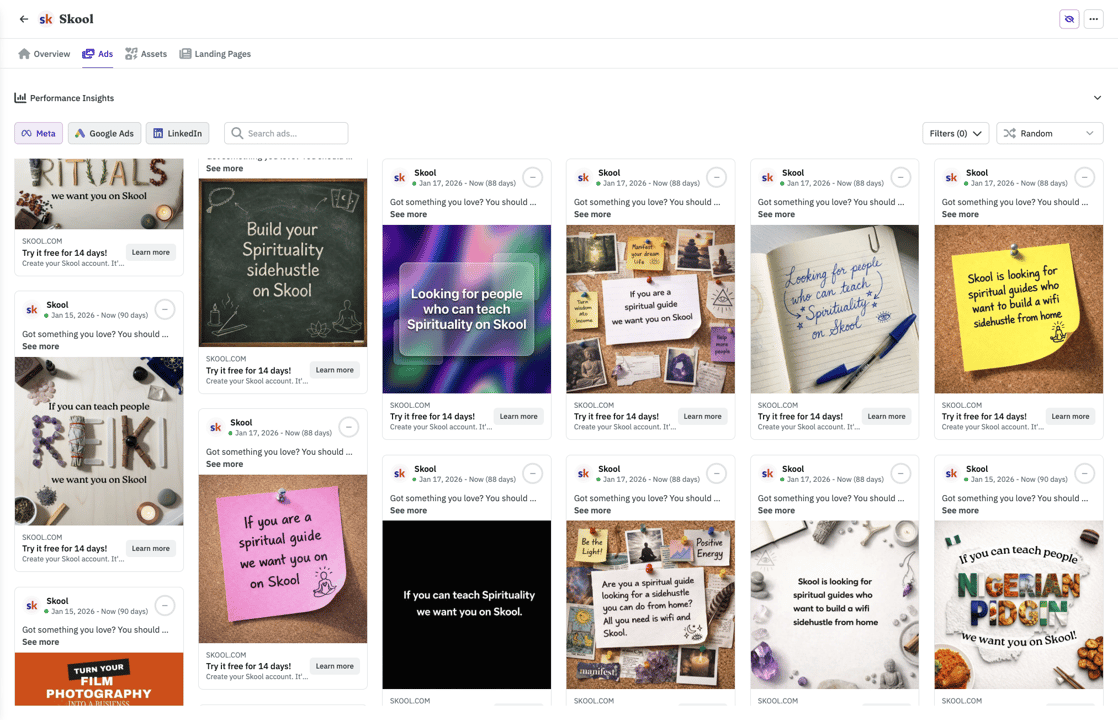
Find what's working right now
Browse 500k+ ads or import your competitors. Filter by vertical so you see businesses like yours.
- Competitors tracked across Meta, Google, and LinkedIn automatically
- See which ads are evergreens vs. tests your competitors already killed
- Weekly digest in your inbox. No more scrolling ad libraries.
With your agent
ClaudeWhat's the ad Notion has been running the longest?
Their Postit style ad has been live 142 days, it points to their top landing page (126 ads running to it). Want me to save the creative and LP to your swipe file?
Frequently asked questions
Ready to run LinkedIn Ads from Claude?
Build the audience you already know. Cut the titles burning budget. Send the client report in a sentence. Launch Sponsored Content from one prompt, with every change held for your approval.