



The safe MCP server for LinkedIn Ads
The only LinkedIn Ads MCP with drafts and safeguards
Let your agent build professional audiences, launch Sponsored Content, cut wasted spend, and write your weekly report. Every change lands as a draft you approve before LinkedIn sees it.
 Claude
 OpenClaw
 ChatGPT
 Perplexity
 Claude Code
 Codex
Codex Cursor
 Grok
Grok Gemini CLI
 Hermes
 n8n
n8n MCP Server










"My agent analyzed my account using Adkit, found what to optimize, and drafted all the changes on its own. I only had to click 'Approve'. The first 30 minutes already saved me 8 hours of work."
LinkedIn Ad Manager makes simple work take an hour
- Build audiences by hand, adding job titles one at a time
- Babysit budgets that overspend or campaigns that die overnight
- Export CSVs and build the same client report every Monday
- ...or use other MCPs that have no guardrails and break your account
- 1. Tell your agent what you wantOne prompt, plain English. "Build my target audience" or "cut the job titles wasting spend".
- 2. Review the draftEvery campaign, audience, and budget change lands in AdKit as a draft. Inspect it before LinkedIn sees a thing.
- 3. Publish when readyApprove and the draft ships to LinkedIn Ads. Your live campaigns stay frozen until you sign off.
"AdKit MCP has been extremely useful. I've been using my AI agent for a month now and last month I wanted to run an ad, I had to manually copy-paste csv, fix all the settings, spend hours. AdKit allows me to create and iterate on ads in a single prompt"
What you can do with your agent
 Claude
Launch these 3 creatives as a Sponsored Content campaign targeting VPs of Sales at companies with 200+ employees. $100/day, lead generation.
Built it as a draft: 1 campaign, 3 ads, VP of Sales targeting at $100/day.
[ Launch Campaigns ]
Launch LinkedIn Ads from one message
Attach your creatives and tell your agent who to reach. It builds the campaign, targeting, and budget as a draft, and nothing goes live until you approve it.
 Claude
Write my weekly LinkedIn report for the client — spend, leads, what's working.
Here's the week, ready to send:
Weekly LinkedIn Ads Report
Jun 23 – Jun 29
Spend
$4.2k
+8%
Leads
52
+15%
CPL
$81
-6%
Cost per lead down 6% week over week
Best audience: VPs of Sales at $61 per lead
[ Reporting ]
Create reports you can share
Ask your agent for the week and it writes the report: spend, leads, cost per lead, and what changed, ready to drop into an email or a client deck. No CSV export, no pivot table.
 Claude
Break down my Sponsored Content campaign by job title. Which titles are wasting spend?
Two titles are clicking but not converting. Here's the breakdown:
Exclude 2 job titles
Drafted — approve to apply
[ Cut Waste ]
Find the job titles burning budget
Your agent ranks your job titles by cost per lead and flags the ones producing nothing. Approve the exclusion and it drafts the targeting change.
 Claude
Build me an audience: marketing managers and up, at SaaS companies with 50–500 people.
Assembled it with every seniority tier:
Job titles
Company
Exclude
[ Build Audiences ]
Build your target audience in seconds
Ad Manager makes you add job titles one at a time. Your agent builds the whole audience in one go and shows the estimated reach before you spend a dollar.
ClaudePause any ad group over $120 CPL, and relaunch the 'Enterprise Q3' campaign — it stopped delivering yesterday.
Two moves drafted for approval:
Pause 'Demand Gen — Broad' ad group
CPL hit $148, above your $120 cap
Relaunch 'Enterprise Q3' campaign
Lifetime budget exhausted — reset and resume delivery
[ Budget Control ]
Keep your ad spend under control
LinkedIn can overspend your daily budget by up to 50%, and campaigns can switch themselves off overnight. Your agent watches both and drafts the pause or the relaunch for your approval.
"Now I can use my AI agent for monitoring competitors, creating static ads, publishing them, and analyzing their performance. This has 10x'd my capabilities to iterate on ads."

Flo Pariset
Founder of Notis AI
Connect, draft, and publish in three steps
Connect your agent to LinkedIn Ads
Link your ad account to AdKit, then connect your agent via MCP. Takes about two minutes, no API keys.
LinkedIn Ads
3 campaigns
Google Ads
2 campaigns
Meta Ads
Connect...
TikTok Ads
Connect...
Tell your agent what to do
Ask it to launch a campaign, build an audience, or check your results. It drafts every change for you.
ClaudePause any ad group over $120 CPL and show me what's working
Two ad groups are above your cap. I've drafted the pauses, you just need to approve.
Review and approve
Every change sits as a draft in AdKit until you approve it. Nothing goes live without your say.
Pause: Summer Sale
Low CTR · below threshold
Scale: Brand Awareness
Top performer · 3.2x ROAS
Update: Retargeting
New headline copy
"I'm not a technical person, but I was able to get AdKit set up really quickly! I use it for competitor research and managing Meta campaigns, and it's made the whole process much much faster. I connected it to Giga, my AI co-pilot in Slack, and was able to launch a campaign directly from there. Super!"
"Why not use another LinkedIn Ads MCP?"
There are other ways to hand your agent the keys to your LinkedIn Ads account. Most of them connect it straight to your live campaigns.
A direct connection means every change your agent makes goes live instantly. No drafts, no review step, no safety layer.
And agents make mistakes. LinkedIn enforces strict policy on ad accounts, so one bad move can get yours restricted.
Your LinkedIn ad account represents years of professional audience data, conversion tracking, and campaign learnings. You probably want something between your agent and all of that.
AdKit sits between your agent and LinkedIn.
Your agent talks to AdKit. AdKit talks to LinkedIn. Every change becomes a draft first. You review everything before it goes live. Your agent never touches your live account directly.
AdKit was engineered specifically for AI agents. It checks every request, catches mistakes, and keeps your agent inside the guardrails, so nothing sloppy ever reaches LinkedIn.
"Other tools I found were just proxies for the ads API. One bad call and you could mess up a live campaign. What I like about AdKit is that everything goes through a draft first. That buffer between your agent and your live account is what makes it safe to use."
Works with any AI agent
Any MCP or CLI-compatible client. One config line, connected in under 2 minutes.
More than just a LinkedIn Ads MCP...
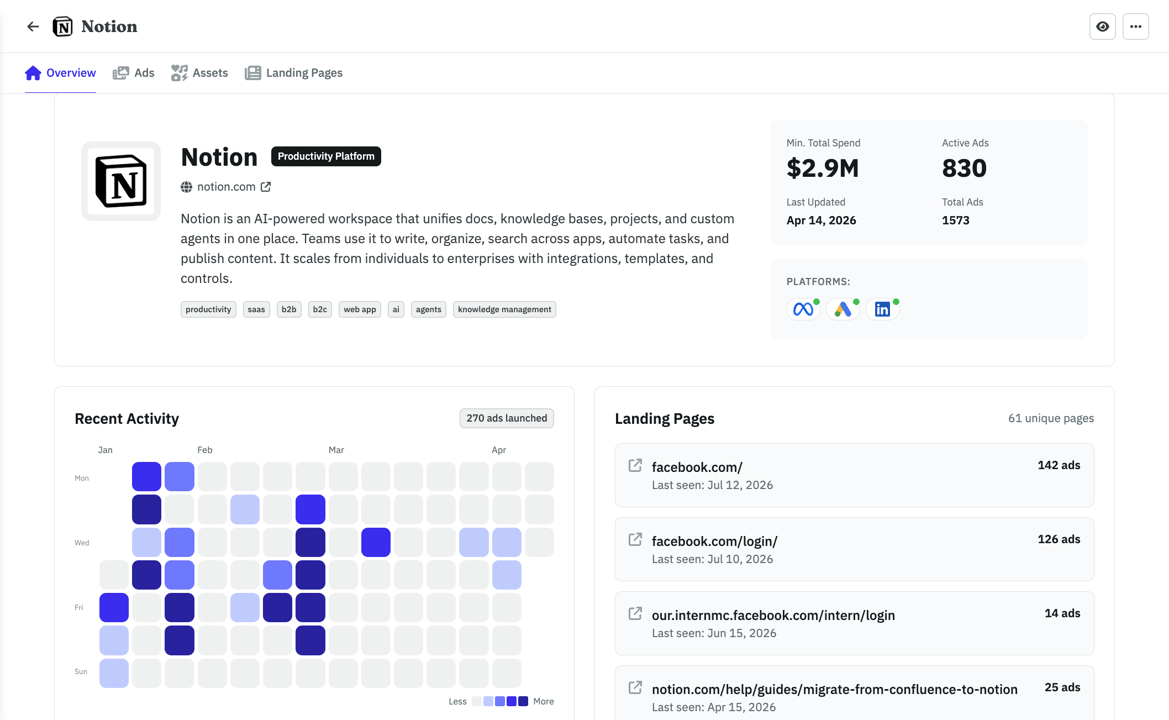
Research
Find what's working right now
Browse 500k+ ads or import your competitors. Filter by vertical so you see businesses like yours.
- Competitors tracked across Meta, Google, and LinkedIn automatically
- See which ads are evergreens vs. tests your competitors already killed
- Weekly digest in your inbox. No more scrolling ad libraries.
With your agent
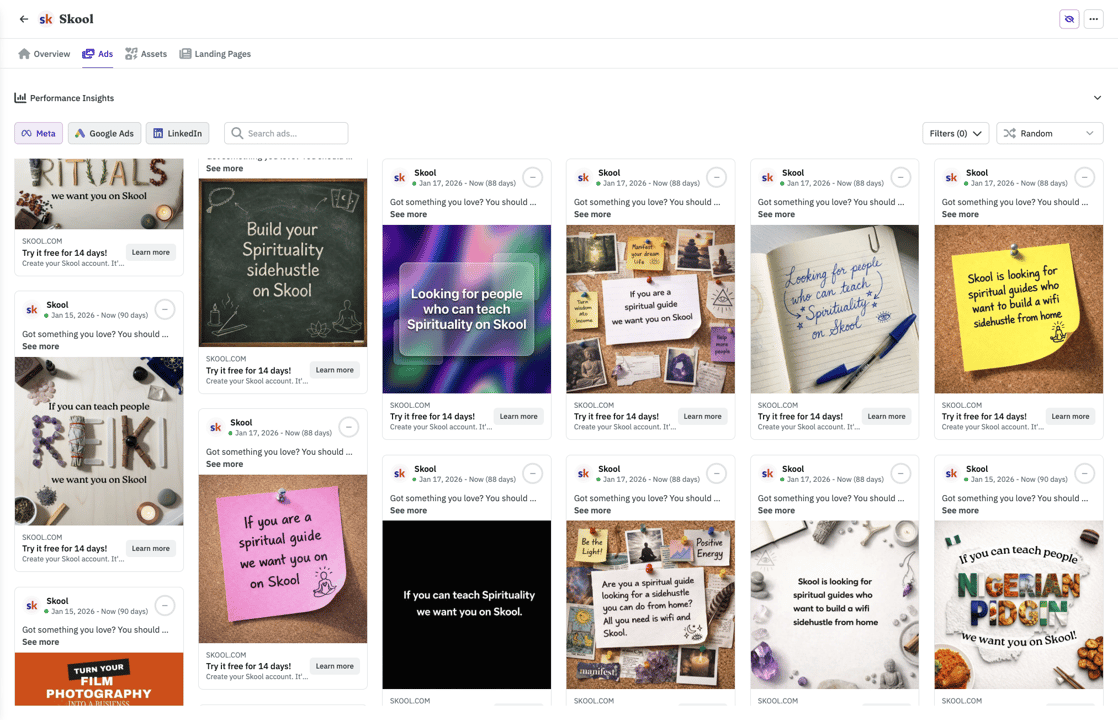
ClaudeWhat's the ad Notion has been running the longest?
Their Postit style ad has been live 142 days, it points to their top landing page (126 ads running to it). Want me to save the creative and LP to your swipe file?
A word from the founder

Hi there 👋 I'm Nico, the founder of AdKit 😄
Before building startups, I was a media buyer. I managed over $1,000,000 in Ads, sold two startups grown with ads, and helped 1,000+ makers learn Meta Ads through my online guides.
I love ads but... it involves a lot of repetitive, boring work 😩 And I hated every second of it. So I built AdKit to fix that.
To let me and other marketers focus on the fun parts: the strategy, the thinking, the creativity. And not have to waste my time clicking around in buggy interfaces.
It's the app I always dreamed of, and I hope you'll like it too 😀
You're probably wondering...
Every change is a draft by default. Your agent creates campaigns, ad groups, and ads in AdKit's dashboard. Nothing touches your LinkedIn account until you approve it. Review everything before it goes live.
AdKit connects to LinkedIn using the official Marketing API. Built-in rate limiting, request validation, and error handling. Your agent never talks to LinkedIn directly.
If you can type instructions to Claude or Cursor, you can manage ads. No code, no API keys to configure, no terminal commands required.
People like you love AdKit:
Founders & Solopreneurs
You're growing a product and don't have the budget for an agency. You want to run ads yourself without spending your week in Ad Managers UI.
Agencies & Media buyers
You run multiple ad accounts and want a way to manage them faster. 10 accounts = 10x the same work, and every hour wasted in ad managers is time you'll never get back.
Growth Marketers
You already do most of your work with AI agents. Ads should work the same way, not force you into a separate tool with its own learning curve.
Brand Managers
You need to easily keep track of what competitors are doing and get ideas. AdKit lets you track your competitors across platforms and search 500k+.
Stop losing hours to LinkedIn Ad Manager
- 45mAudience builds
Job titles, seniority tiers, company sizes. One prompt instead of forty clicks.
- 1hClient reporting
Spend, leads, and cost per lead across every campaign, written up and ready to send.
- 30mWaste sweeps
Rank job titles by cost per lead and draft the exclusions in one pass.
saved every year
(2-3h/week x 52 weeks)
That's a client report and an audience build off your plate, every single week.
Your target audience is a prompt away, rebuilt fresh for every campaign.
The Monday client update goes from an hour of CSV wrangling to one sentence.
Overspending ad groups get flagged and drafted for pause before they hurt.
AdKit vs other MCPs vs the ad manager
  | Other MCP servers | Ad manager UIs | |
|---|---|---|---|
| Platforms | Meta, Google, TikTok, LinkedIn, X, and Reddit from one server. | Usually one platform per server. Need a different setup for each. | Log into each ad manager separately. |
| Safety | Changes are saved as drafts. Nothing goes live until you approve. | Most servers write directly to your live ad account. | You click the buttons, so mistakes are yours to catch. |
| Setup | Connect your ad accounts and start managing from your agent in minutes. | Install the server, set up API credentials, connect to your agent. | No setup needed. You already have your ad manager logins. |
| Competitor research | Ask your agent to pull competitor ads from a library of 500k+ creatives. | Not available. | Open each platform's ad library and search manually. |
| Reporting | Ask your agent how your campaigns are doing across all platforms. | Your agent can pull numbers, but only from one platform at a time. | Log into each platform and check the dashboards yourself. |
"I look up a competitor, I check that they run ads across LinkedIn, Google and Meta, so I get a good sense of what works or what channel I should focus on."
Compatible with:












Cheaper than the hour it saves you
Single Project
Every AdKit tool (ads library, AI studio, and MCP) for one brand.
$49
per month
Everything you need:
- Multi-platform Ad Library
- Competitor Tracking
- Activity Alerts
- AI Ads Generator & Cloner
- Swipe File
- 1 Project
- 1 ad account on each platform
- MCP Access for AI Agentsnew
Multiple Projects
Unlimited brands, ad accounts, and creative analytics (soon).
$97
per month
Everything you need:
- Multi-platform Ad Library
- Competitor Tracking
- Activity Alerts
- AI Ads Generator & Cloner
- Swipe File
- Unlimited Projects
- Unlimited ad accounts
- MCP Access for AI Agentsnew
- Creative Analyticssoon
"Loving AdKit! It works flawlessly with my Claude Code setup, and the value is fantastic. I came from another tool and not only does it save me money, there's basically no trade-off for what I need, and the support is 10/10. Definitely recommend!"

Mitch Hills
CEO at Mastered Marketing
Got questions? We've got answers
Ready to run LinkedIn Ads from your agent?
Build the audience you already know. Cut the titles burning budget. Send the client report in a sentence. Every change held for your approval.