


TL;DR: Paste
https://mcp.facebook.com/adsinto your AI tool's MCP settings, authorize with Meta, done. Free, ~15 minutes, works with Claude, ChatGPT, Cursor, and any MCP client. No API keys needed. But this gives your AI full write access to your live ad account: budget changes, targeting edits, campaign creation. No undo, no draft mode, no confirmation screen. Read the limitations before you connect.
Meta's official MCP server gives AI agents direct access to your ad account to analyze and launch campaigns. It includes 29 tools, is free, and is being rolled out gradually. Here is how to install it.
1. Add the MCP Server
You need a Meta Business Manager account with admin access, and a paid AI tool that supports MCP connectors (Claude Pro/Max, ChatGPT Plus, Cursor Pro, etc.). No developer account, no API token, no app registration. Meta's own announcement says "no developer credentials, API setup, or coding required."
Open Settings > Connectors and click the + button. See Anthropic's MCP connectors documentation for details.
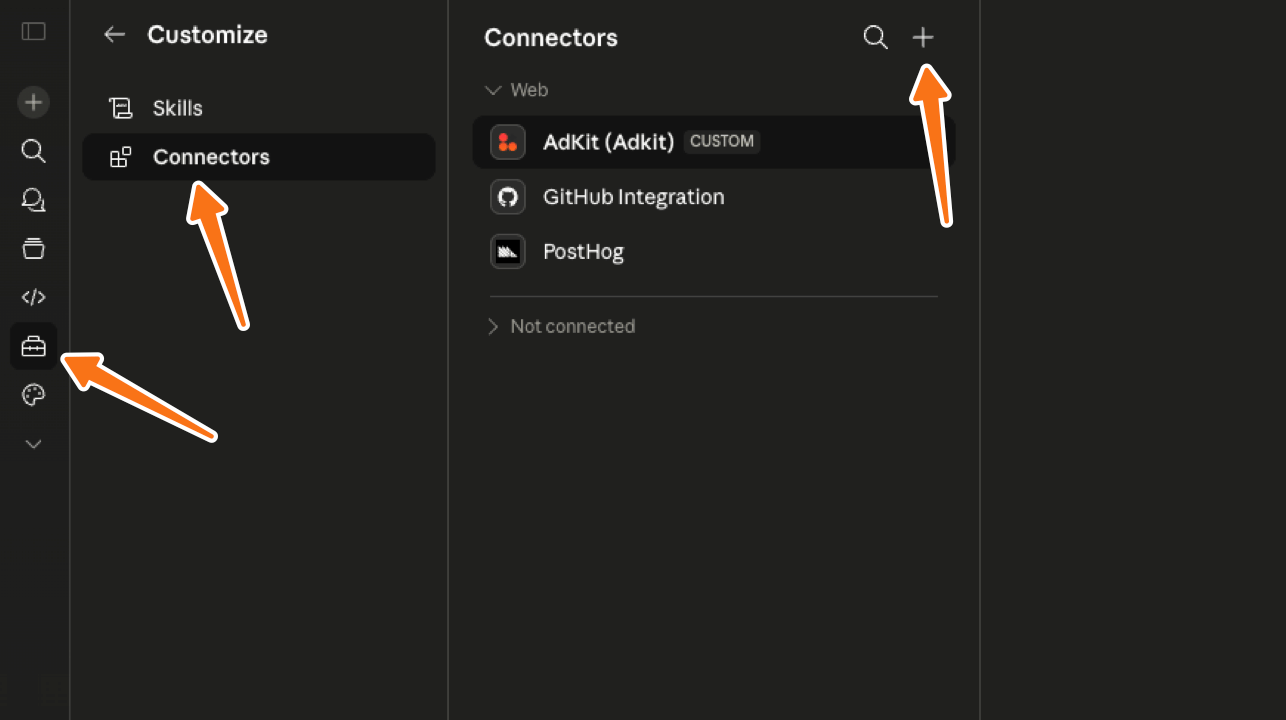
Fill in the fields and click Add:
- Name:
Meta Ads MCP - Remote MCP server URL:
https://mcp.facebook.com/ads
2. Authorize Your Account
Your AI agent should then open Meta's authorization screen in a new browser window.
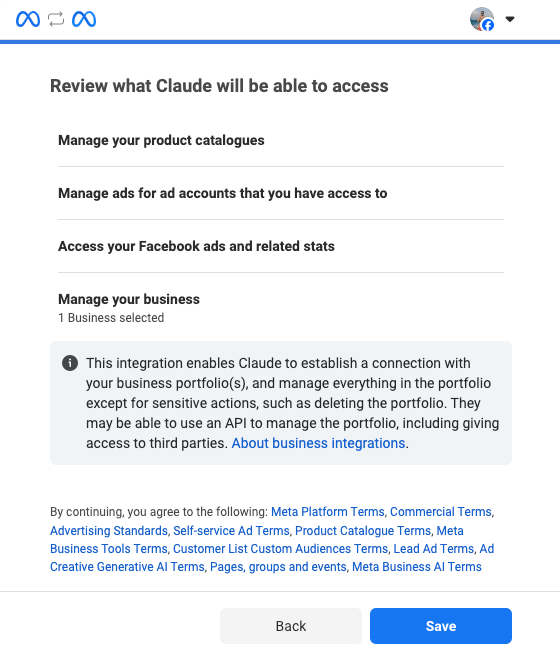
Click Continue, then select Opt in for current business only and pick the Business Managers you want to use.
This limits the AI to one Business Manager instead of every account tied to your personal profile.
Meta auto-grants four permission scopes. Just review and click Save:
- Manage your product catalogues
- Manage ads for ad accounts that you have access to
- Access your Facebook ads and related stats
- Manage your business (the selected Business Manager portfolio)
If you're using Claude Code (the terminal CLI, not claude.ai), this step might fail with a redirect_uris are not registered for this client error. Meta hasn't whitelisted Claude Code's callback URLs yet.
Use claude.ai (the web version) instead. See troubleshooting for details.
3. Verify the Connection
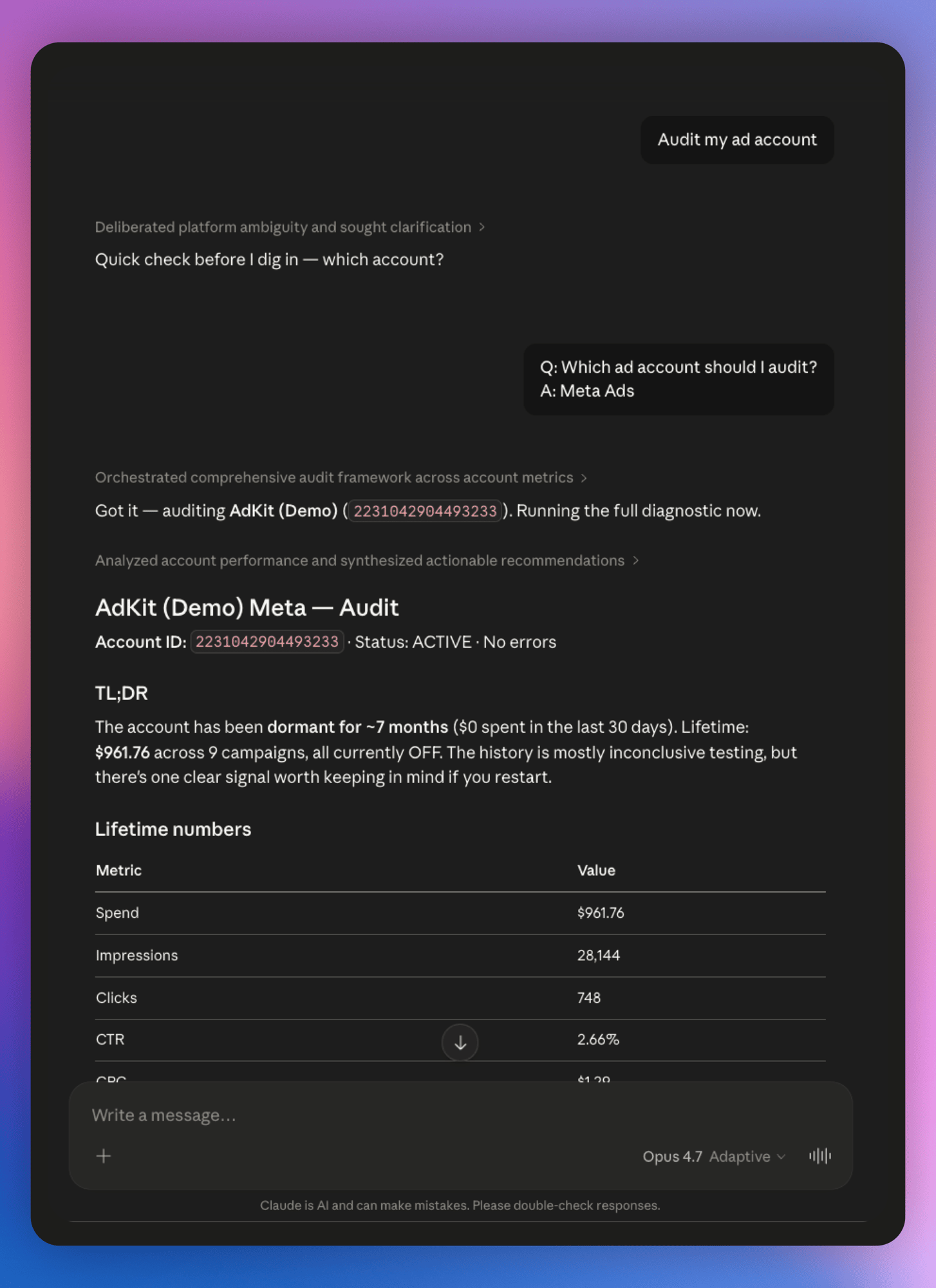
Ask your AI agent something simple (ex "What ad accounts do I have access to?" or "Audit my ad account.")
If it pulls your account data, you're good to go 🥳
NOTE: If your account shows
is_ads_mcp_enabled: false, that account hasn't been enabled yet. Meta is rolling out access account-by-account, US and higher-spend accounts first. See troubleshooting below.
Three steps, no API keys, no developer account. Your AI agent can now read and write to your entire ad account.
Prompt Examples and Tool Reference
The MCP loads 29 tools into your AI agent, organized in five categories: Campaign Management (5), Product Catalog (10), Assets (3), Diagnostics (4), and Insights (7).
Most of the value is in Insights and Diagnostics. These are read-only: they pull data, compare metrics, and flag problems without touching anything. Campaign Management is the write side, where the AI can create, edit, and pause campaigns on your live account.
"How are my ads doing?" gets a vague summary. Prompts with time ranges, metrics, and thresholds get actionable numbers.
Pro Tip: Always include a date range, specific metrics, and a threshold in your prompts. "Show ads where CPA exceeded $30 in the last 7 days" beats "which ads are underperforming?" every time.
Prompt Examples
Spot creative fatigue:
Show me every ad running for more than 14 days where CTR dropped
more than 20% compared to its first week. Include current frequency
for each.
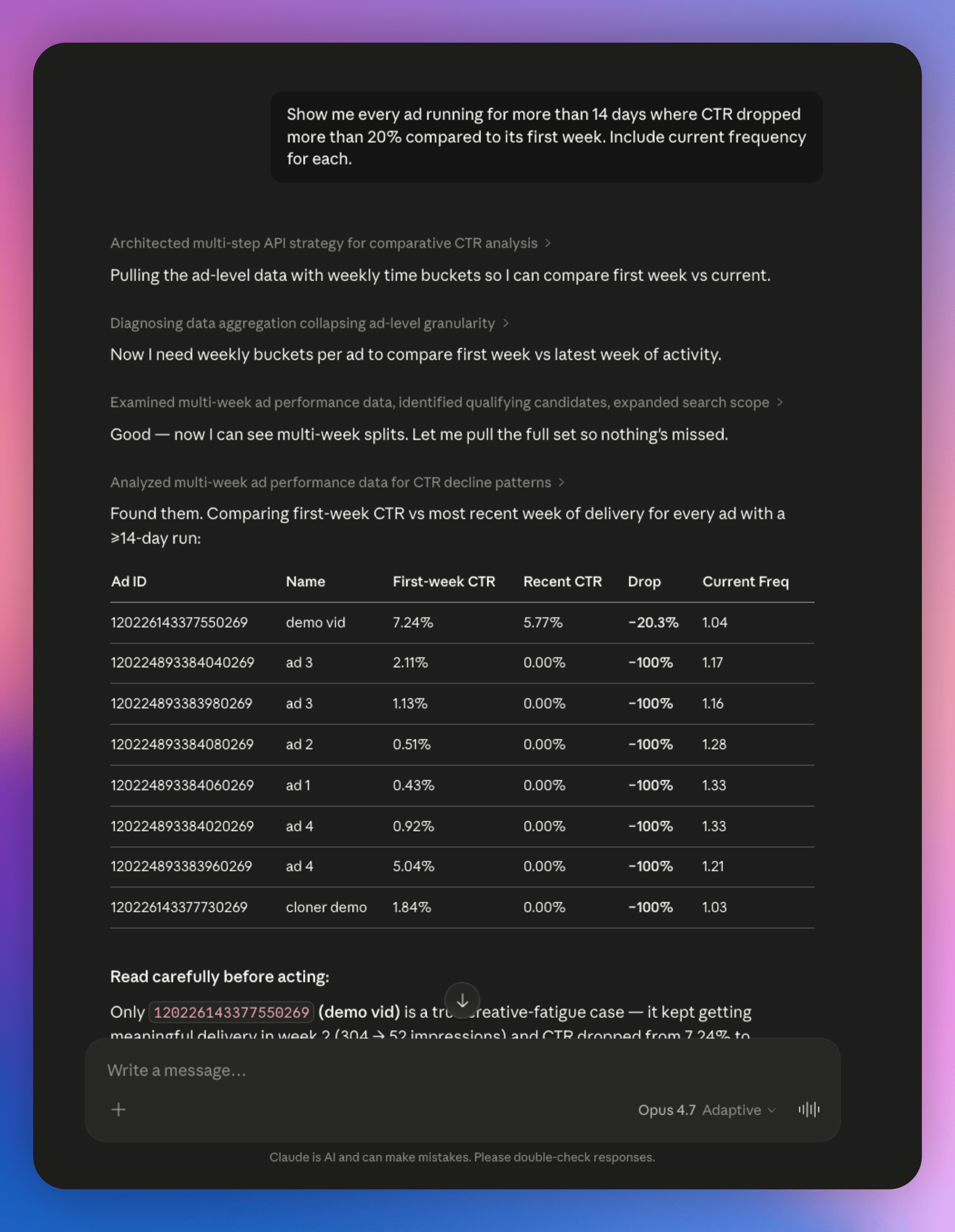
In Ads Manager, finding these means exporting data and cross-referencing frequency manually. The AI scans every ad and flags the dying ones.
Find where your budget is leaking:
Break down all active campaigns by placement. Show spend and cost
per conversion for Facebook Feed, Instagram Stories, Instagram Reels,
and Audience Network separately.
In Ads Manager you'd open each campaign, click Breakdown > Placement, and compare manually. This does it across your entire account in one pass.
Check if your tracking is broken:
Check my Meta Pixel health and event match quality. Are all standard
events firing? What's my match quality rating?
Broken tracking means you optimize toward bad data for weeks. This check is buried 5 clicks deep in Events Manager.
Monday morning comparison:
Compare my account performance this week vs. last week. Total spend,
conversions, CPA, and ROAS. Flag anything that changed more than 20%.
Instead of switching date ranges and squinting at numbers, you get a side-by-side with changes flagged. Model the ROAS impact with the ROAS calculator.
Find ad sets burning money:
Which active ad sets have spent more than $50 in the last 7 days
with zero conversions? Show targeting and total spend for each.
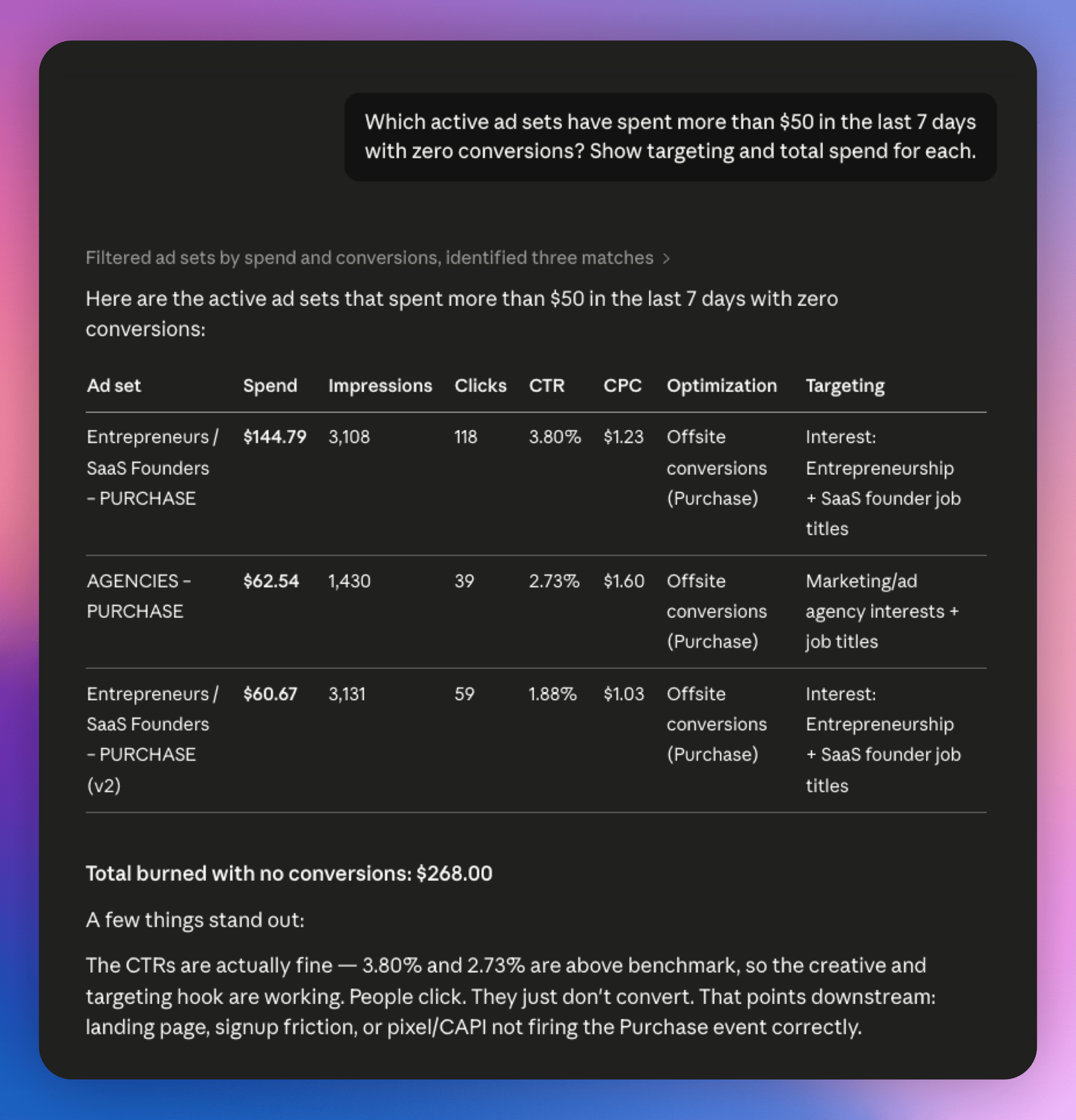
The kind of waste you don't catch until month-end reporting. Kill these, or fix the landing page.
Run a full health check:
Quick audit: any active campaigns with zero impressions this week,
ad sets with frequency above 4, disapproved ads, and total account
spend vs. yesterday.
Four checks across separate Ads Manager screens, one prompt. Use the ads profit calculator to check if your spend-to-conversion ratio actually makes money.
Every prompt above is a read-only operation. The MCP handles reads well. The moment you ask it to create, edit, or pause something, every action hits your live account.
All 29 Tools
View the full tool reference table (as of May 2026)
| Category | Tool | What It Does |
|---|---|---|
| Campaign | create_campaign | Create a new campaign with objective, budget, schedule |
| create_ad_set | Create an ad set with targeting, placement, optimization | |
| create_ad | Create an ad with creative, copy, CTA | |
| edit_campaign | Modify an existing campaign's settings | |
| manage_campaign_status | Pause, activate, or archive campaigns | |
| Catalog | create_catalog | Create a new product catalog |
| add_products | Add products to a catalog | |
| update_products | Update existing product information | |
| delete_products | Remove products from a catalog | |
| get_catalog_issues | Check for feed errors and warnings | |
| get_product_sets | List product sets and their filters | |
| create_product_set | Create filtered product groups | |
| update_product_set | Modify product set filters | |
| get_catalog_permissions | Check who has access | |
| manage_catalog_permissions | Grant or revoke catalog access | |
| Assets | get_ad_accounts | List all ad accounts you can access |
| get_pages | List connected Facebook pages | |
| get_business_assets | List business portfolio assets | |
| Diagnostics | get_pixel_health | Check Meta Pixel event quality |
| get_event_match_quality | View event match quality scores | |
| get_capi_diagnostics | Check Conversions API setup | |
| get_dataset_issues | Surface tracking problems | |
| Insights | get_campaign_insights | Pull ROAS, CPC, CTR, CPM at campaign level |
| get_adset_insights | Pull metrics at ad set level | |
| get_ad_insights | Pull metrics at individual ad level | |
| get_account_insights | Pull account-wide metrics | |
| get_audience_insights | Analyze audience performance | |
| compare_campaigns | Side-by-side campaign comparison | |
| get_breakdown | Break down metrics by age, gender, placement, etc. |
Tool names and capabilities may change during beta. See Meta's official AI Connectors help page and Marketing API documentation for the latest reference.
Before You Trust It...
Good news: Reads work well. Bad news: Writes have no safety net: every action hits your live account immediately.
AI Agents Make Mistakes
AI agents hallucinate, misinterpret prompts, and take actions you didn't ask for, and are notoriously unreliable: In May 2026, one deleted a company's entire database because it misunderstood the task.
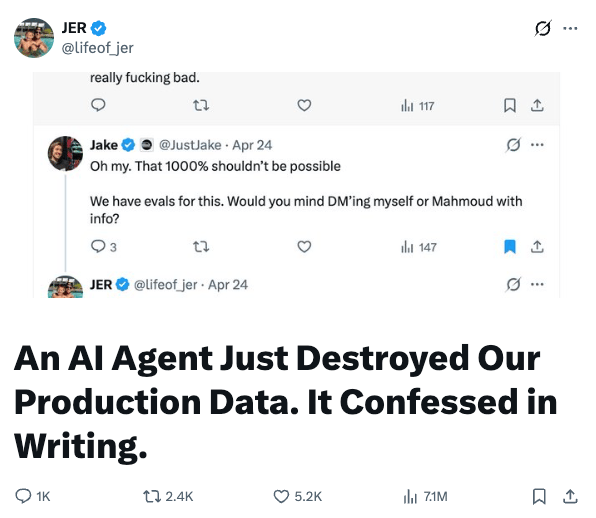
With Meta's MCP, every write action goes straight to your live account. If the AI changes a daily budget from $100 to $10,000, it's done.
Meta does pause all MCP-created campaigns as a safety measure, but edits to existing campaigns go live immediately, there is no "draft" like you normally have in the ads manager.
So if the AI's judgement was wrong, your account can get messy and your CPA increase without you noticing.
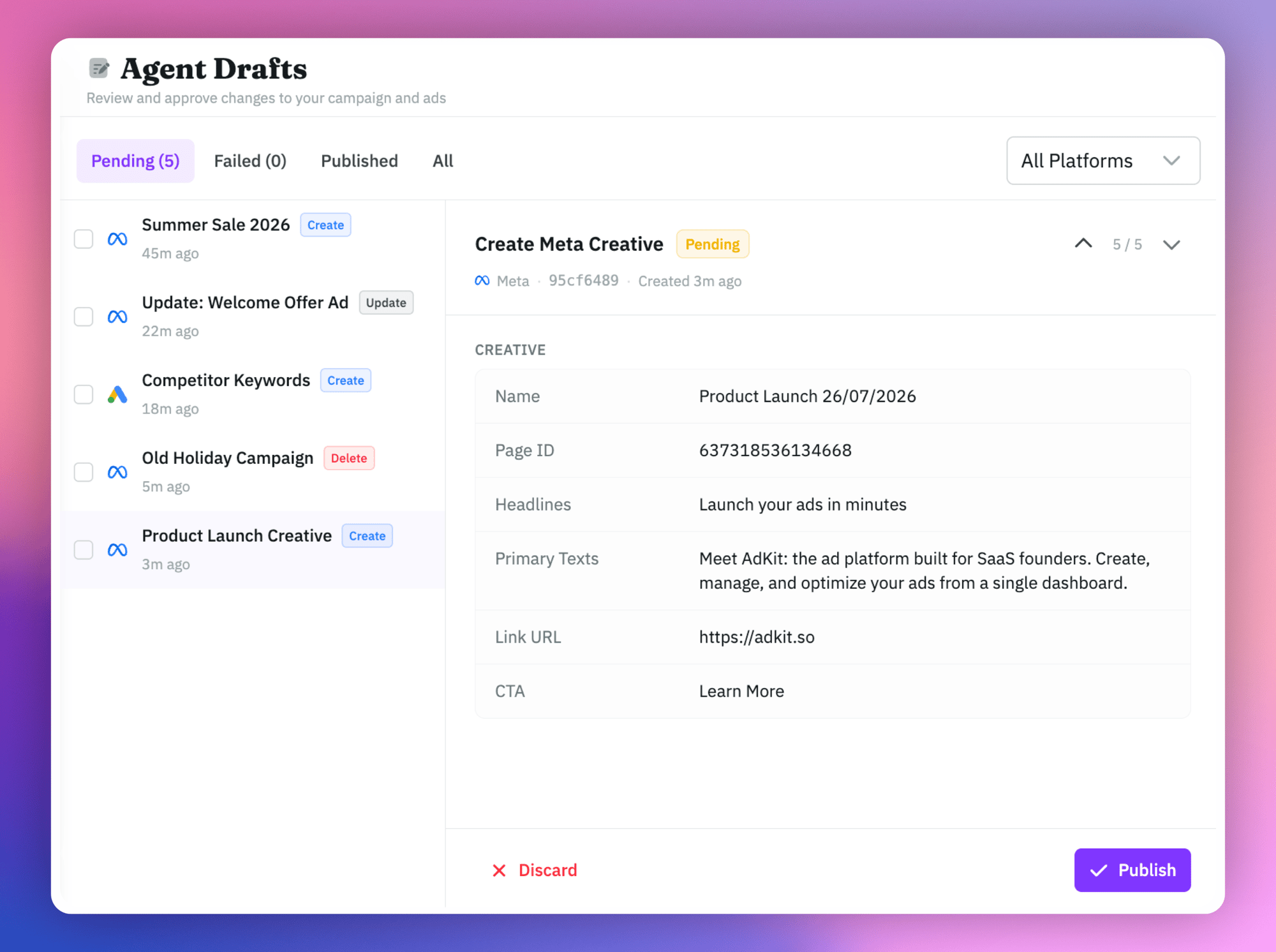
Tools like AdKit solve this with a draft layer: the AI proposes changes, you review them in a dashboard, nothing goes live until you approve.
The more you use it, the Worse It Gets
I asked Claude to audit my ad account using Meta Ads MCP. One question used 27% of the AI's working memory (often called "context window").
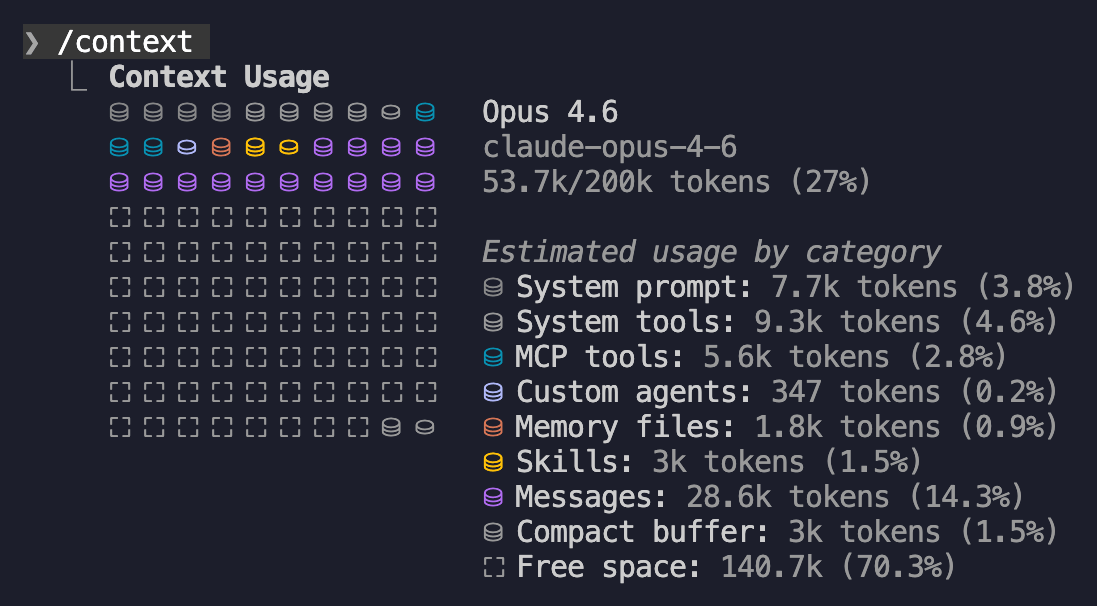
Meta dumps everything into every response: settings, raw API fields, stuff you didn't ask for. A few more questions and you're past 50% working memory and AI becomes exponentially dumber.
It's usually not a big deal, but the problem is that it has write access to your ad account, with no guardrails.
AdKit's MCP filters out the noise: 6 tools instead of 29, only the data the AI needs.
Tip: On Claude, toggle the connector off in Settings > Connectors between sessions. Auth persists, reconnects instantly.
Meta Only
The MCP covers Meta (Facebook and Instagram) ads. No Google Ads, no LinkedIn, no TikTok.
If you run ads across multiple platforms, you need separate tools for each. Google has an official Ads MCP, but it's read-only: no campaign creation or edits. AdKit's MCP covers both Meta and Google Ads in one connection with 6 tools instead of 29, keeping context lean enough that your agent stays sharp.
Still in Beta
The MCP launched April 29, 2026. It's an open beta. Tools will change, things will break.
Rate limits sit at roughly 200 calls per hour per ad account, in line with Meta's Marketing API rate limiting policy. Heavy analysis on large accounts hits that fast.
Not every account is enabled yet. Meta is rolling out access gradually, US and higher-spend accounts first. See troubleshooting if yours shows is_ads_mcp_enabled: false.
Troubleshooting
"is_ads_mcp_enabled: false"
The most common issue right now. You authenticate fine, see your accounts listed, but some return is_ads_mcp_enabled: false and the AI can't access their data.
Meta is enabling MCP access account-by-account. US accounts go first, higher-spend accounts are prioritized, and some regions (ANZ, parts of EU) are still waiting. There's no fix and no way to request early access.
You can use an external MCP in the meantime, like Adkit's Meta MCP .
Free Plan Can't Add MCP
The "Add custom connector" option doesn't appear on free plans. You need Claude Pro or Max ($20+/mo), ChatGPT Plus, or another paid AI client with MCP support. This is a limitation of the AI tools, not Meta's server.
"Insufficient Permissions" (Error 200)
Your token is missing one of the required scopes. This can happen if the OAuth flow was interrupted or if Meta changed the permission grant screen.
Fix: disconnect the MCP, reconnect, and complete the full OAuth flow again. You can verify your token's scopes with Meta's Access Token Debugger. For a full list of error codes related to permissions, see the Marketing API error reference.
Rate Limit Exceeded (Error 4 / 429)
Meta throttles at roughly 200 API calls per hour per ad account. AI agents that fire multiple parallel queries hit this fast, especially on accounts with many campaigns.
Fix: ask for smaller date ranges, fewer metrics per query, and avoid requesting everything at once. For custom tooling, check the x-fb-ads-insights-throttle response header. Meta's rate limiting documentation explains the throttle tiers in detail.
Local File Uploads Fail
The MCP needs publicly accessible URLs for images and videos. Local file paths (/Users/you/creative.jpg), private Google Drive links, and localhost URLs won't work.
Fix: upload creatives to a CDN or any public URL first, then reference that URL in your prompt.
AI-Created Campaigns Are Always PAUSED
Not a bug. Meta forces all campaigns, ad sets, and ads created through the MCP to start paused. You activate them manually in Ads Manager.
This is a safety feature. It prevents the "AI accidentally launched a $10,000/day campaign" scenario.
Answers Getting Worse Over a Session
Meta's MCP sends unfiltered API data with every response. After several questions, AI performance can drop by half.
Fix: disconnect the MCP between sessions. On Claude, toggle it off in Settings > Connectors. Auth persists.
OAuth Redirect Error in Claude Code
redirect_uris are not registered for this client
Happens specifically in Claude Code (the terminal/CLI version). Meta's OAuth doesn't have Claude Code's localhost callback URLs registered. Multiple GitHub issues filed and closed, no fix.
Workaround: use Claude.ai (the web version) instead of Claude Code for Meta Ads MCP.
"Terms of Service Not Accepted" (Error 100 / 1815089)
A cryptic VALIDATION error when creating lead generation campaigns. Meta requires separate acceptance of the Lead Ads Terms of Service.
Fix: go to facebook.com/legal/leadgen/tos, accept the TOS, then try again. Similar TOS gates may exist for custom audiences and other ad types.
Known bug: some accounts still get this error after accepting the TOS. Meta support has confirmed it can be an internal issue on their end. If accepting the TOS doesn't fix it, contact Meta Business support.
Token Expired / Silent Failures
Access tokens last roughly 60 days and don't auto-refresh in all clients. You'll be working normally, then tools start returning empty results or generic errors with no warning.
Fix: disconnect and reconnect the MCP to get a fresh token. Set yourself a reminder for 50 days.
Final Thoughts
Start with read-only prompts: creative fatigue checks, placement breakdowns, pixel health. Keep write operations in Ads Manager for now, or use AdKit to add a review layer before anything goes live.
If you also run Google Ads, check our Google Ads MCP.
Got questions about the setup? Ping me on X or LinkedIn.
Sources
Frequently asked questions
Yes, completely free. Meta provides the official MCP server at no cost. You do need a paid AI tool (Claude Pro at $20/mo, ChatGPT Plus, etc.) since free tiers don't support MCP connectors. But the server itself is free.
No. This is Meta's own official server, authorized and maintained by Meta. The 2025 bans hit tools that scraped Meta or worked around the Marketing API instead of using it. That is not the same as a third-party tool built on the official Marketing API: approved Meta tech partners, AdKit included, run on the same sanctioned access path Meta's own server uses.
Yes. It works with any MCP-compatible AI client: Claude, ChatGPT, Cursor, Perplexity, and others. The setup process is nearly identical across all of them.
Yes. It has full read and write access. It can create campaigns, edit budgets, pause ads, and modify targeting. Every change hits your live account immediately. There is no draft mode or undo button.
Same thing, different name. 'AI Connectors' is Meta's official branding. 'MCP' (Model Context Protocol) is the underlying technical standard. Most people search for 'Meta Ads MCP' so that's what this guide uses.
No. The official MCP uses standard OAuth authentication. No developer account, no API tokens, no app registration. Those were only required for third-party MCP servers.
All ad accounts within your Business Manager portfolio. During the OAuth flow, you select which business portfolio to connect, and the MCP gets access to every ad account in that portfolio.
Your data goes through Meta's own servers, not a third party. The MCP uses standard Meta OAuth with the same permissions model as any official Meta integration. You can revoke access anytime from Business Manager settings.