

TL;DR: Google's official Google Ads MCP is free and read-only: your AI can pull reports from Google Ads but can't change a thing. Setup runs on your own computer and takes 30 to 45 minutes. It works in Claude Code, Cursor, Gemini, and VS Code, not on claude.ai or ChatGPT web.
Fair warning: this is more involved than most MCP setups. You'll build your own Google sign-in, request a developer token, and run a terminal command, all so your AI can read your campaigns without being able to change them.
There's a shortcut. A hosted version like AdKit (the one we make) connects in about three clicks with no technical setup, and it can safely make changes too, only with your approval. Otherwise, here's the full walkthrough.
What you'll need
The official Google Ads MCP is a bit technical, but I'll walk you through all of it. This guide handles the Google login, the Google Cloud project, and the access token as you go. To actually start, you only need three things:
- A Google Ads account with the campaigns you want to read (thanks captain obvious!)
- One AI tool that runs on your computer: Claude Code, Cursor, Gemini, or VS Code. Web agents like Claude and ChatGPT can't use the official Google Ads MCP, because it runs locally on your machine instead of in a browser. See what it can and cannot do for more.
- About 30 to 45 minutes.
1. Get a developer token
Your developer token is the key that lets the API talk to Google Ads, and it only lives on a manager account. Sign in to Google Ads, then open the API Center. If you don't have a manager account yet, create one first; it's free and takes a minute. (Not sure whether you have one? See the FAQ at the end.)
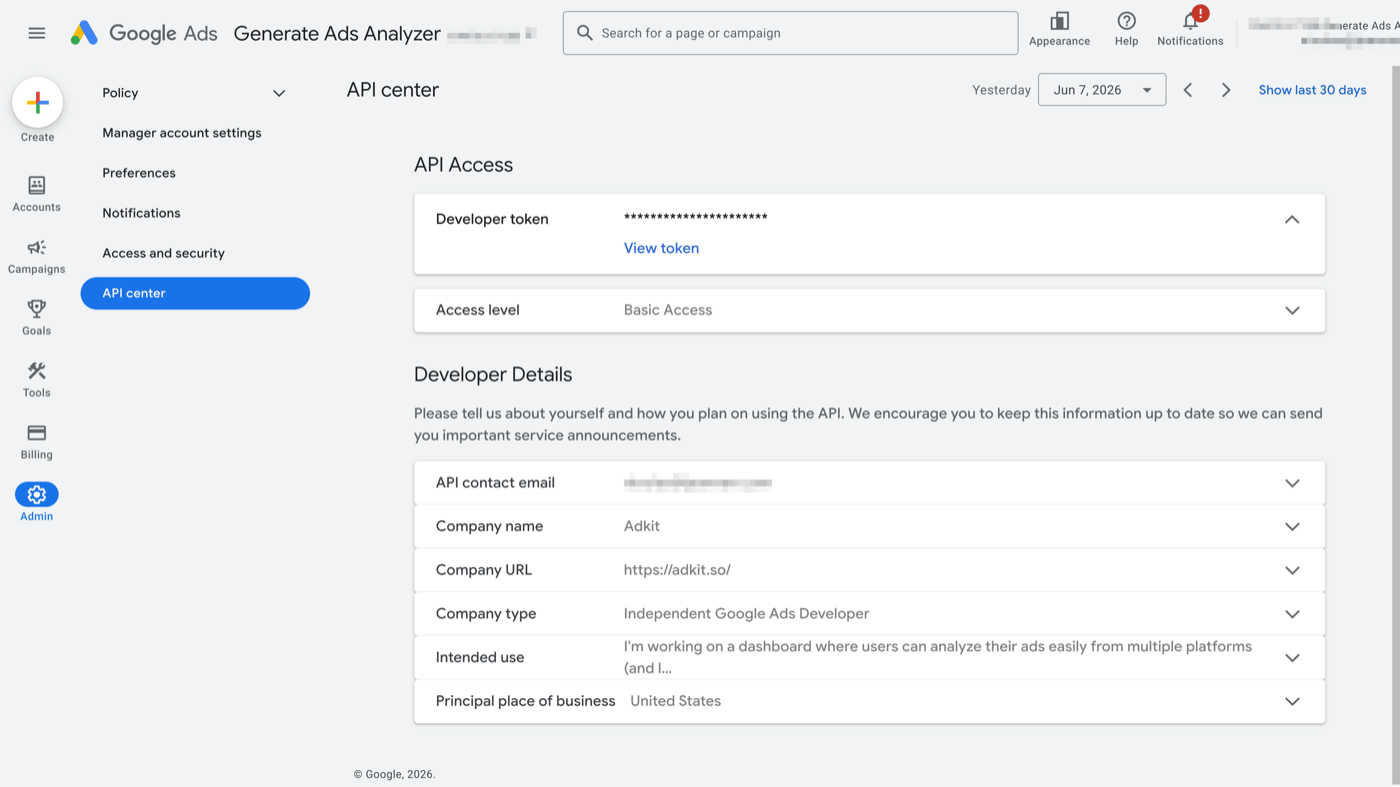
In the API Center, complete the API access form, accept the terms, and note your token's access level. That one field decides whether this works:
- Test access reads test accounts only. It can't touch your real campaigns, so it's the one level that won't work here.
- Explorer access reads your real accounts, with a daily limit well beyond what reporting needs. Google's automatic review grants this to most people the moment they submit the access form.
- Basic or Standard access also read real accounts, with higher limits.
When you submit that access form, Google reviews it automatically and usually grants Explorer access on the spot, which is all you need here. You only hit a wall if that automatic review can't clear you and your token lands on Test access instead. If that happens, apply for Basic access in the API Center and wait; Google targets a couple of business days, but the queue can run longer. Once your token shows Explorer, Basic, or Standard, you're clear to continue.
You now have a token. Next it needs an API to call.
2. Create a Cloud project
The MCP talks to Google Ads through the Google Ads API, which lives in a Google Cloud project. Open the Google Cloud console, create a new project (or pick one), and note the project ID.
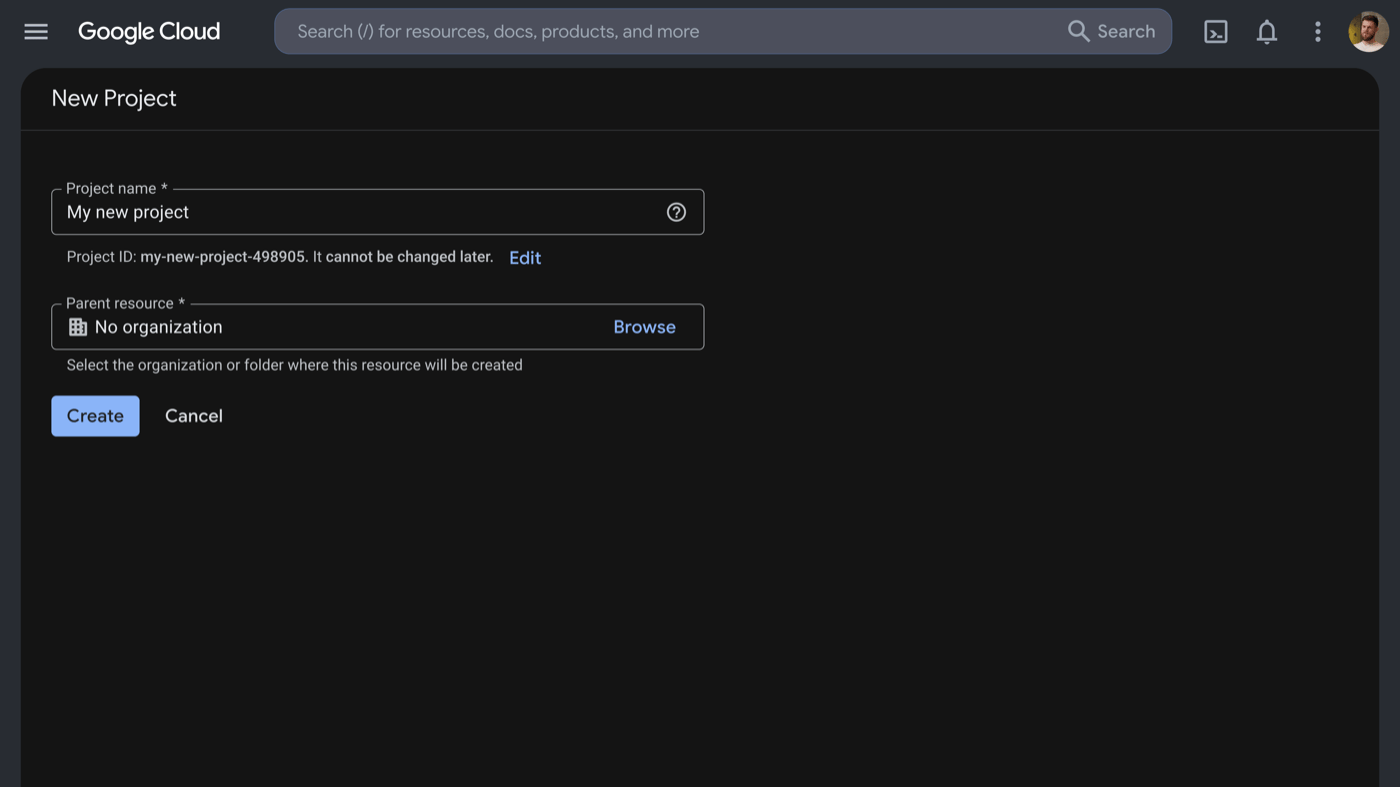
One rule from Google's setup docs: a project can use only one developer token, so don't reuse a project that was tied to a different token before. A fresh project is the safe choice.
Now enable the API. Go to the Google Ads API library page and click Enable.
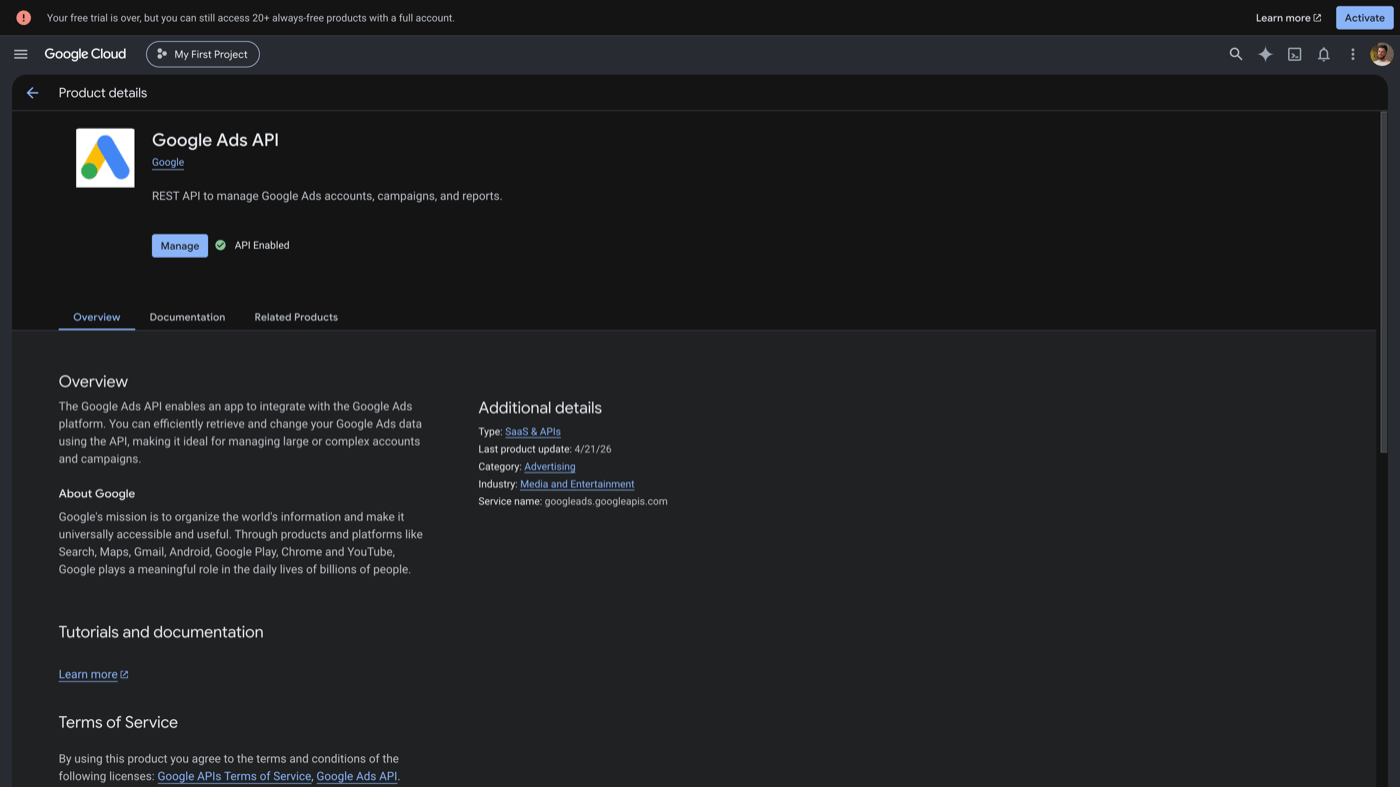
The API is live. Now you need a way to prove you're allowed to use it, which means an OAuth client.
3. Build the OAuth client
You need your own OAuth client because gcloud's built-in one is now blocked for the Google Ads scope. This is three small parts: the consent screen, the test users, and the client itself. Skipping the test-user part is the single most common cause of a failed first login, so don't.
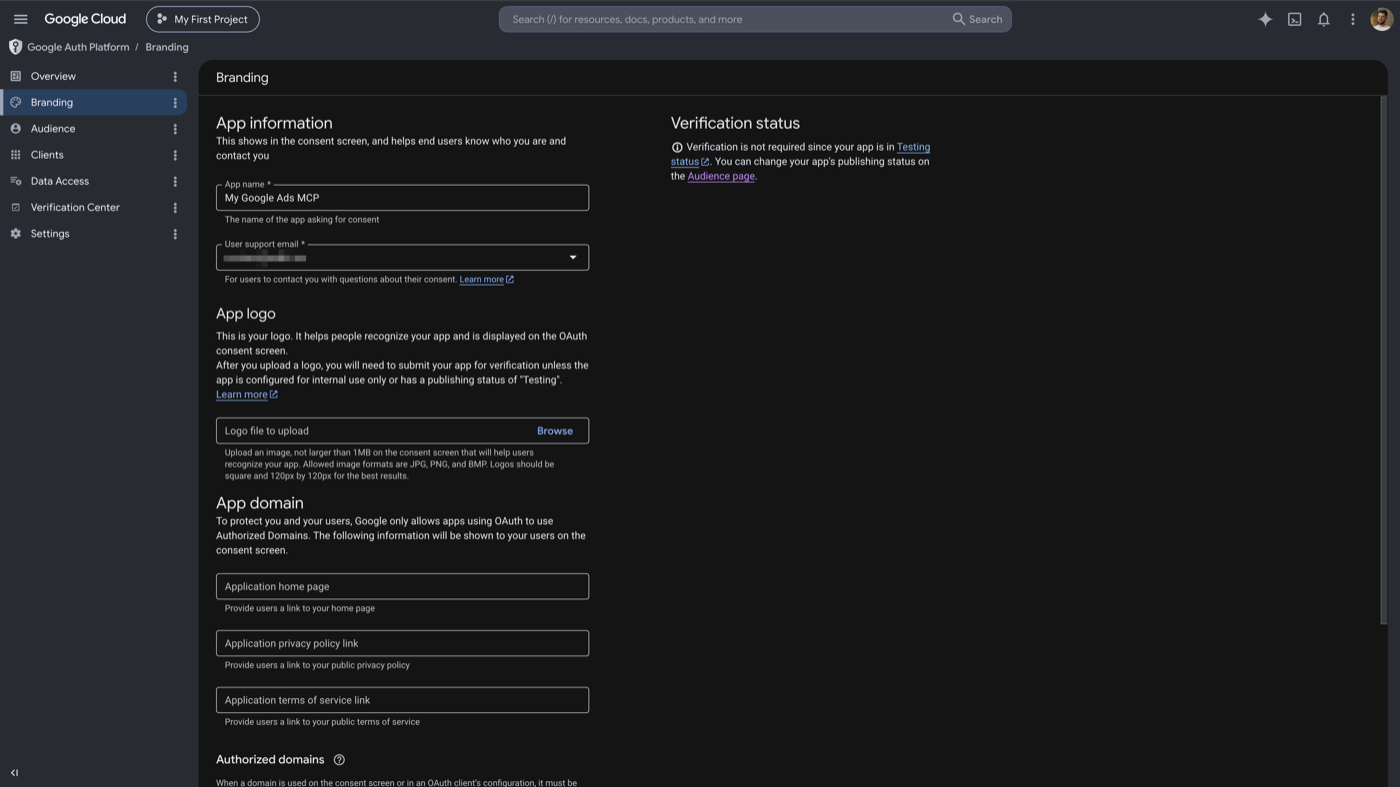
First, the consent screen. Open the Cloud console branding page, fill in an app name and your email, and set the user type to External with publishing status Testing. Testing is fine; you don't need Google to verify the app for your own use.
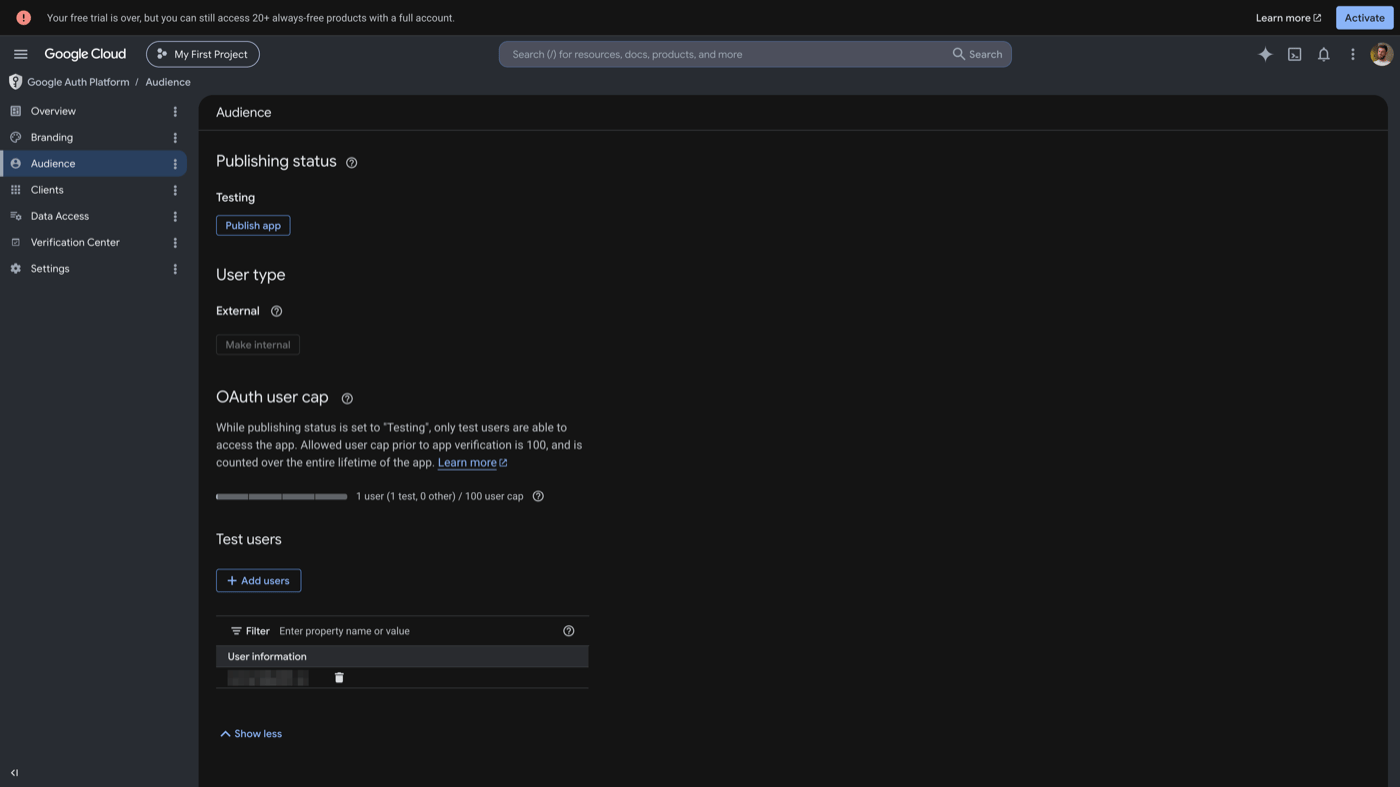
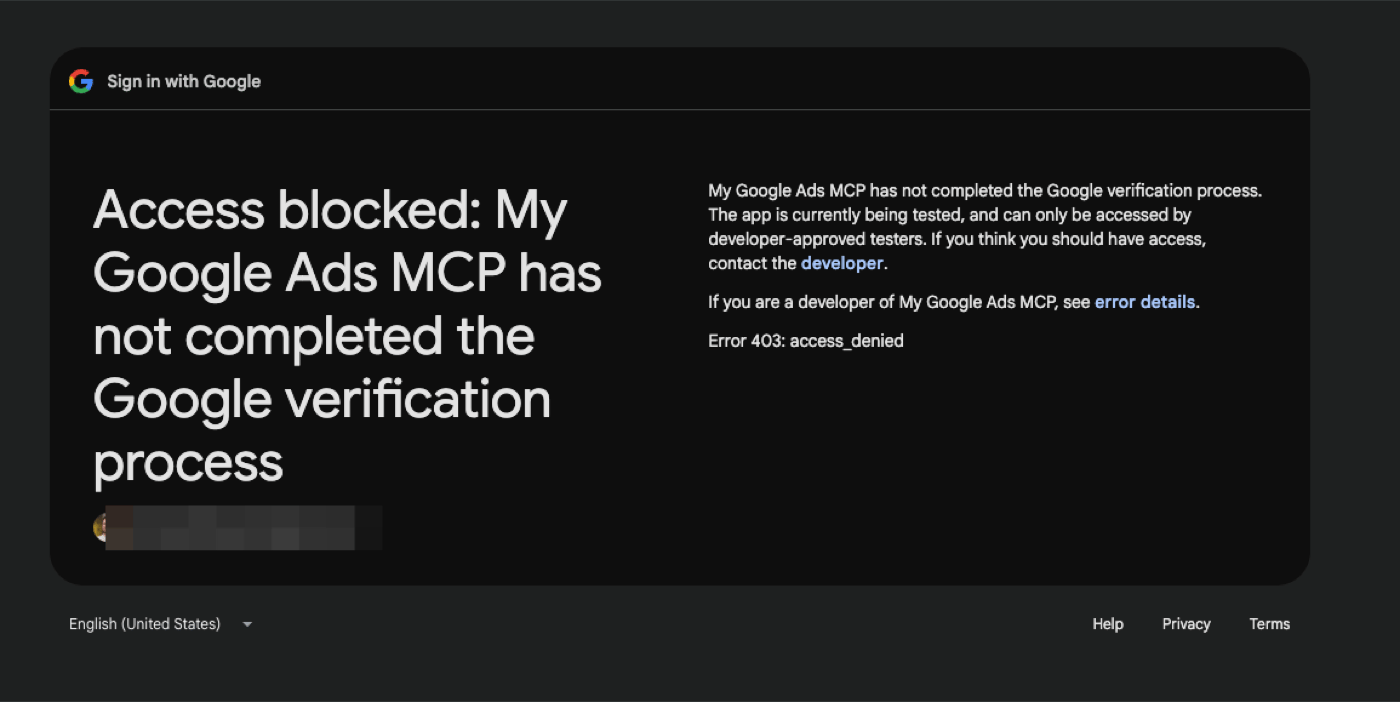
Now the part everyone forgets. Go to the Audience page and add test users. Add two emails: the Google account you're authenticating with, and your Google Ads login email. If those aren't both on the list, your login fails with Error 403: access_denied, app is being tested.
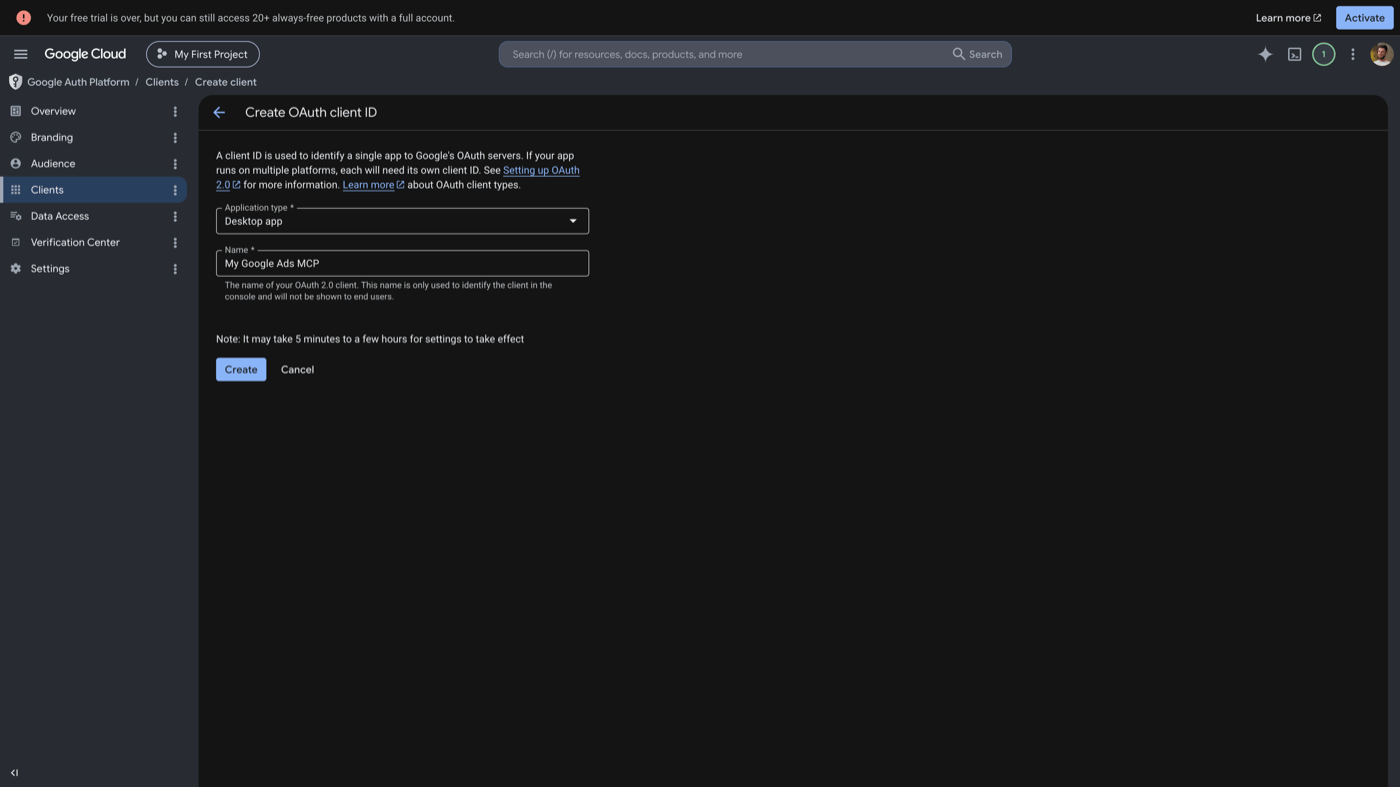
Finally, create the client. Go to the Clients page, create an OAuth client, choose application type Desktop app, and download the JSON. Save it somewhere you'll remember; you'll point at it in the next step.
You have a client and a JSON file. Now you use it to authenticate.
4. Authenticate with gcloud
This step generates the credentials the MCP will read, using your own OAuth client. From here on you'll use your computer's terminal. To open it: on Mac, press Cmd+Space, type "terminal," and press Enter; on Windows, open the Start menu, type "powershell," and press Enter. One Windows note for the rest of the guide: commands that break across lines with \ need to go on a single line, because PowerShell doesn't read \ that way.
If you don't already have the gcloud CLI, install it first:
Then run the command below, pointing --client-id-file at the JSON you downloaded in step 3:
gcloud auth application-default login \
  --client-id-file=/path/to/client_secret.json \
  --scopes=https://www.googleapis.com/auth/adwords,https://www.googleapis.com/auth/cloud-platform
Two things to change before you run it. Replace /path/to/client_secret.json with the real location of the OAuth client file you downloaded in step 3. Leave the --scopes line exactly as written; those two long entries are the permissions the server needs, one for Google Ads and one for your Google Cloud project.
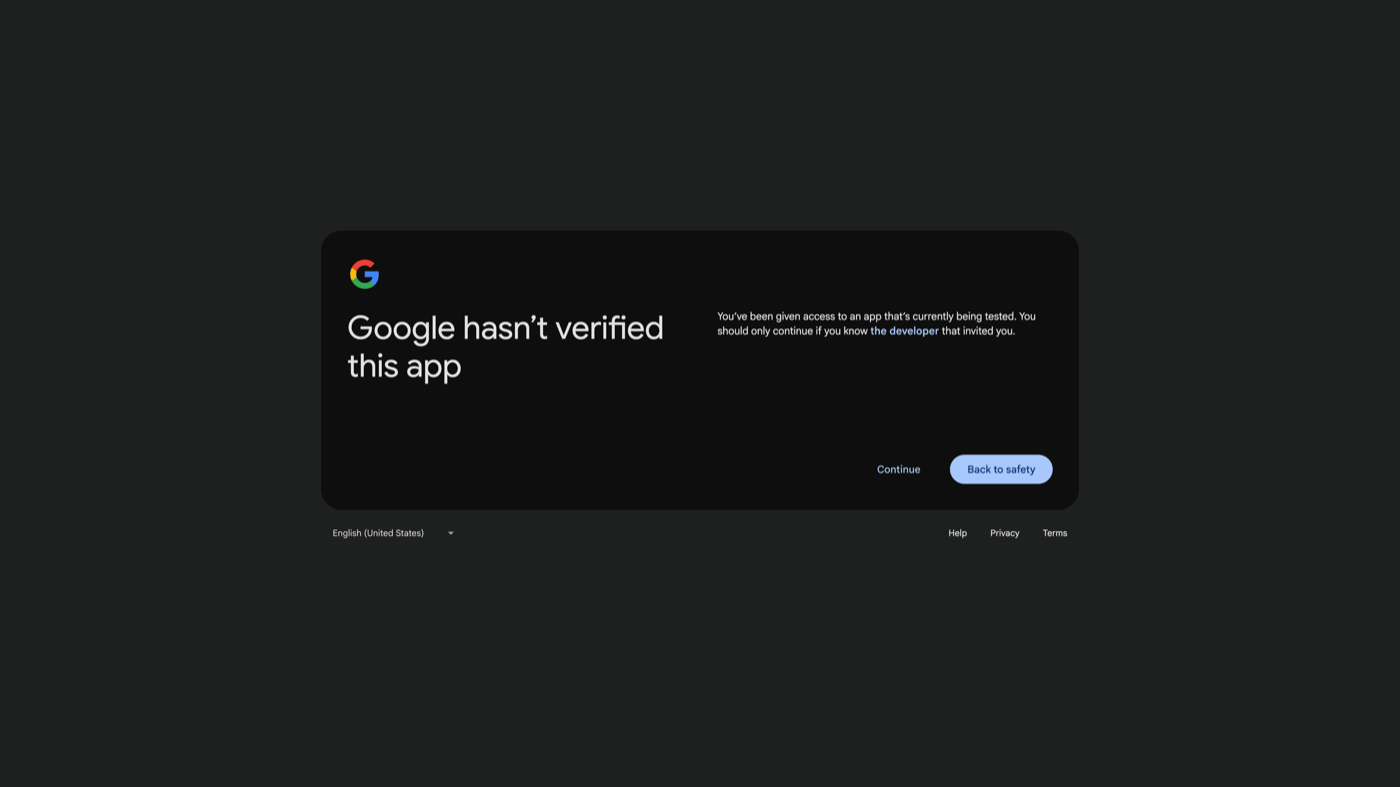
Your browser opens and shows a warning: "Google hasn't verified this app." That's expected, because it's your own test app. Click Continue (you're the developer it's asking you to trust), then allow the permissions on the next screen.
When it finishes, gcloud prints a line like Credentials saved to file: [PATH]. Copy that path. The MCP config reads it as GOOGLE_APPLICATION_CREDENTIALS.
Credentials are saved. The last step is connecting your AI client.
5. Install and connect the MCP server
The Google Ads MCP isn't a website you log into. It's a small program that runs on your own computer, and your AI tool starts it up when it needs it. To run it, you first install a little helper called pipx (it installs and runs tools like this one).
Either way, close and reopen your terminal afterward so the change takes effect.
Now you point your AI tool at the server. The block below has four CAPITALIZED slots to fill in. They look cryptic, but each one is just something you already collected:
GOOGLE_APPLICATION_CREDENTIALSis the path to the credentials file from step 4.GOOGLE_PROJECT_IDis your Cloud project ID from step 2.GOOGLE_ADS_DEVELOPER_TOKENis your developer token from step 1.GOOGLE_ADS_LOGIN_CUSTOMER_IDis your manager account ID, digits only.
Pick your tool, swap those four values into the example, and paste it in:
Run this in your terminal. Swap in your real values, and use digits only for the manager ID (no dashes):
claude mcp add google-ads \
  --env GOOGLE_APPLICATION_CREDENTIALS=/path/to/application_default_credentials.json \
  --env GOOGLE_PROJECT_ID=your-project-id \
  --env GOOGLE_ADS_DEVELOPER_TOKEN=your-developer-token \
  --env GOOGLE_ADS_LOGIN_CUSTOMER_ID=1234567890 \
  -- pipx run --spec git+https://github.com/googleads/google-ads-mcp.git google-ads-mcp
Drop the GOOGLE_ADS_LOGIN_CUSTOMER_ID line if you access your ad account directly, without a manager.
On Windows, write file paths in the JSON with forward slashes (C:/Users/you/gcloud/...), because a single backslash breaks the file.
That's everything wired up.
Verify it works
Confirm the server connected before you trust any answer. In Claude Code, run:
claude mcp list
You want to see google-ads marked connected. The first run is slow because pipx clones and builds the server from GitHub, so give it a minute.
Then ask your agent the cleanest connectivity check there is:
What ad accounts do I have access to via Google Ads MCP?
That runs list_accessible_customers and returns your accessible customer IDs. If you get a list back, you're connected to real data.
What it can and cannot do
The server has exactly three tools, and all three only pull data out of your account, never change it: search (runs a report), get_resource_metadata (tells the agent what fields exist), and list_accessible_customers (lists your accounts). None of them creates, edits, or pauses anything. Google says it plainly: the server "cannot modify bids, pause campaigns, or create new assets."
So it handles the reporting you'd normally click through the Ads dashboard to get. For example:
- Search terms report: "Show search terms from the last 30 days that spent over $50 with zero conversions." Wasted spend and negative-keyword candidates in one pass.
- Performance by campaign: "Compare spend, conversions, and cost per conversion by campaign, this month versus last."
- Across every account at once: "Which campaigns have the worst cost per conversion right now, across all my accounts?" No clicking into each one.
Four limits decide whether that's enough for you. None are bugs; they're the design:
- It can only read. It can show you a campaign that's wasting budget in seconds, but you still switch to the Ads dashboard to pause it yourself. Good for analysis, only half of an actual workflow.
- Not in the browser. It runs as a program on your computer, so it only works in AI tools you install: Claude Code, Cursor, Gemini, VS Code. The browser versions of Claude (claude.ai) and ChatGPT can't reach it.
- The same question can return different numbers. You ask in plain English, and the AI translates that into a precise report query on its own, a little differently each time. So a figure it gives you is a quick read, not a final number. Confirm anything you'll report on against the Ads dashboard first.
- Google only. No Meta, no LinkedIn. Every other platform is a separate setup.
The first one is the dealbreaker for most people: you can ask, but you can't act.
When you need to make changes
If you want your agent to actually change things, pause a campaign, shift a budget, push a new asset, the official server can't do it, at least not yet. It's read-only by design, and Google hasn't announced anything about write support.
The only way to get write access today is a hosted MCP: a remote server that holds the keys to your account and makes changes for you.
That access is broad. A hosted MCP can see your spend, your performance, and your customer data, and it can make changes to your live account. Give that to some random server you found online and you've handed a stranger real access, with no idea who runs it or where your data goes.
AdKit is the one we make, and it's built for exactly that worry:
- It's an official Google tech partner, vetted to work with the Ads API. Not an unknown endpoint.
- Every change is draft-first: the agent proposes the edit, and nothing goes live until you approve it.
- One connection covers Google and Meta, so a cross-platform ROAS view isn't two separate setups.
| Official Google Ads MCP | AdKit | |
|---|---|---|
| Access | Read-only | Read and write, with your approval |
| Setup | 30 to 45 minutes, on your machine | About 3 clicks |
| Platforms | Google only | Google, Meta, and more |
| Cost | Free | Starting at $29/month |
Two honest options: free and read-only, or write access through a service you can actually trust.
Troubleshooting
"This app is blocked" or "cloud-platform scope required"
You tried to authenticate with gcloud's built-in OAuth client, which Google no longer permits for the Google Ads scope. Create your own OAuth client (Desktop type), download its JSON, and pass it with --client-id-file. Make sure both adwords and cloud-platform are in your --scopes flag. See step 3 and step 4.
"Error 403: access_denied, app is being tested"
Your OAuth consent screen is in Testing mode and the email you signed in with isn't on the test users list. Go to the Audience page and add both your own Google account and your Google Ads login email as test users, then retry the gcloud login.
"The developer token is only approved for use with test accounts"
Your token has Test Account access, which can't read production data. Most people get Explorer access instead (it reads real accounts and is enough for this MCP) when Google auto-approves the API access form. A Test result means that auto-review couldn't clear you, so open the API Center on your manager account and apply for Basic access. Google targets a couple of business days, but the queue can run longer.
Manager account: "can't find the account"
If you reach your ad account through a manager (MCC), the server needs to know which manager to log in through. Set GOOGLE_ADS_LOGIN_CUSTOMER_ID to the manager account's customer ID, digits only, no dashes. Without it, the server can't resolve accounts under the manager.
Service account dead-end: "zero Google Ads access"
Service accounts can't be added as users in Google Ads, so they have no access to your campaigns no matter how the permissions look in Cloud. The official server uses user OAuth with your own client, which is what this guide sets up. If you went hunting for a service-account route, this is the dead-end it saves you from.
Server doesn't appear in `claude mcp list`
The first pipx run clones and builds the server from GitHub, which is slow and needs network plus git. Give it a minute and re-check. If it still doesn't appear, confirm pipx is installed and on your PATH (pipx ensurepath, then restart your terminal), and that Python is available. On macOS, python vs python3 mismatches are a common cause.
Final thoughts
The two platforms are far apart right now. Meta's official MCP is a paste-a-URL, two-minute setup with full write access. Google's is a 30-to-45-minute local build, longer if your token needs approval, and at the end it can only read. Neither is wrong; it's just where each one sits today.
If you want free, first-party Google reporting and don't mind the setup, the official server is the right call, and this guide gets you there. If you need to make changes, or you also run Meta, that's where a hosted option like AdKit's Google Ads MCP fits.
If you get stuck, ping me on X or LinkedIn.
Sources
Frequently asked questions
Yes. Google's official server (github.com/googleads/google-ads-mcp) is open-source and free. You run it locally via pipx. There is no hosted version and no subscription. Your only cost is the time it takes to set up, which is real.
No. The official server is strictly read-only. Google's docs say it 'cannot modify bids, pause campaigns, or create new assets.' It has three tools, all for reading data. If you need to make changes, you need a different tool with write access.
No. The official server runs locally on your machine, so it only works with clients that launch local processes: Claude Code (the CLI), Cursor, Gemini CLI, Gemini Code Assist, and VS Code. claude.ai web and ChatGPT web connect to hosted URLs only, and Google does not host this server.
Your OAuth consent screen is in Testing mode and the Google account you signed in with is not on the test users list. Add both your own email and your Google Ads login email as test users in the Google Cloud console, then try again.
Your token has Test Account access, which can't read real campaigns. Google's automatic review usually grants Explorer access (which reads real accounts) the moment you submit the API access form, so a Test result means that auto-review couldn't clear you. Apply for Basic access in the Google Ads API Center and wait; Google targets a couple of business days, but the queue can run longer.
Yes, to get a developer token. The API Center only appears on a manager account, and the token request form lives there. Creating a manager account is free. If you access your ad account through that manager, set GOOGLE_ADS_LOGIN_CUSTOMER_ID to the manager's ID, digits only.
Not for Google Ads. Service accounts can't be added as users in Google Ads, so they have zero access to your campaigns. Use user OAuth with your own client, which is what this guide walks through.
Google hasn't committed to it. There is clear demand for write access, but no date and no promise. If you need to make changes today, you need a hosted MCP that already has write access, such as AdKit.