

 Nico Jeannen

TL;DR: LinkedIn has no official connector for Claude, so you add AdKit from Claude's connector directory. Then sign in to LinkedIn through AdKit, give each client a project and choose what Claude can publish. After that, Claude can read your Campaign Manager numbers and prepare changes, like turning a company post into a campaign.
You can connect LinkedIn Ads to Claude in a few minutes. Once it's connected, Claude answers from your live Campaign Manager data and makes changes from a single message, instead of you clicking through three screens.
Can Claude connect to LinkedIn Ads?
Yes, through AdKit. LinkedIn doesn't have its own connector for AI agents like Claude, so a tool has to sit in between.
AdKit is one: it links your ad accounts on LinkedIn, Meta, Google, TikTok and other ad platforms to Claude through each platform's official API. You add it once from Claude's connector directory.
(AdKit's LinkedIn Ads page for Claude lists everything it can do.)
What you need before you start
- Claude, on the web or the desktop app. The free plan works.
- An AdKit account. Create one here.
- A LinkedIn ad account where your role is Campaign manager or Account manager. With the Viewer role, Claude can read your numbers but can't prepare changes.
How to set up LinkedIn Ads in Claude
Step 1: Connect LinkedIn Ads to Claude
Claude reaches LinkedIn through AdKit, so the first thing to do is add AdKit to Claude.
- Open AdKit in Claude's connector directory.
- Click Connect. If you're signed out of Claude, the button reads Sign in to add.
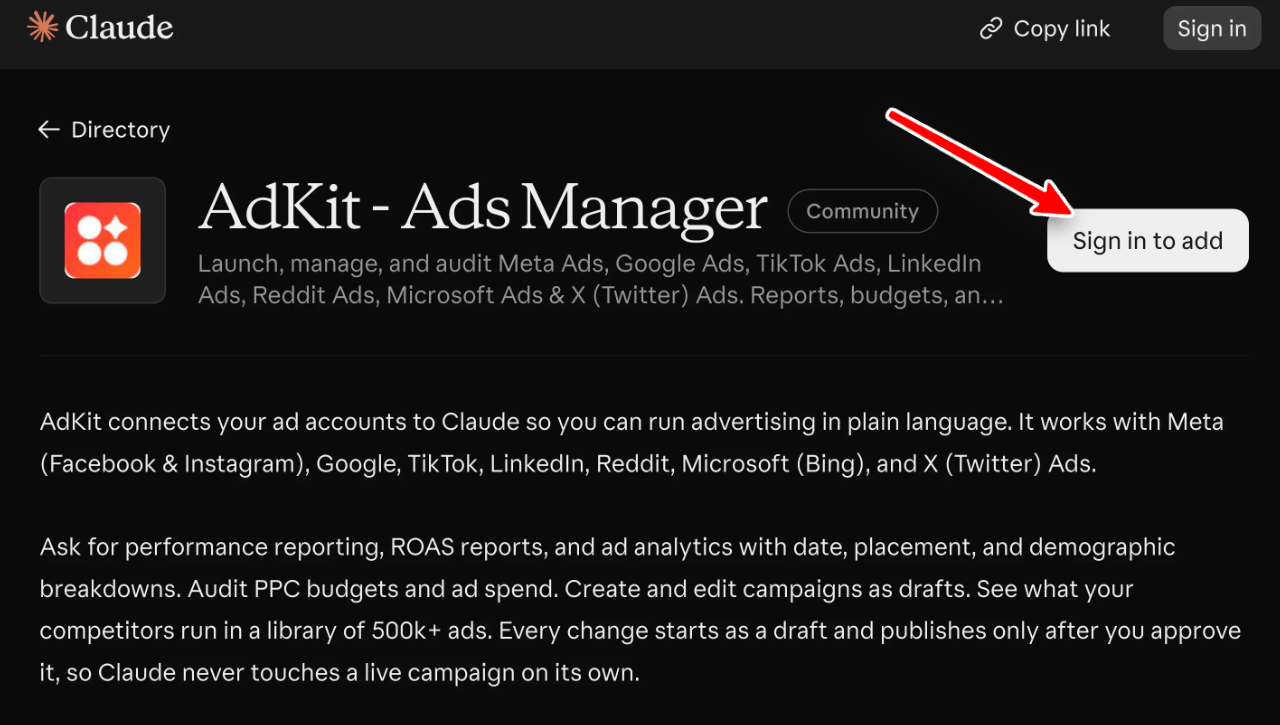
- Allow the connection when Claude shows the permission screen.
- Sign in to AdKit.
AdKit now shows up in your Claude connectors. You can do the rest of the setup in AdKit, or ask Claude to do it.
Step 2: Connect your LinkedIn login
AdKit needs your LinkedIn login to reach your ad accounts.
- In AdKit, open Settings → Integrations.
- Click + next to LinkedIn.
- Sign in with the LinkedIn profile that has access to your ad accounts, and allow the access.
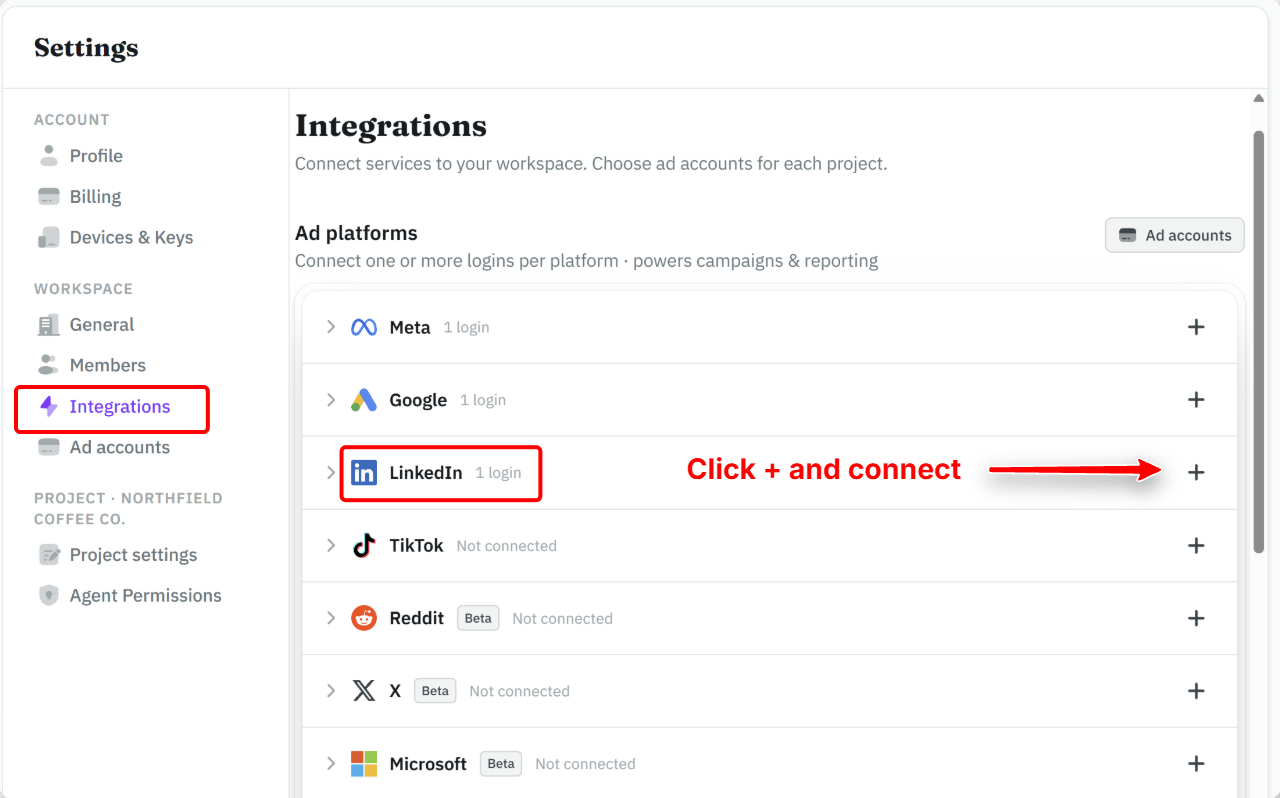
LinkedIn now shows 1 login instead of Not connected.
Step 3: Give each client a project
A project holds one brand's ad accounts, and Claude works only inside the project you name. That's what keeps one client's budget away from another's.
- Open Settings → Ad accounts.
- Drag the LinkedIn ad account from the list on the right into the client's project.
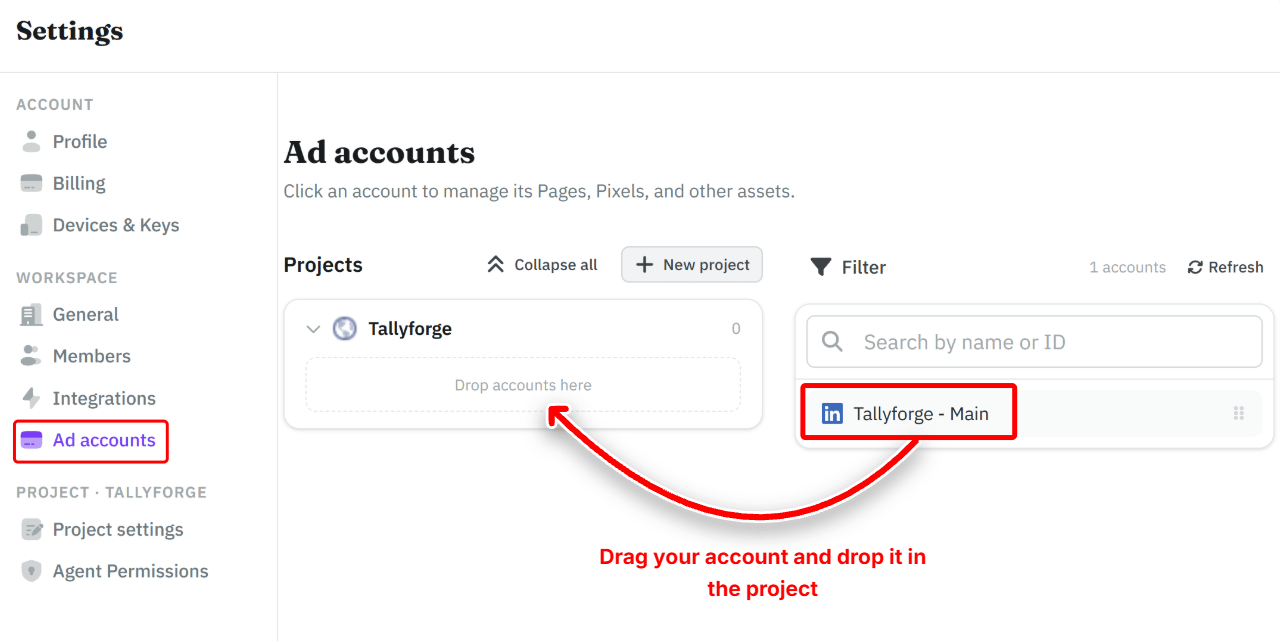
The account now sits inside that client's project. To switch client later, name the other project at the start of your message.
Create one AdKit project for each of these clients and move their LinkedIn ad accounts into it: [your client list]
Step 4: Choose what Claude can publish
Claude never changes Campaign Manager directly. Every change is saved as a draft in AdKit first, and the access level decides who publishes it:
- Read-only: reports and answers only. Nothing gets prepared.
- Draft only: Claude builds the change, and you press Publish in Draft Approval (the AdKit page where pending changes wait, more in Step 7).
- Draft + Publish: the change is built and published with no click from you. New projects start here.
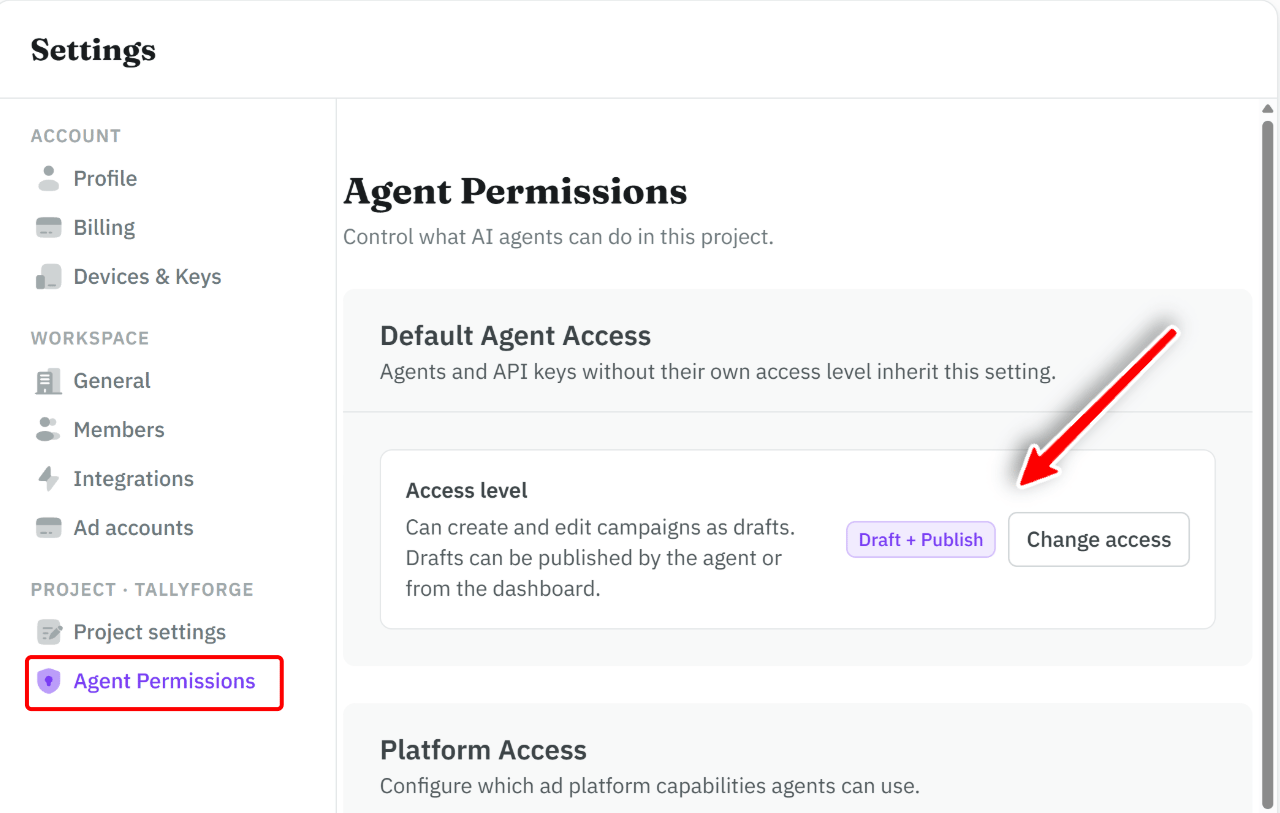
Your project's current level shows next to Change access.
On client accounts, Draft only is the safer pick. Ask for $50 a day for two weeks and Claude could still set a $50 total budget, or the other way round. With Draft only, you see the ad set before any of the client's money is spent. The cost is one extra click per change.
- In AdKit, open Settings → Agent Permissions.
- Under Default Agent Access, click Change access.
- Select Draft only and click Save.
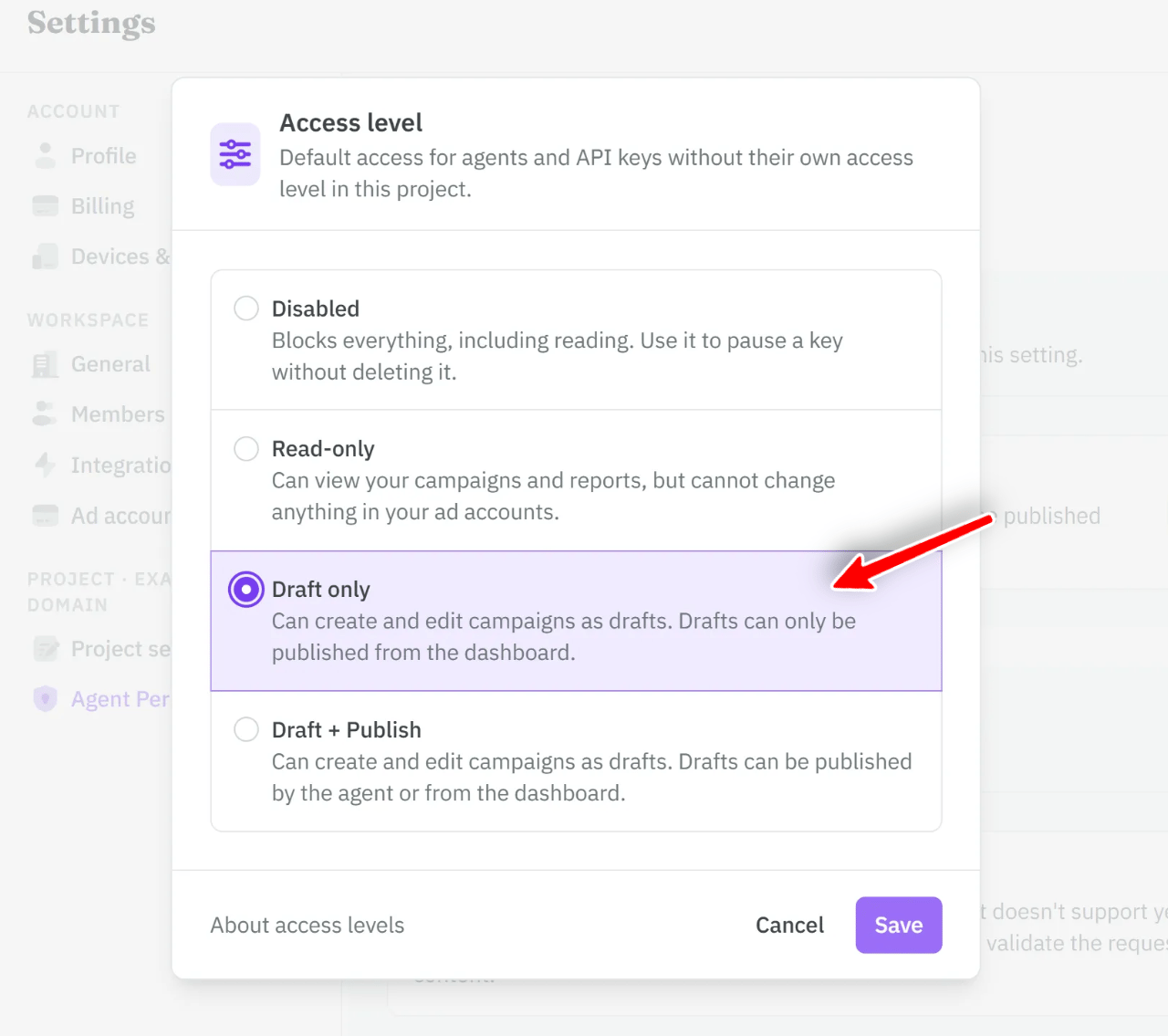
The default access now reads Draft only.
Step 5: Ask for your first report
A first report shows that Claude sees the right accounts before you ask it to change anything. Paste this in a new chat:
List my AdKit projects and the LinkedIn ad accounts in each one, with how much each account spent in the last 30 days.
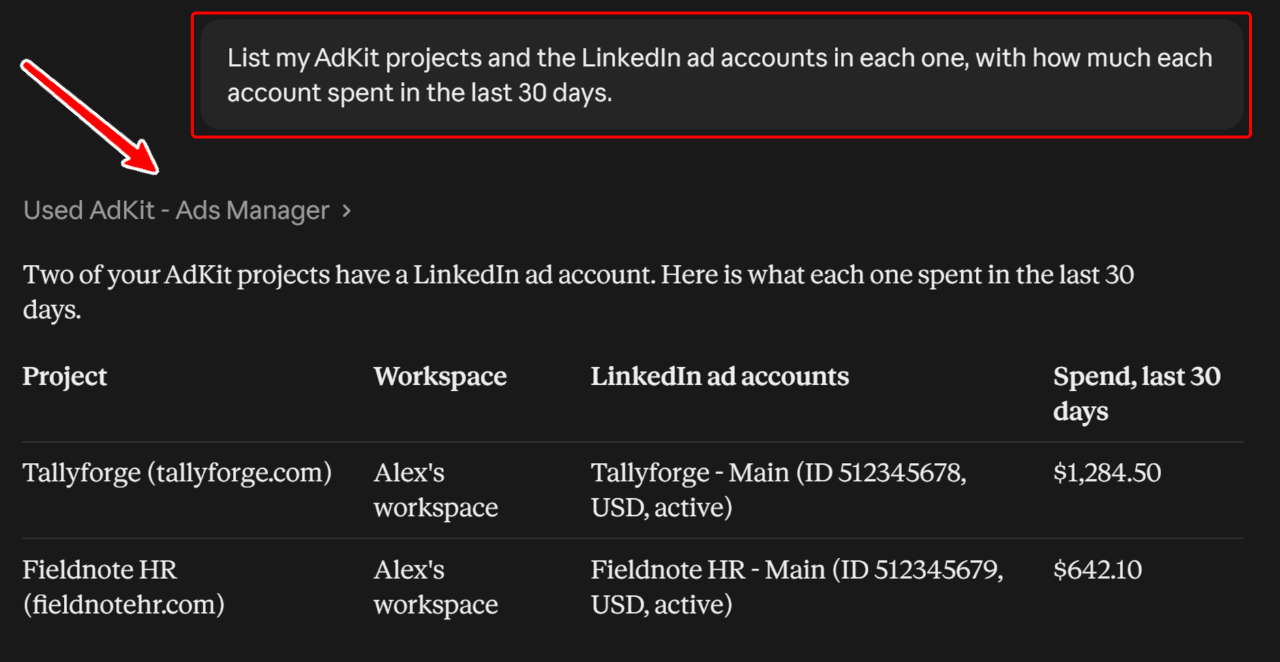
Claude lists each project with its LinkedIn ad accounts and their spend. If one is missing, go back to Step 3.
Step 6: Make your first change
Now ask Claude for something you'd normally do in Campaign Manager. On LinkedIn, a good first test is promoting a company post that already gets likes and comments: the creative is done, and you know your followers react to it.
Paste this, and put the link to your post in place of the brackets:
Promote this company post as an ad: [link to your post]. Audience: marketing managers in the US. Budget: $50 a day for 2 weeks. Save it as a draft.
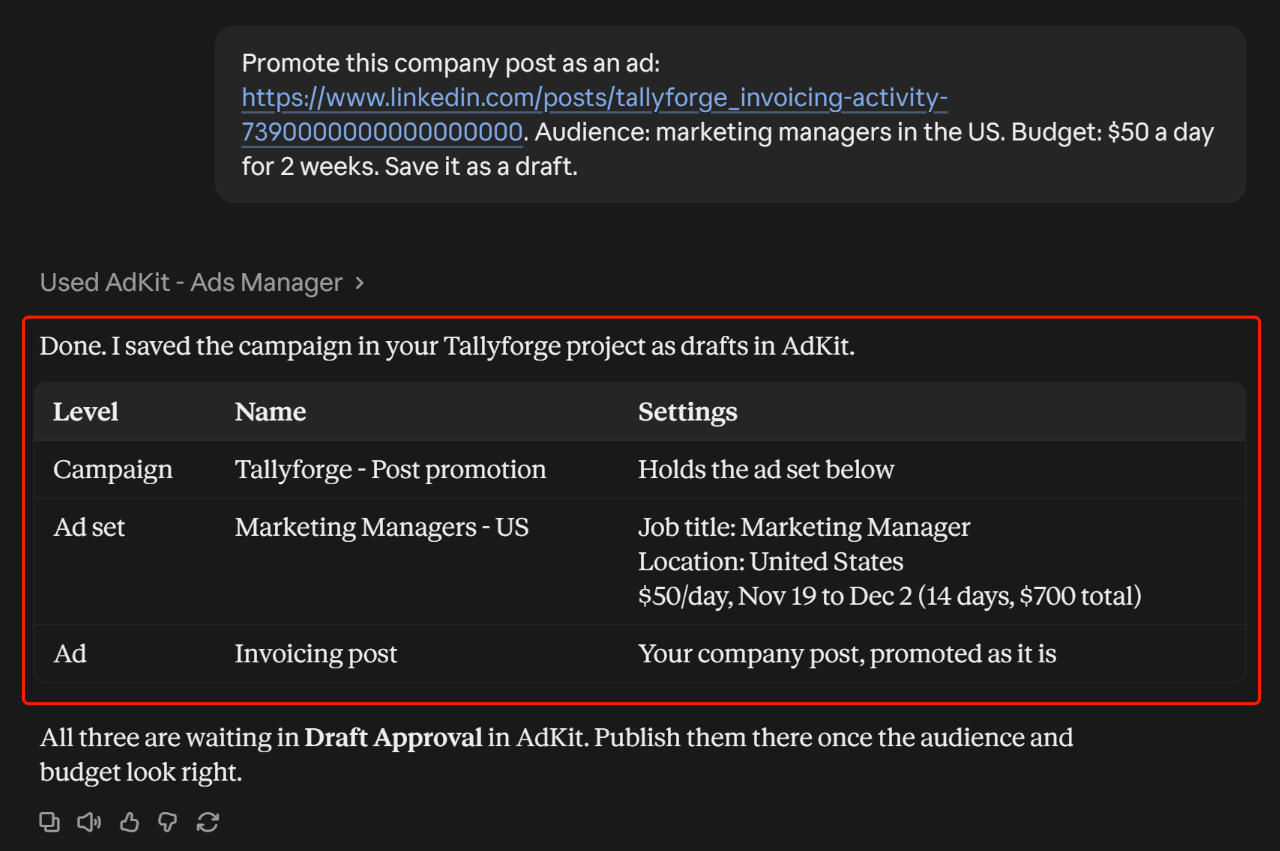
Claude replies with the campaign, the ad set with its audience and budget, and the ad, all saved as drafts in AdKit. If you have a goal in mind, like website visits, add it to the message.
A promoted post is only one option. You can also get a client update, cut ad sets that don't bring leads or keep competitors out of your audience: the prompts below are ready to paste.
Step 7: Publish the draft
Before the change reaches LinkedIn, look it over once.
- In AdKit, open Draft Approval in the left menu, under Ads Manager.
- Open the ad set. Make sure the audience is the one from your message, the budget is daily and the dates are right.
- Click Publish, or Discard to drop it.
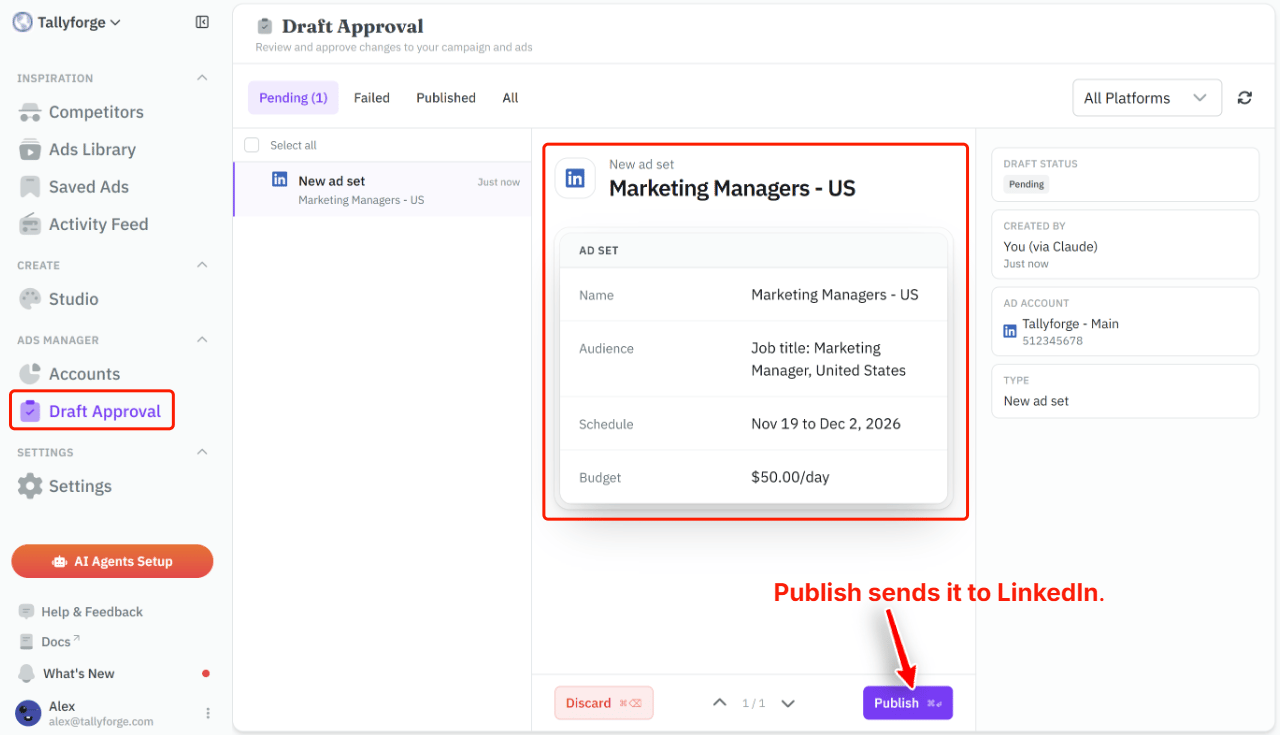
Once you publish, the campaign shows up in Campaign Manager.
Claude prompts for LinkedIn Ads
Paste any of these in a chat with AdKit connected. Change the parts in brackets, and every change waits as a draft until you publish it.
Is it safe to connect LinkedIn Ads to Claude?
Yes, if the connection goes through LinkedIn's official API and you decide what gets published.
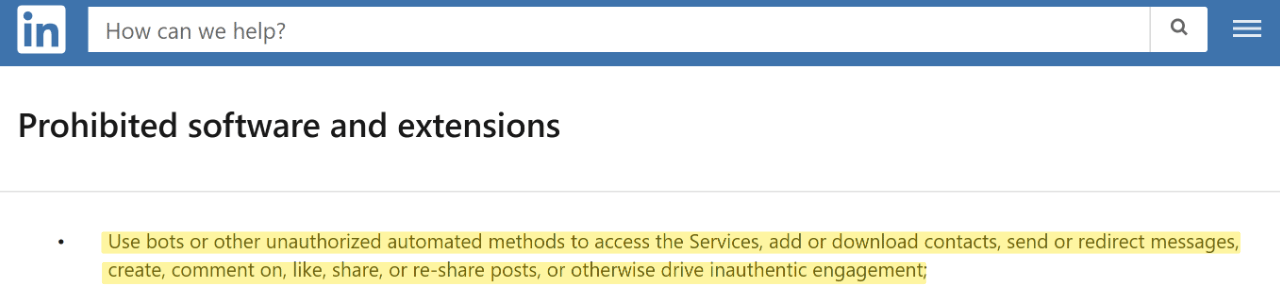
The risky setups are the ones that work on LinkedIn's website instead of its API, like browser extensions that click through Campaign Manager for you. LinkedIn doesn't allow bots or automated tools on its site. AdKit connects through LinkedIn's official API, and Claude never gets your LinkedIn password. See how AdKit keeps ad accounts safe.
Claude can still misread a brief. With Draft only, the change waits in Draft Approval, so you can catch a wrong audience or budget before it runs.
Troubleshooting
These are the issues you're most likely to hit:
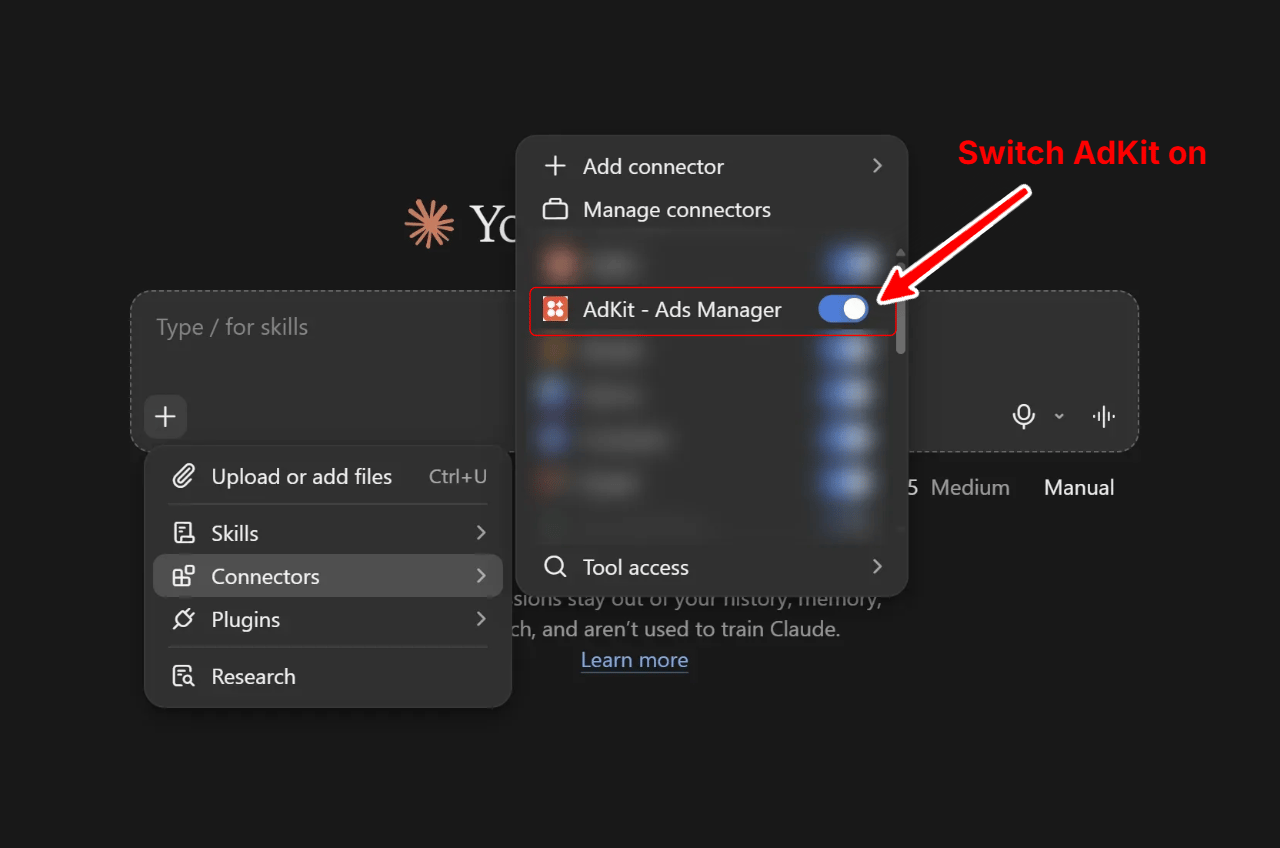
AdKit isn't on in that chat. Open a new chat, click +, go to Connectors and switch AdKit - Ads Manager on.
The account isn't in a project yet (Step 3), or the LinkedIn profile you signed in with has no role on it. Ask an Account manager to add you in Campaign Manager, then sign in again in Settings → Integrations.
Your LinkedIn role is Viewer, or the project is set to Read-only in Agent Permissions (Step 4).
The post has to belong to the Company Page linked to the ad account. A post from another company's page can't run from this ad account.
The daily budget is under LinkedIn's $10 minimum, or a total budget has no end date. Ask Claude to fix the budget in the draft.
Final thoughts
Start with one client on Draft only, so you see every change before it goes live, and widen access once you trust the drafts.
Running Meta or Google Ads too? The same connector works for them: see how to connect Meta Ads to Claude.
Next step: create an AdKit account, connect one client and ask Claude for your first change.
Frequently asked questions
LinkedIn doesn't offer an official connector for Claude. To work on your ad accounts from Claude, you add a tool that connects to LinkedIn's Advertising API, like AdKit, from Claude's connector directory.
This guide connects Claude to LinkedIn Ads, the ad accounts you manage in Campaign Manager. It doesn't give Claude access to your personal profile, your messages or your feed.
MCP is the standard that AI agents like Claude use to plug into other tools. A LinkedIn Ads MCP lets Claude read your Campaign Manager data and prepare changes, like a new ad set or a budget change.
Yes, through AdKit. Claude builds the campaign, the ad set with its targeting and budget, and the ad, and saves them as drafts in AdKit. You decide whether Claude can publish them or you do.