

 Nico Jeannen

TL;DR: To connect Meta Ads to Claude, add AdKit from Claude's connector directory, link your Meta account to AdKit, put each client's ad account in its own project, and choose what the agent can publish. Claude can then read your Facebook and Instagram campaigns and prepare changes. Each change is saved in AdKit first, so on client accounts you can publish every one yourself.
Meta’s own connector lets Claude work on your ads for free, but it can be a bit risky. Ask it to pause the ads that aren’t working, and it might pause them on the wrong client. This six-step setup keeps each client separate and lets you choose what Claude can publish.
Can Claude connect to Meta Ads?
Yes, in two ways: Meta’s official connector, or a tool like AdKit. The difference between them is how a change ends up in your ad account.
| Option | What Claude can do | How changes reach your account |
|---|---|---|
| Meta Ads AI connector (free) | Read and change your Meta campaigns | New campaigns, ad sets and ads start paused. Edits to running ones go live right away |
| AdKit | Read and change campaigns on Meta and other ad platforms | Each change is saved in AdKit first. You choose whether Claude can publish it |
Without either, you’d export a report from Ads Manager and paste it into Claude. It works, but every new question needs a fresh export.
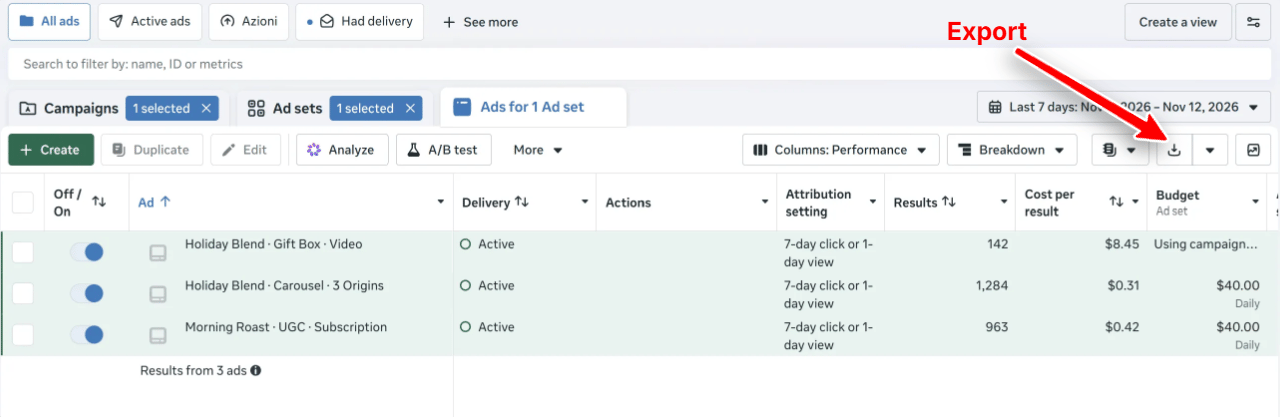
Meta Ads AI connectors is Meta’s own connection for AI assistants: you add it to Claude as a custom connector and log in with Facebook.
It’s a fine start if you run one account and mostly want reports. Our Meta Ads MCP setup guide walks through it, and if it answers is_ads_mcp_enabled: false, here’s what that means.
The rest of this guide uses AdKit. It passed Meta’s app review, connects through Meta’s official API, and keeps each client in a separate project.
What you need before you start
- A Meta ad account.
- An AdKit account. Create one here.
- An AI assistant. This guide uses Claude, and the free plan works too.
How to connect Meta Ads to Claude
Step 1: Connect Meta Ads to Claude
Open AdKit in Claude's connector directory and click Connect (if you're signed out of Claude, the button reads Sign in to add). Allow the connection when Claude shows the permission screen, then log in to AdKit.
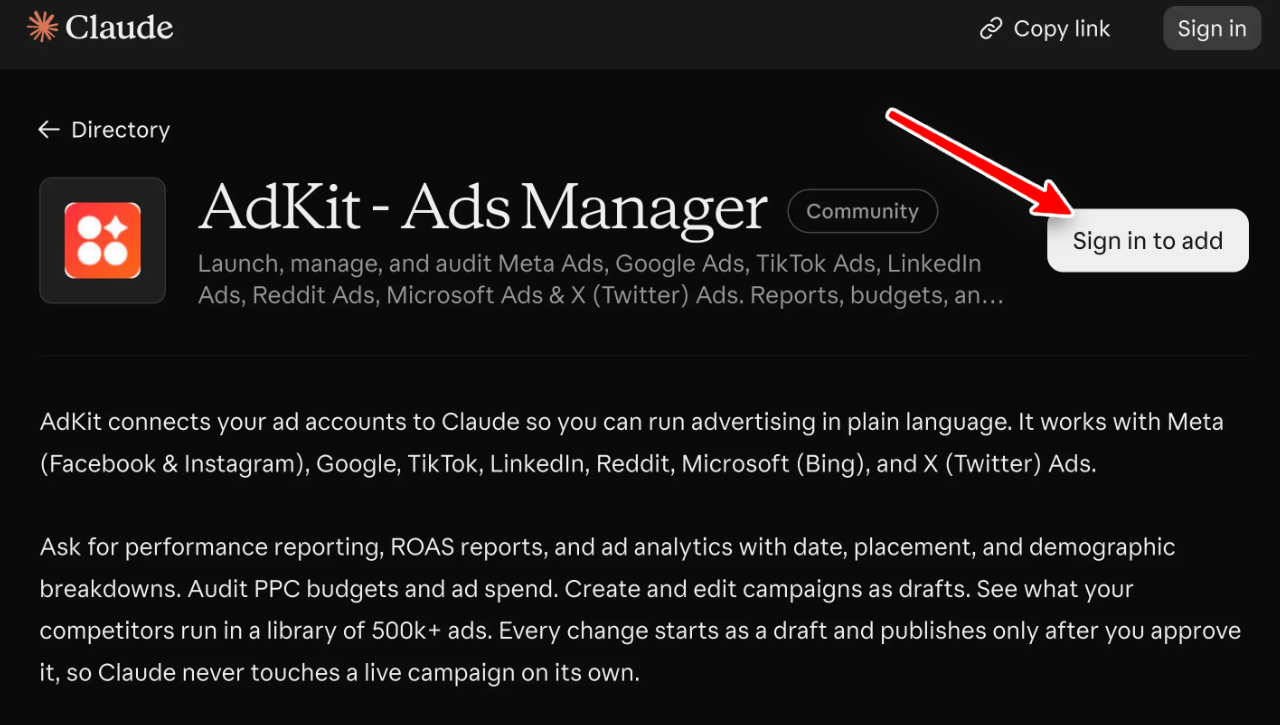
AdKit now appears in your connectors. Claude can't see your campaigns yet: that's the next step.
Step 2: Connect Meta to AdKit
AdKit needs access to your Meta ad accounts before Claude can work with them.
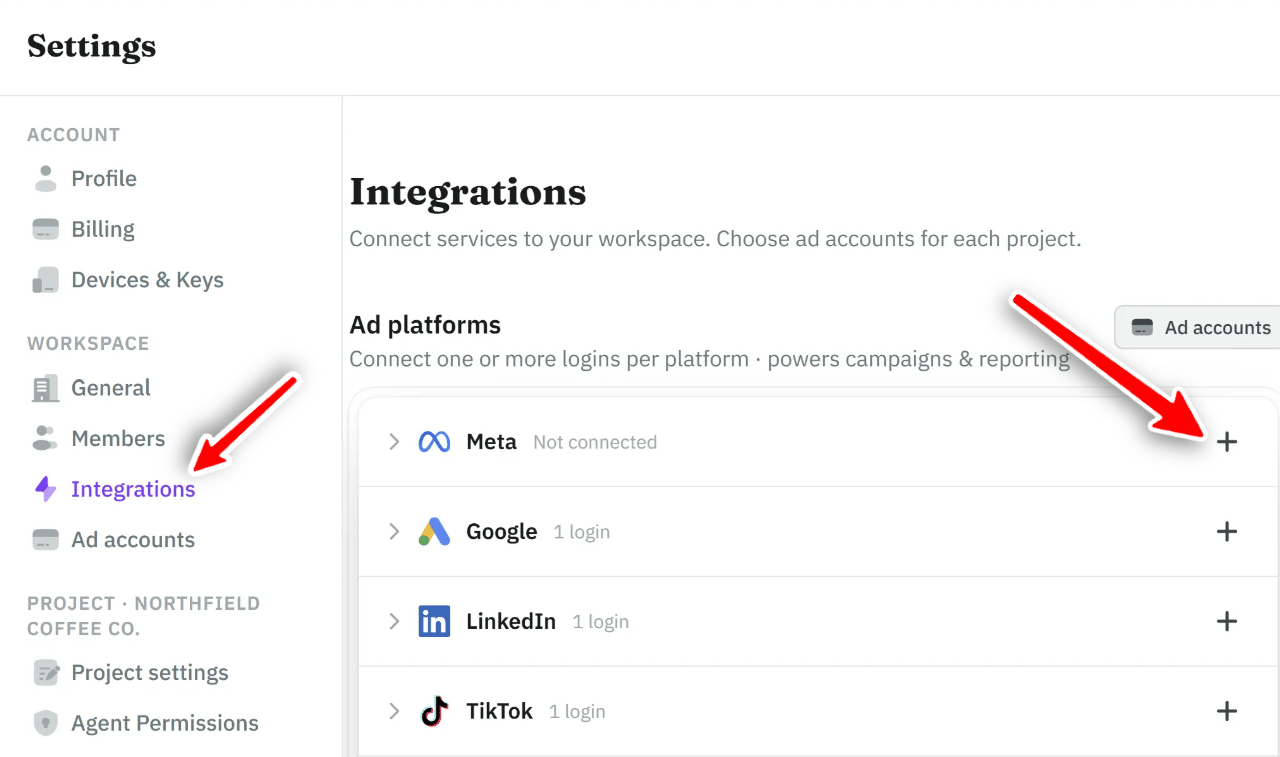
- Go to Settings → Integrations in AdKit.
- Click + next to Meta.
- Sign in with the Facebook profile that manages your ad accounts and allow the access Meta asks for.
Step 3: Add the ad account to a project
A project holds one brand or client. Claude works inside the project you name, so clients don't mix.
- Go to Settings → Ad accounts. A new project starts empty.
- Drag your Meta ad account from the right-hand column into the project.
- Optional: click the account to pick a default Page (the Facebook Page that publishes your ads) and Pixel (the code on your website that tracks what people do after the click), then click Save.
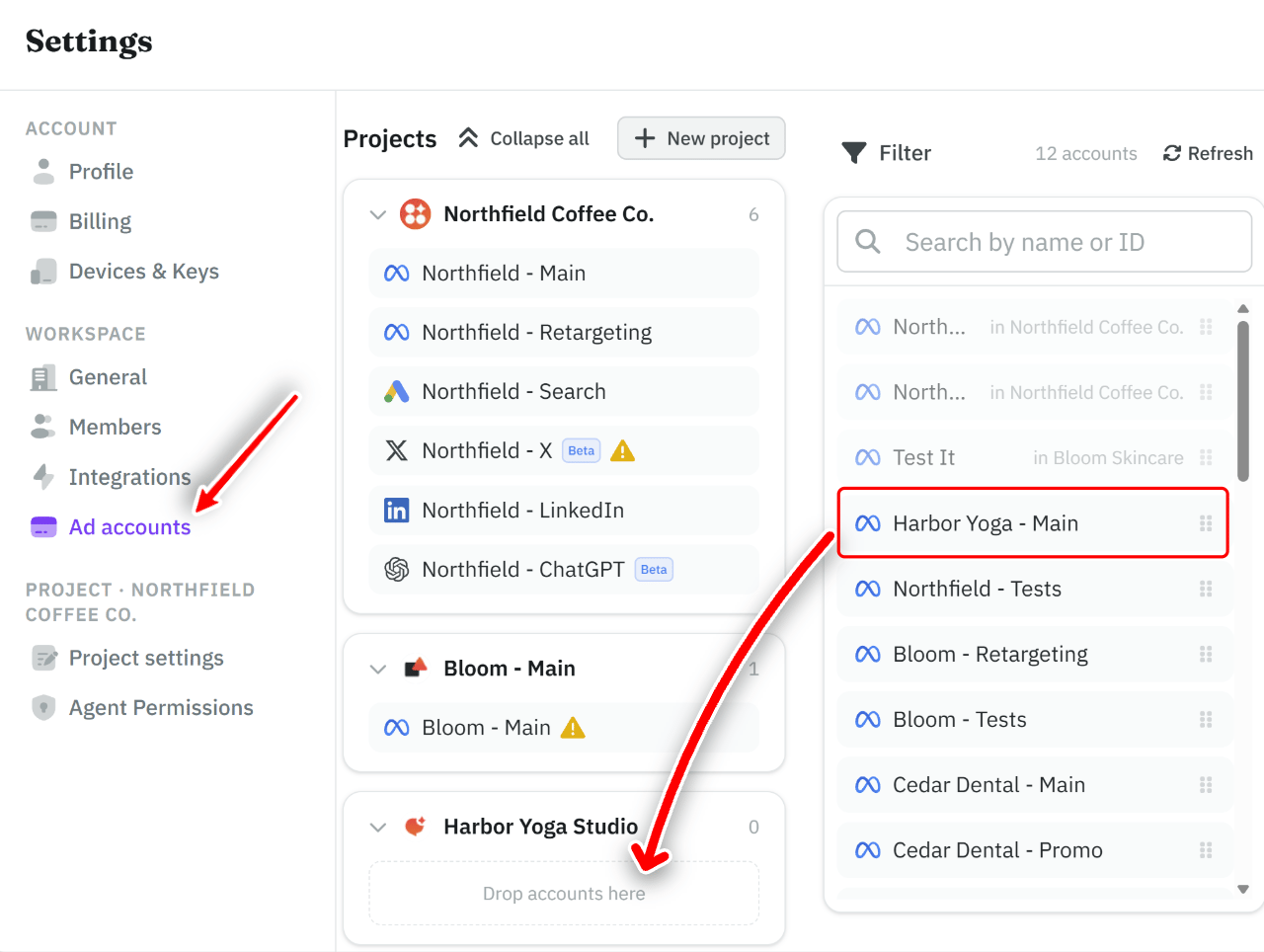
Create one AdKit project for each of these clients and move their Meta ad accounts into it: [your client list]
Step 4: Configure agent permissions
By default, your agent can read your campaigns, prepare changes and publish them. It never edits Meta directly, though. Each change is saved in AdKit first, where you can open it in Draft Approval, and you can switch publishing off in a few clicks.
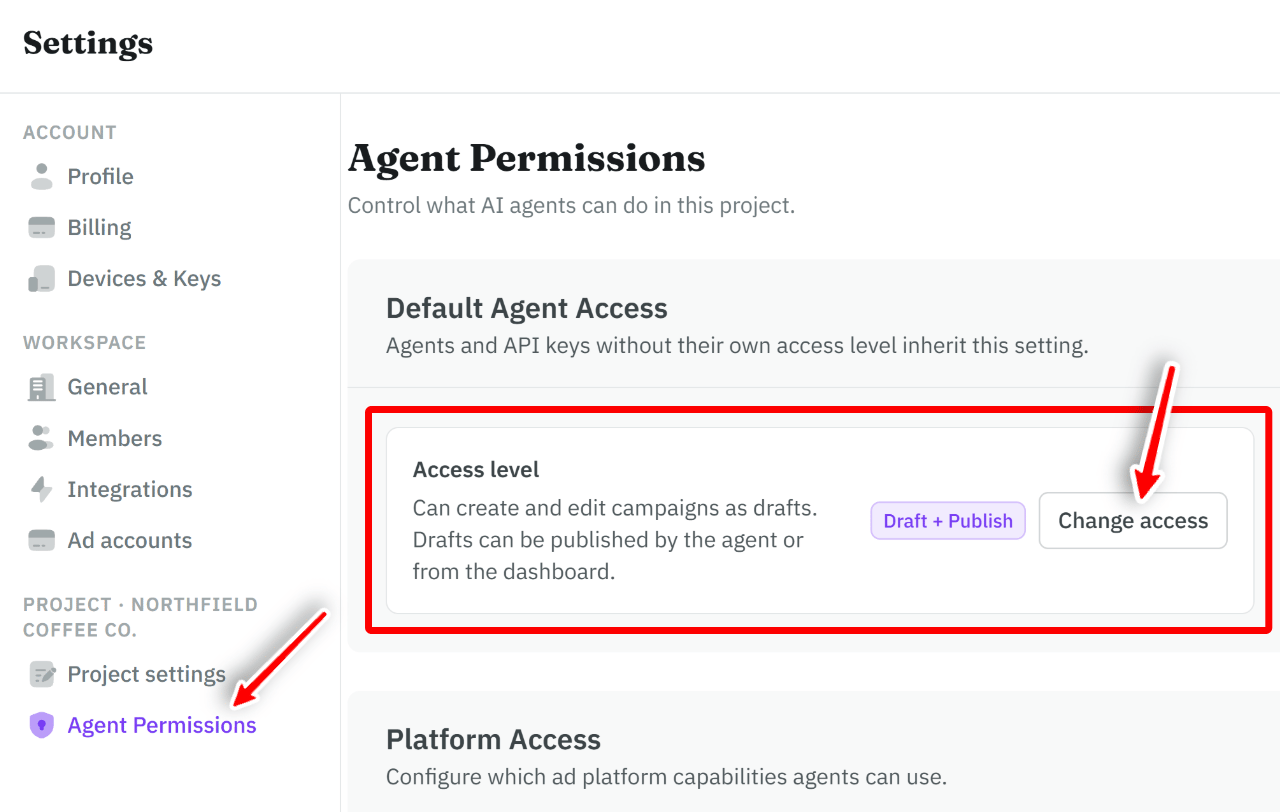
- Go to Settings → Agent Permissions in your project.
- In the access section, click Change access.
- Pick Draft only.
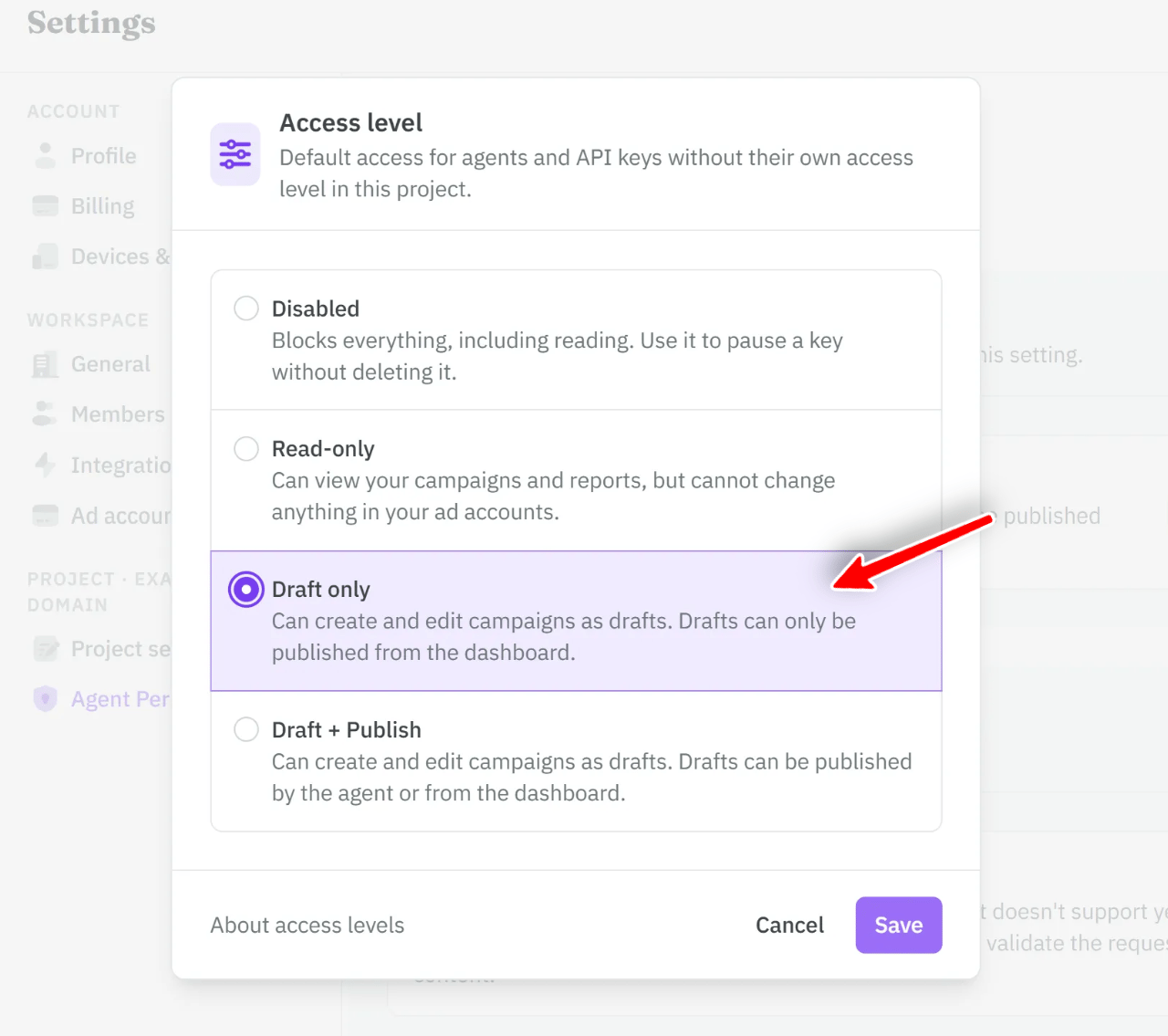
Claude still prepares every change, but publishing is now your click. Working with a team? Each member can get their own permissions.
Step 5: Confirm Claude sees your accounts
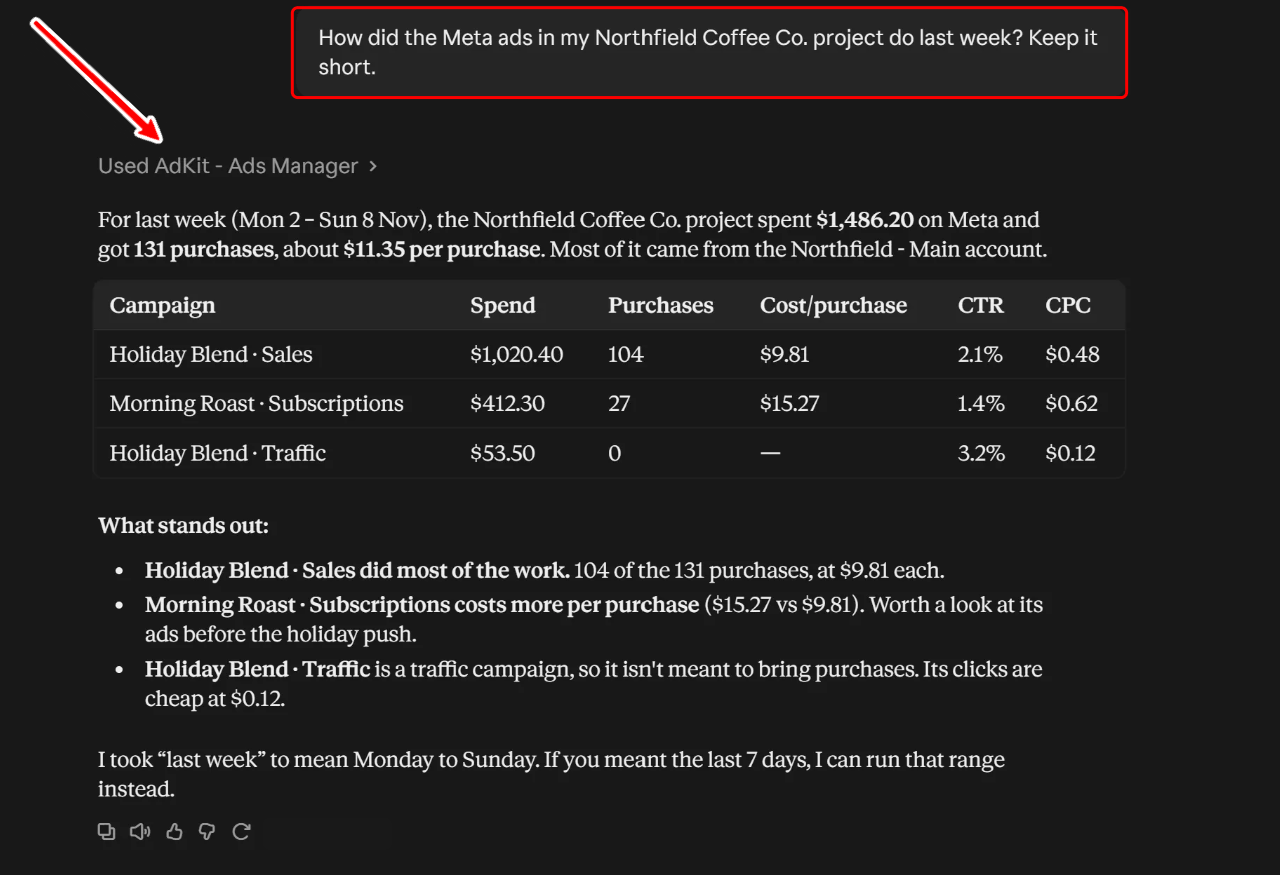
Start a new chat and send:
Which Meta ad accounts can you see through AdKit? Group them by project.
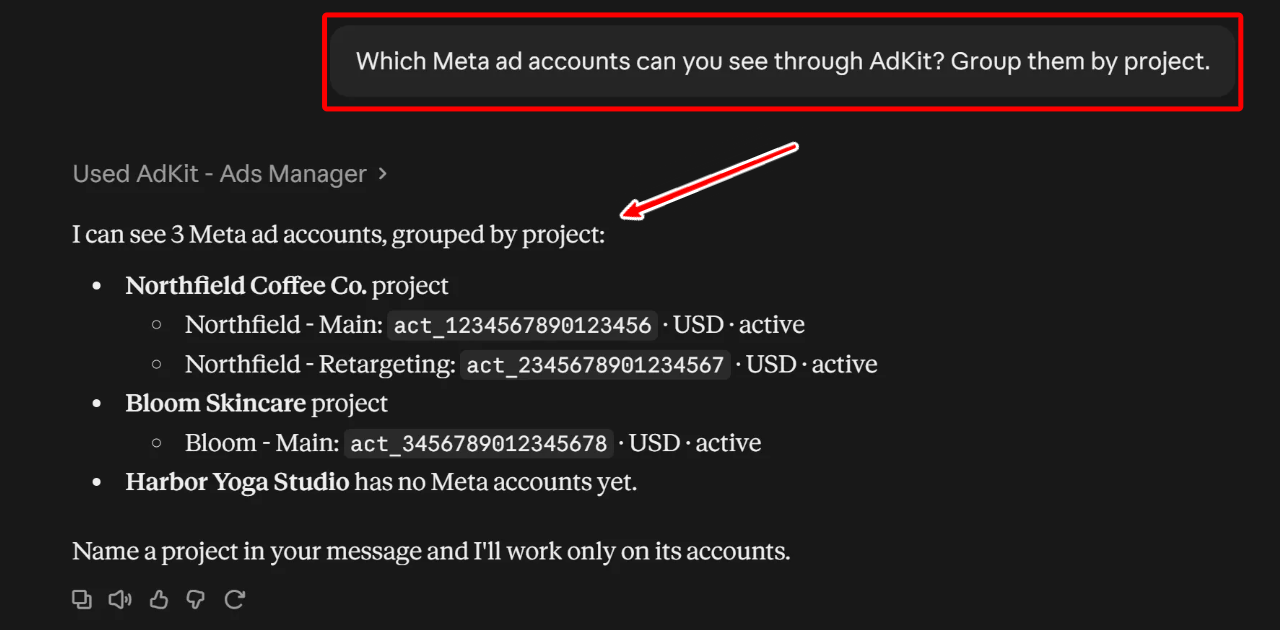
Each ad account shows up under its client's project. If one is missing, drag it into a project (Step 3) and ask again.
From now on, name the client's project in your message and Claude works in that project.
Step 6: Make your first change
Now ask Claude for something you'd normally do in Ads Manager. On Meta, a good first test is spotting creative fatigue. It happens when the same people have seen an ad so often that they stop reacting.
Two numbers show it: frequency, the average number of times each person saw the ad, and click-through rate (CTR), the share of people who clicked. When frequency rises and results drop, Meta says your audience may be tired of the ad.
Paste:
Look at the Meta ads in my [project name] project from the last 14 days. Which ones show creative fatigue, with frequency going up while CTR or cost per result gets worse? Show the numbers, then draft a pause for the worst ones.
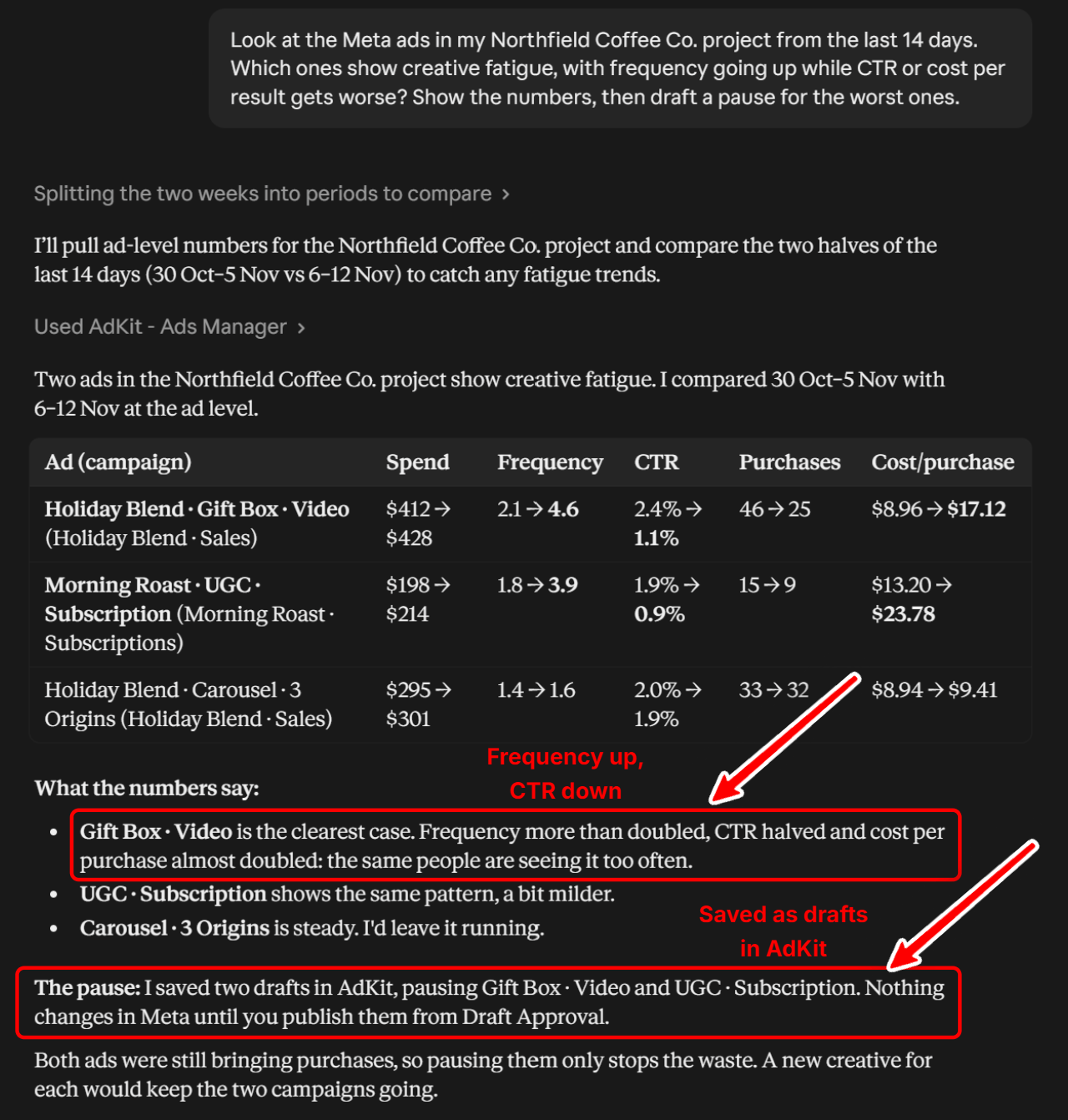
Claude lists the tired ads with their numbers and saves each pause as a draft.
Open Draft Approval in AdKit to see them. Publish pauses the ads in Meta, Discard keeps them running.
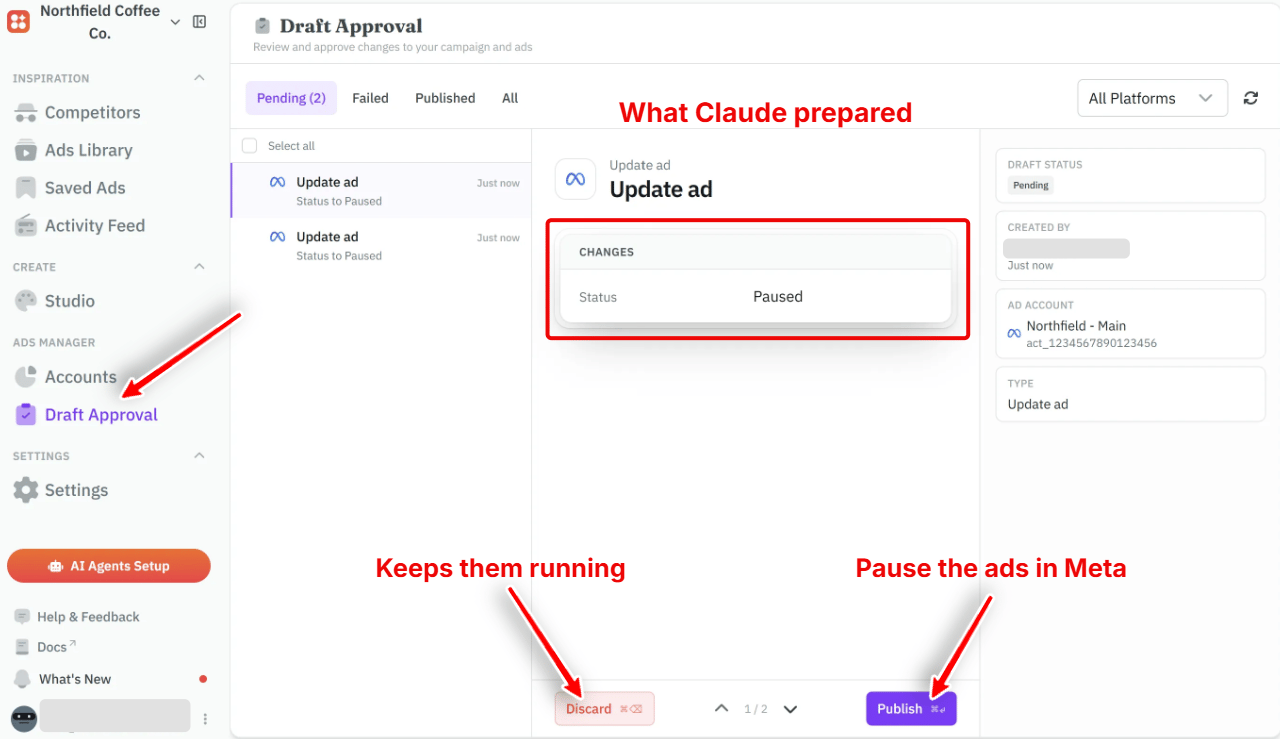
The draft shows the change but not the reason, so keep Claude's answer open while you review. Pausing stops the waste, but the real fix is a new creative, which Claude can draft too.
Creative fatigue is only one option. You can also get a client report, launch new creatives or scale what works: the prompts below are ready to paste.
What else Claude can do with Meta Ads
Paste any of these in a chat with AdKit connected. Change the parts in brackets, and every change waits as a draft until you publish it.
Is it safe to connect Meta Ads to Claude?
Yes, as long as the connection is official.
The risky tools are the unofficial ones. Some click around Ads Manager for you. Others ask you to paste a secret key to your ad account into a chat. Earlier in 2026, some advertisers had their accounts shut down after using unapproved tools.
Meta’s official connector and AdKit both connect the way Meta approves. AdKit passed Meta’s review, and your key stays with AdKit, never in the chat. See how AdKit keeps ad accounts safe.
Meta’s usual rules still apply. If an ad breaks them, Meta rejects it, whoever made it. And if you suddenly launch far more ads than usual, Meta may take a closer look at the account.
Troubleshooting
AdKit uses one connector for every ad platform, so there's nothing extra to add for Meta. Make sure Meta shows as connected in Settings → Integrations and the ad account sits in a project, then ask again in a new chat.
The account isn't in a project yet (Step 3), or Claude is looking in another client's project. Name the client in your message.
Claude may be using an old list of tools from an earlier connection. Remove AdKit from your connectors, add it again, and start a new chat.
The change is waiting in Draft Approval. With Draft only on, nothing reaches Meta until you click Publish.
The text, link and media of a running Meta ad can't be edited through AdKit yet. Ask Claude to create a new ad with the new text in the same ad set, then pause the old one.
Final thoughts
Reading your Meta Ads from Claude is the easy part, and Meta's free connector does it well. Letting Claude change things is where the setup matters: one project per client, and every change saved where you can review it. Create an AdKit account, connect one client, and ask Claude for its first creative fatigue report.
Frequently asked questions
Add AdKit from Claude's connector directory, connect your Meta account to AdKit, put the ad account in a project, then choose what the agent can publish. Meta's own connector is the other option: you add it to Claude as a custom connector and log in with Facebook.
Meta's own connector is free, and Claude has a free plan. AdKit is a monthly subscription with a free trial.
Yes. Through AdKit, Claude can set up a campaign, its ad sets and its ads. They're saved as drafts in AdKit, and with Draft only on, nothing reaches Meta until you publish it.
Yes. In AdKit, set the agent's access to Read-only. Claude can then pull reports and analyze your campaigns, but it can't prepare or publish changes.
Yes. Connect them all in AdKit and give each client its own project. Name the client in your message and Claude works in that project.
For most people, the AI assistant they already use, connected to their ad account. A general assistant like Claude can read your live numbers, spot problems and prepare changes, as long as you control what it can publish.