

 Nico Jeannen
TL;DR: Ad automation lets the ad platforms, or a tool on top of them, do the ad work you'd otherwise do by hand. Google and Meta already set your bids and pick who sees your ads. The rest (moving budgets, pausing ads, uploading creatives, spotting problems) you can automate in three ways: the platforms' free automated rules, third-party tools, or an AI agent connected to your ad accounts.
If you run ads for a few clients, you probably open Google Ads every day, then Meta, then every other ad manager. You raise the budget on the campaign that's working, cut the one that isn't, pause the ad that stopped converting and upload next week's creatives one by one.
It's not that these jobs are hard to do, you just have a lot of them to take care of, on every account, every day.
Ad automation can make your tasks faster and easier. You decide once what should happen, and the platform or an AI agent does it for you.
What is ad automation?
Ad automation is any setup where the ad platform, or a third-party tool on top of it, does ad work you'd otherwise do by hand. Bidding and targeting are already automated on every major platform. Most of the rest is up to you.
Bidding and Targeting
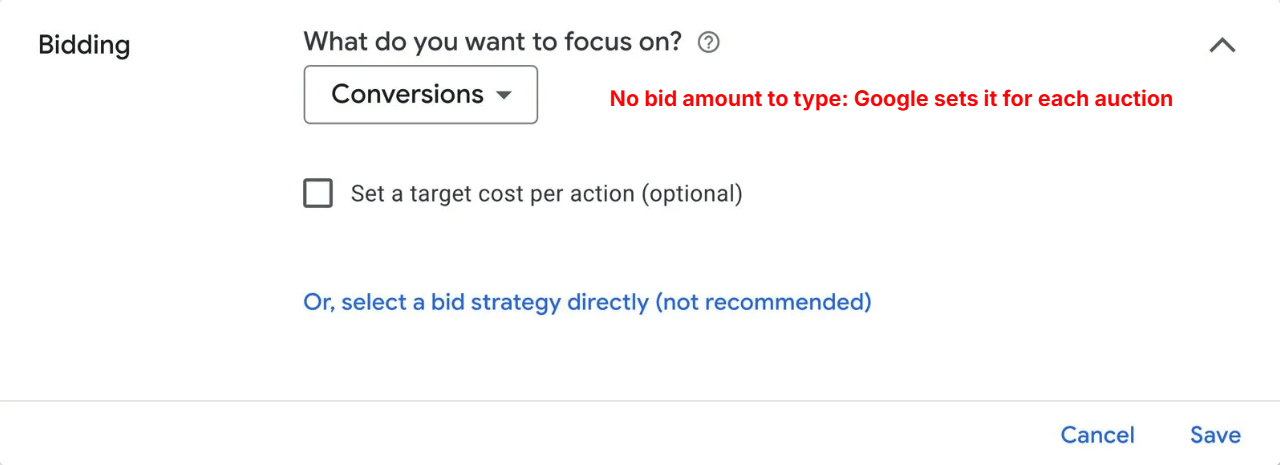
Bidding is how much you pay each time someone clicks or sees your ad. You once had to set that amount yourself. Now you pick a goal, for example more conversions (a sale or a sign-up), and the platform sets the bid for you.
On Google, this is "Smart Bidding", the core of Google Ads automation. It sets a new bid every time your ad can be shown, based on how likely that person is to convert.
Targeting changed even more. Before social media, most ads ran in newspapers or on TV, where you picked an audience, and everyone in it saw your ad. Now the algorithm on our social platforms already knows a lot about each one of us. So today most media buyers let the algorithm decide who sees each ad.
And it works. A man will rarely see ads for lipstick and makeup, for example (tho he might, if he’s spent the last few days looking for a gift for his girlfriend!)
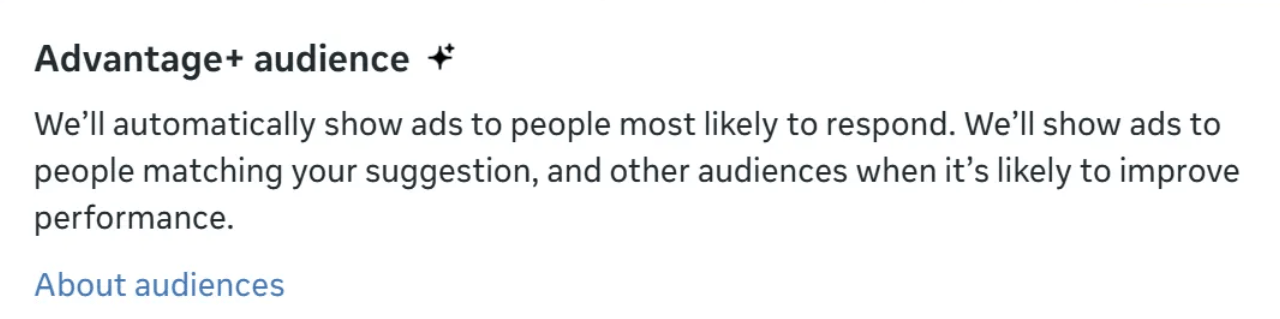
On Meta, this is "Advantage+ audience". It treats the audience you pick as a suggestion but still shows your ad to other people when it expects better results.
Both bidding and targeting run in the background, so there's nothing to set up. If you're new to auctions, how ad platforms work explains the mechanics.
3 ways to automate the rest
The platforms stop there. They won't pause an ad that's losing you money, or move budget to the campaign that's working. For that, you have 3 ways to automate your ads:
| Way | What it handles | What it costs | Drawback |
|---|---|---|---|
| Platform rules | Simple "if this, then that" jobs, one platform at a time | Free | Reacts to a number, can’t tell you why |
| Third-party tools | Advanced rules and specific jobs, across platforms | A subscription per tool | You'll likely need several, and the bills add up |
| AI agent | Almost any job, on every connected platform, from one chat | An AI assistant plus a tool that connects it to your ad accounts | Needs safeguards, like drafts you approve |
1. Use the platforms' automated rules
An automated rule is an instruction you give the platform: "if this happens → do that." In the example below, if a keyword spends more than $50 with no conversions, Google pauses it.
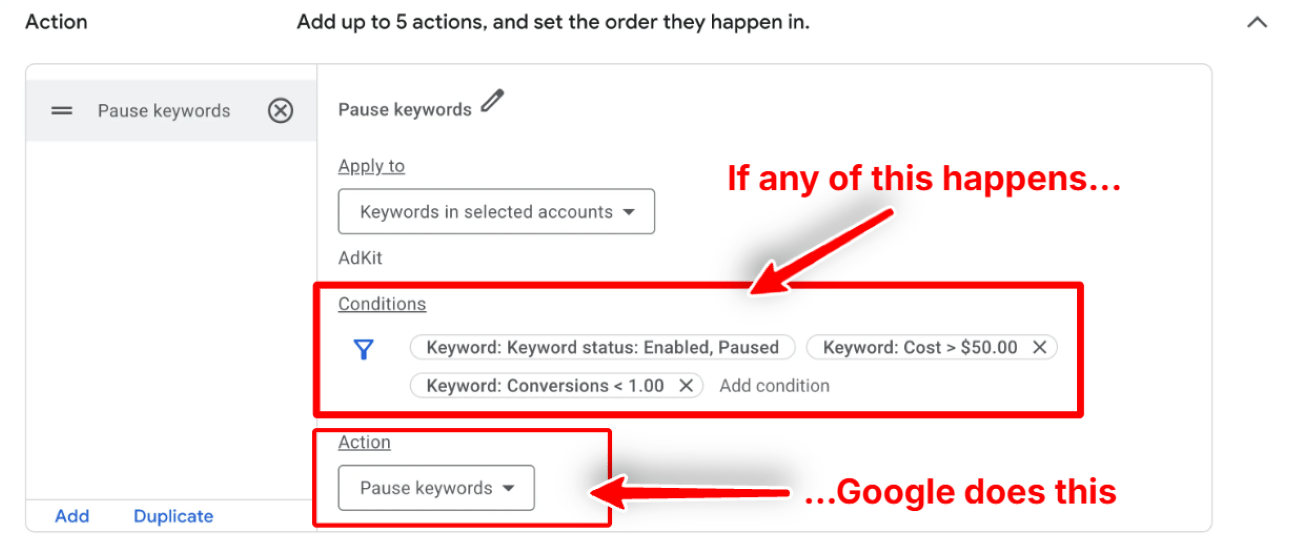
A rule can also raise a budget when a campaign brings sales at a good cost, or lower it when it doesn't.
Some rules don't change anything: they're alerts. "If this happens, let me know," so you can look at the context and decide yourself. On Meta, for example, a rule can send you a notification instead of making a change.
Rules are free, and Google Ads isn't the only platform that has them:
| Platform | Automated rules |
|---|---|
| Google Ads | Yes |
| Meta | Yes |
| TikTok | Yes |
| Microsoft Advertising | Yes |
| No | |
| No | |
| X | No |
Rules are great for the cases you can predict. Their limit is that they need upkeep and they only react to a number, without knowing what’s behind it. They can tell you a campaign’s CPA (what you pay for each sale or sign-up) reached $40, but not why.
2. Use third-party tools
A third-party tool is an app that isn’t made by Google or Meta, but connects to your ad accounts and works on them for you. You set it up once, and it does its job on every platform you connect.
The most common job is rules. A platform rule looks at one number on one platform. A third-party tool can combine several conditions and apply them to all your platforms at once, like this:
IF   cost per sale is above $40 for 3 days in a row
AND  frequency is above 3
AND  the campaign runs on Google or Meta
THEN lower the budget by 20% on both
Rules are only one job. There are a lot of these tools, and most are built around a single task:
| Job | What the tool does |
|---|---|
| Rules with several conditions | Combines conditions like the example above and applies them to every platform |
| Bulk uploads | Turns 50 new creatives into 50 Meta ads in one go, instead of building them one by one |
| Wasted search terms | Finds the Google searches that cost money without converting, so you can exclude them |
| Scheduled releases | Lets you upload a month of creatives once and launch five a week |
| Suggestions | Tells you which budget to raise and which ad to pause |
Each tool usually covers one of these jobs, so most advertisers end up paying for several. That’s where third-party tools get expensive, especially as you add clients and accounts.
3. Use an AI agent
You can connect an AI assistant like Claude or ChatGPT to your ad accounts, and, from there on, it can do the jobs of all the options above, on every platform, from one chat.
What AI agents can do
You ask in plain words, and the agent does the work. For example, it can:
- Write a daily report on every account, with the numbers behind each problem
- Spot creative fatigue: an ad that people have seen too many times
- Suggest budget changes and which ads to pause
- Upload a folder of creatives and build the ads
- Find the Google search terms that waste money and exclude them
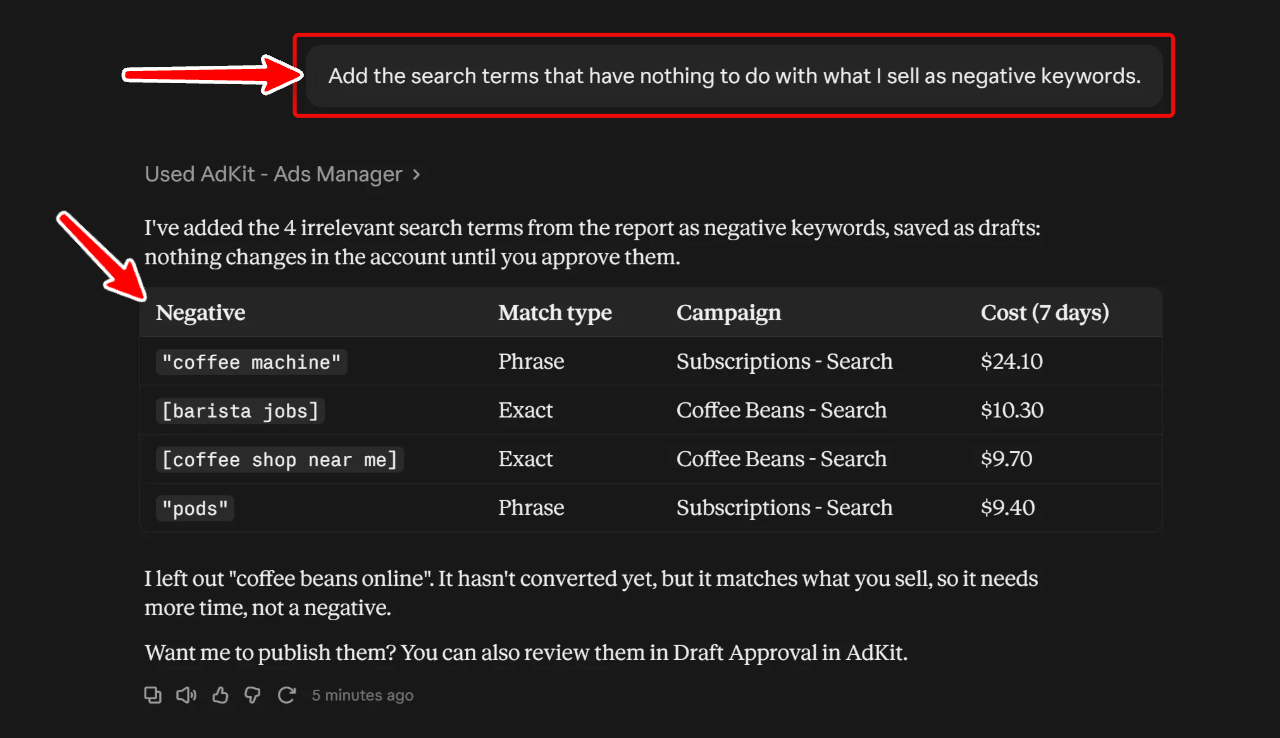
The drawback is control. An agent that can change your ads can also get something wrong, with real money behind it. AdKit, the tool we use in the setup below, saves every change the agent makes as a draft first, and you choose whether the agent can publish it or only you can.
How to set up an AI automation
Here's how to set up a daily ad report that an AI agent writes for you every morning, using AdKit to connect it to your ad accounts. We'll use Claude in the screenshots, but ChatGPT and other AI assistants work too.
What you need:
- An AdKit account: get your 7-day free trial here
- An AI assistant like Claude or ChatGPT (to schedule the report in Claude, as in Step 5, you need a paid Claude plan)
- At least one ad account with campaigns running
Step 1: Connect your ad accounts
The agent only sees the ad accounts you connect to AdKit and add to a project.
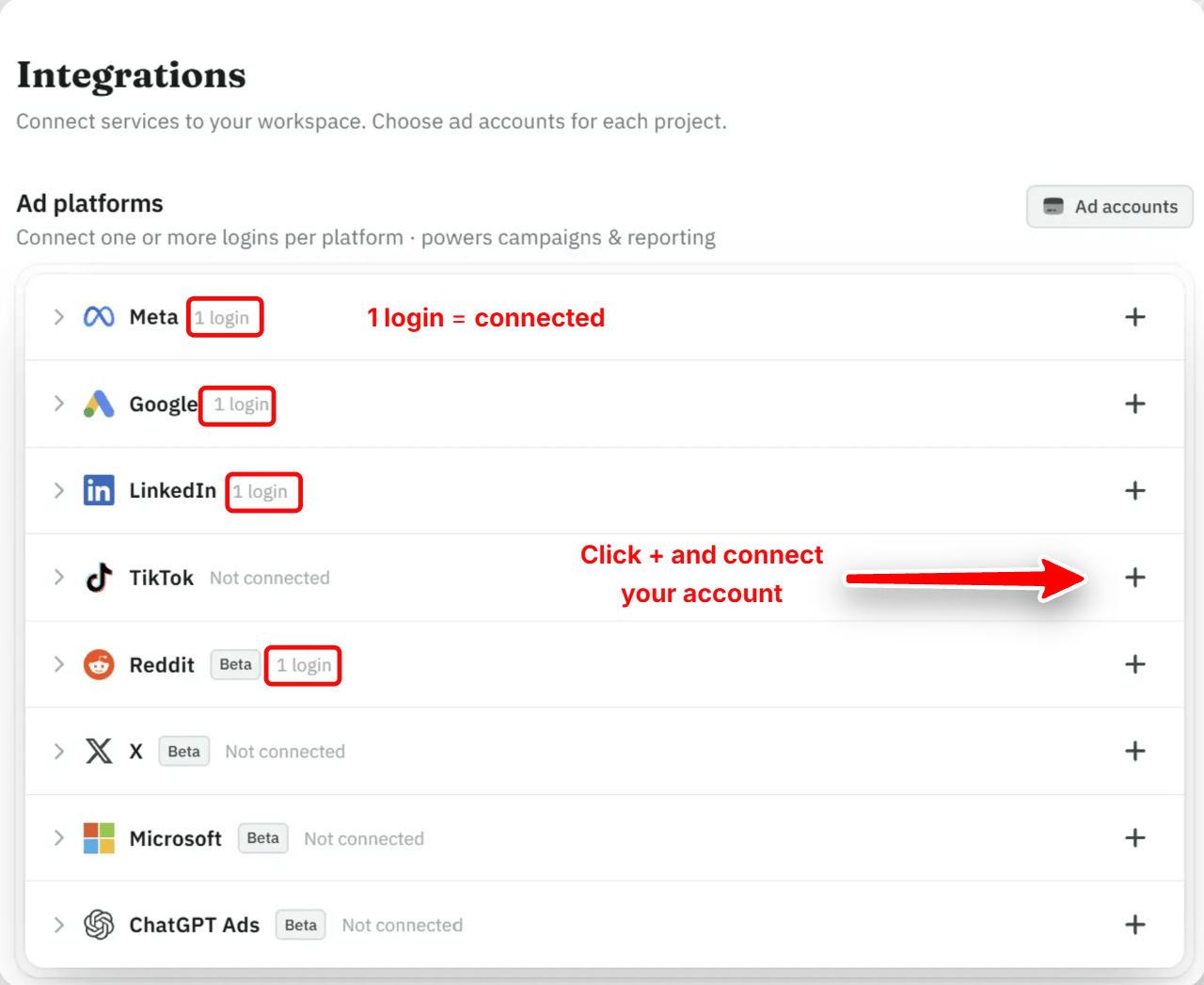
- In AdKit, open Settings, then Integrations.
- Under Ad platforms, click + next to each platform you advertise on, then sign in and approve the access. The platform now shows 1 login instead of Not connected.
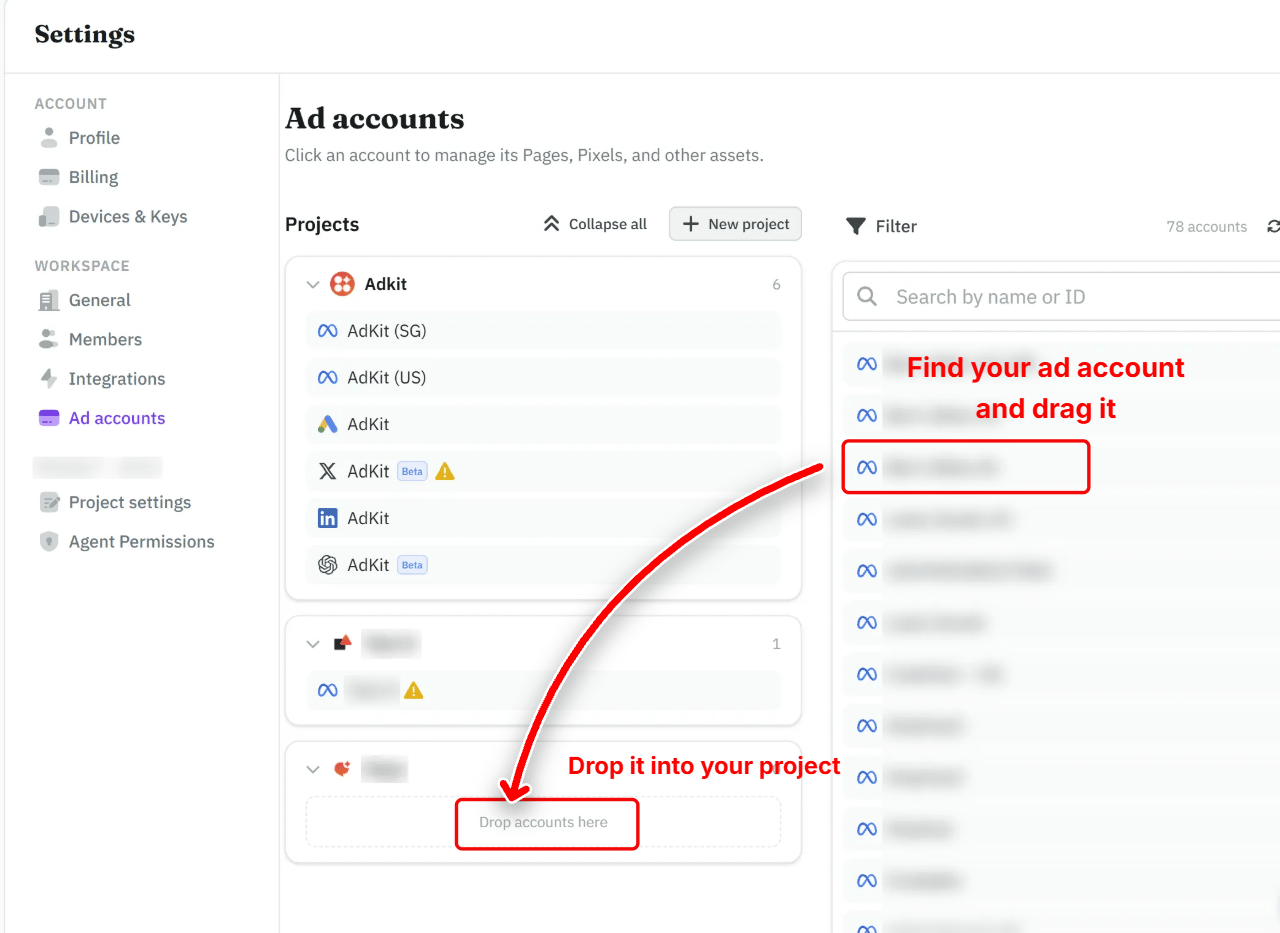
- Open Settings → Ad accounts and drag each ad account from the list on the right into your project. For Meta, click the account, pick its default Page and Pixel, then click Save.
Step 2: Choose what your agent can do
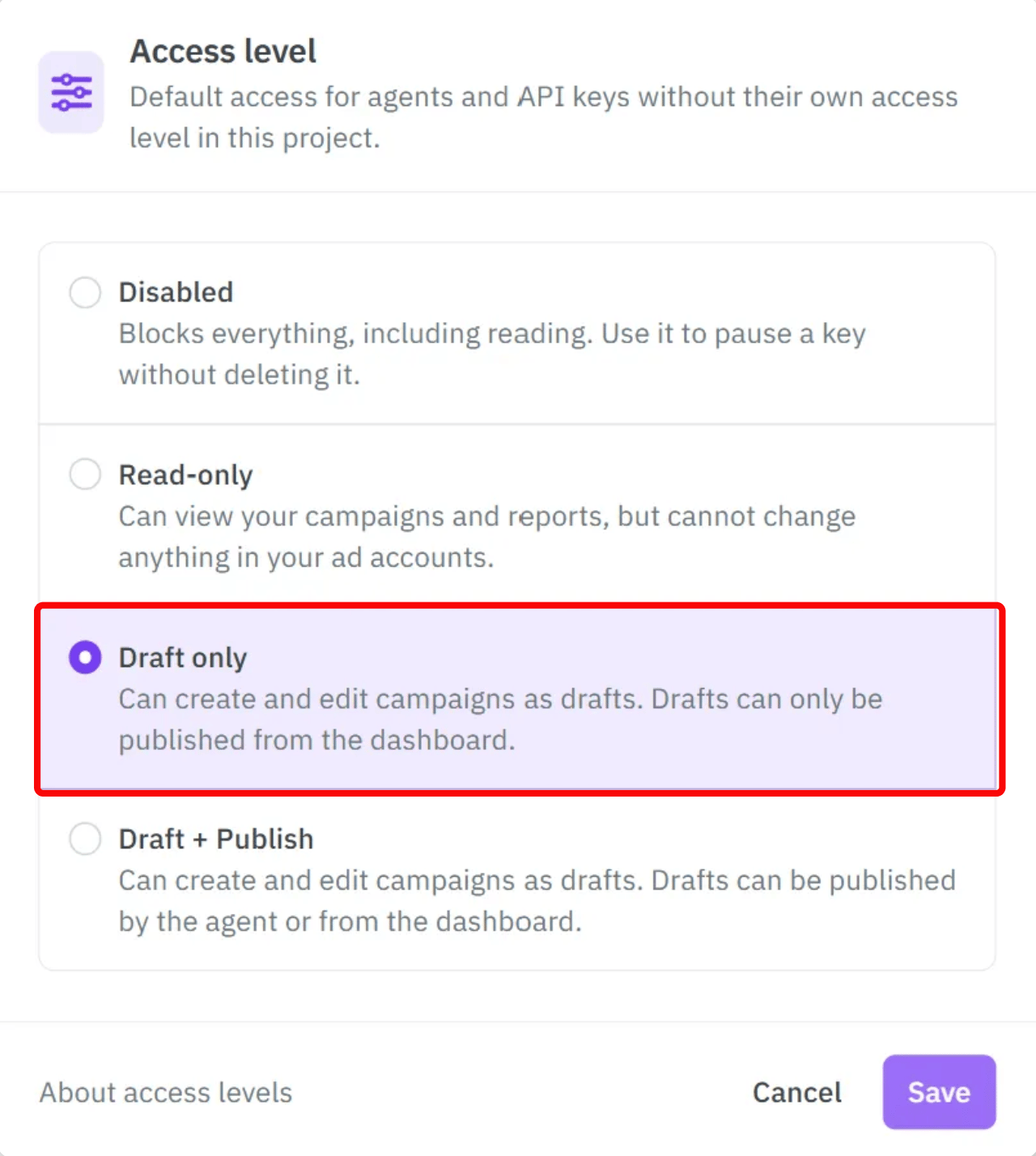
Each project has an access level that decides what the agent can do in your ad accounts:
| Access level | What the agent can do |
|---|---|
| Read-only | Read reports and campaigns, change nothing |
| Draft only | Prepare changes as drafts that you publish from AdKit |
| Draft + Publish | Prepare changes as drafts and publish them when you ask |
New projects start on Draft + Publish, so the agent can finish a job without you opening AdKit. Either way, every change is saved as a draft first. Drafts wait in the Draft Approval page, where you see what each one changes and publish or discard it.
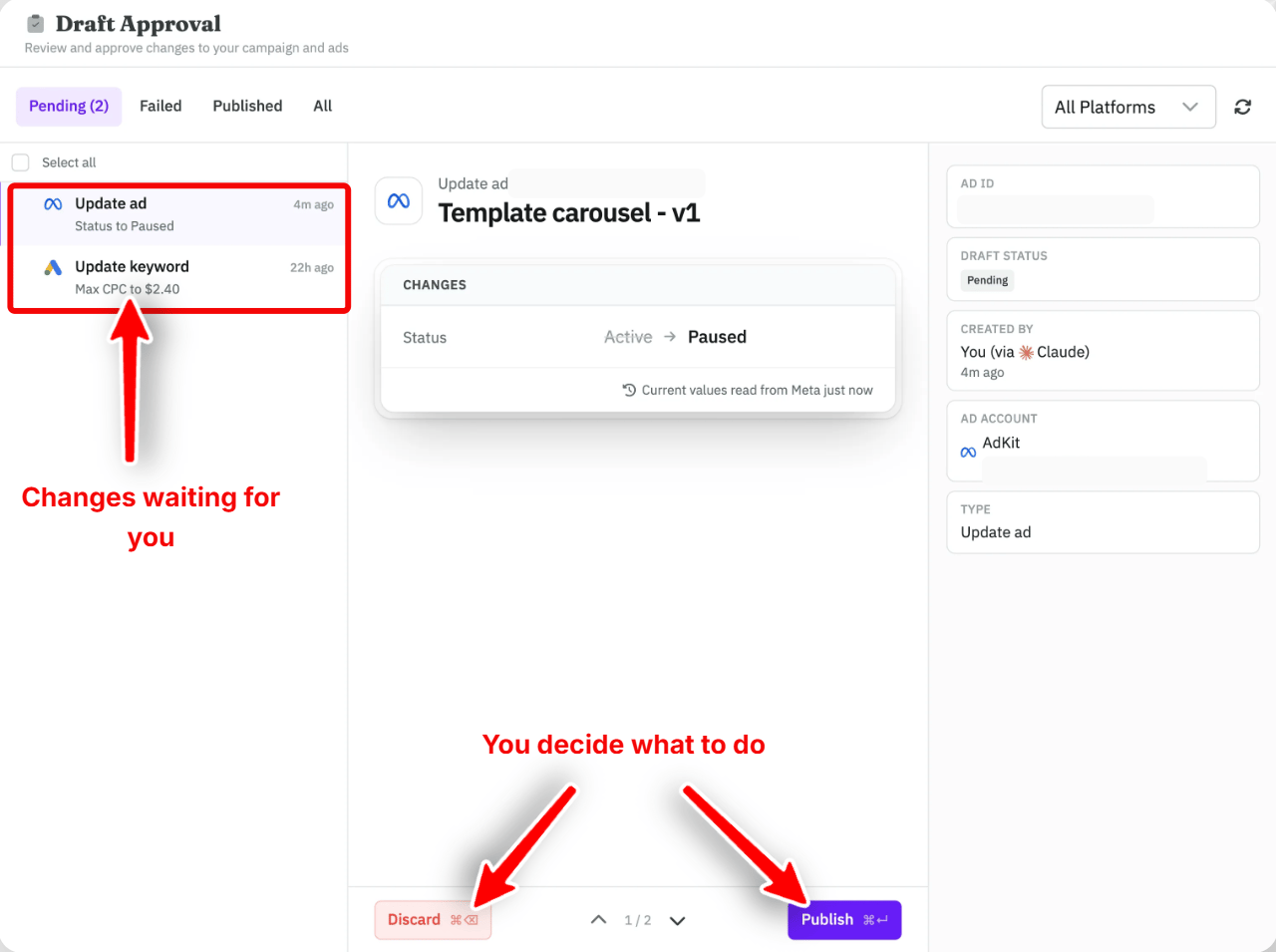
If you'd rather approve each change yourself, switch to Draft only.
- In AdKit, open Settings → Agent Permissions with your project selected.
- Under Default Agent Access, click Change access.
- Pick Draft only and save.
Step 3: Connect your AI assistant
- Open the AdKit connector in Claude and add it. On ChatGPT, open the AdKit app and click Install plugin.
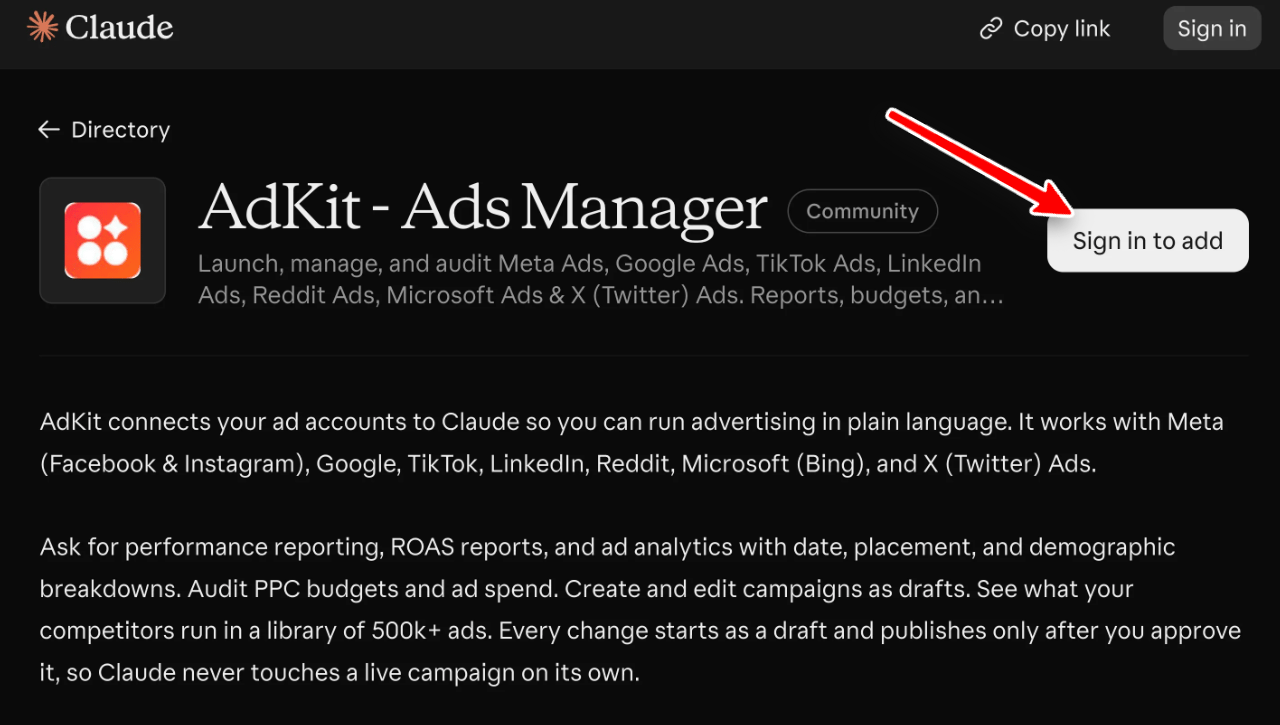
- Sign in to AdKit and approve the access.
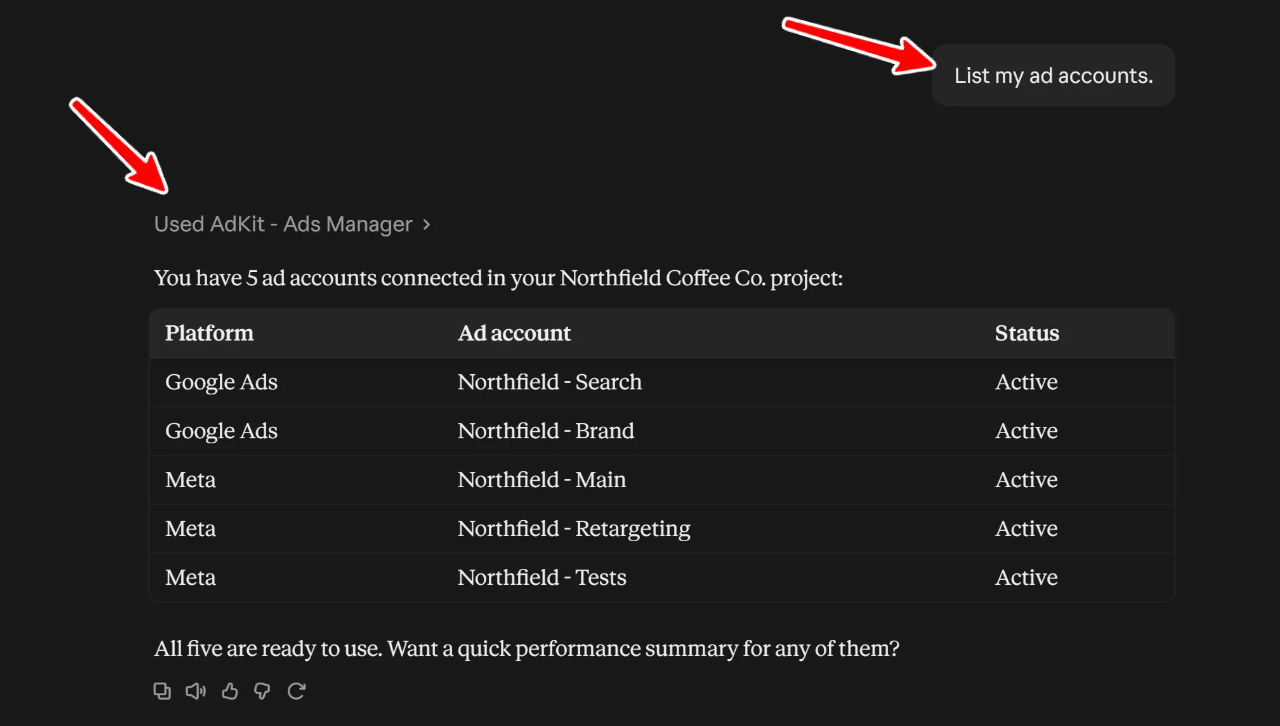
- To make sure everything works, ask the agent to list your ad accounts. If it shows the accounts you added from Step 1, it's connected.
Step 4: Test your automation
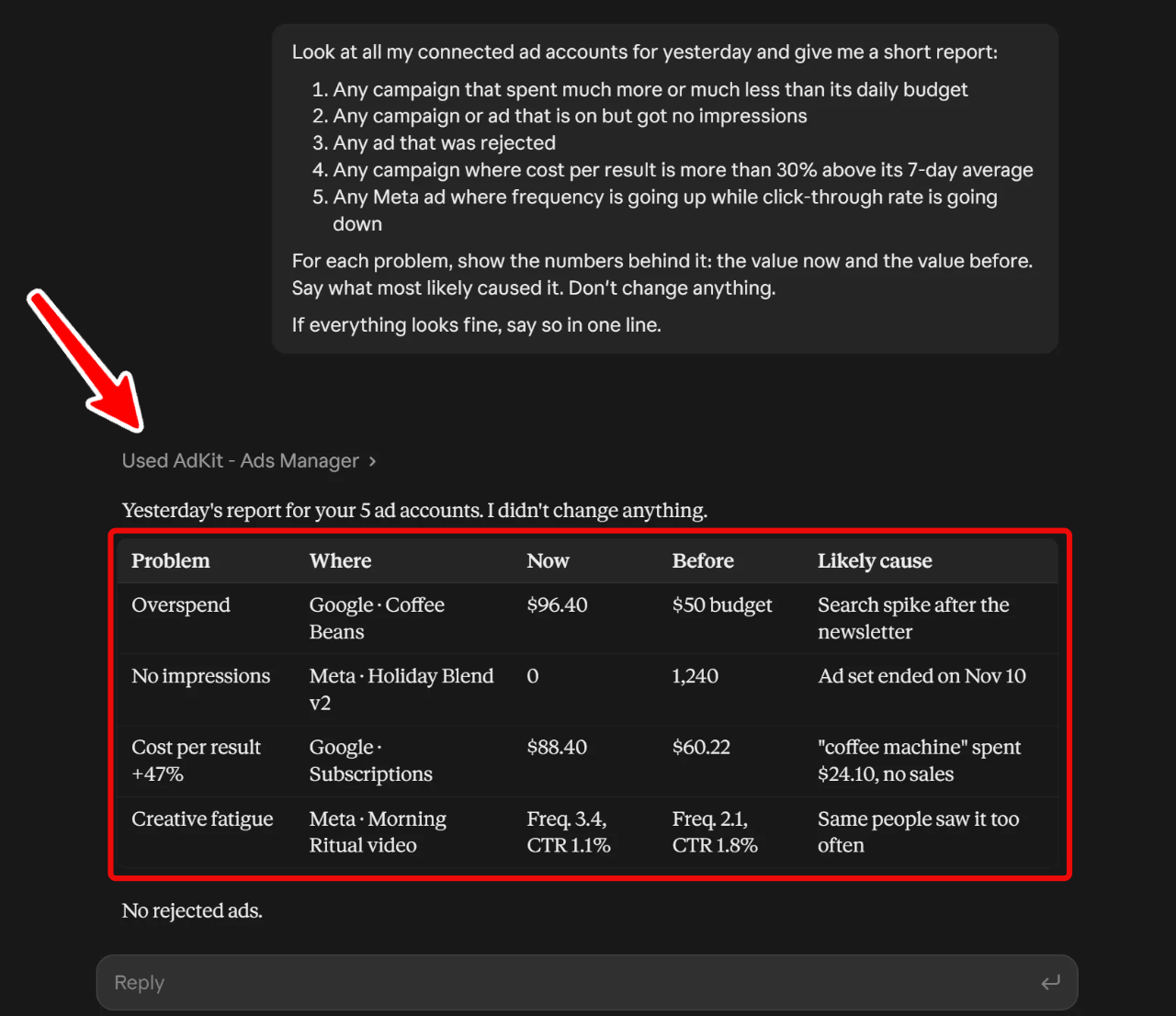
Before you schedule anything, run the report once by hand. Paste this into a new chat:
Look at all my connected ad accounts for yesterday and give me a short report:

1. Any campaign that spent much more or much less than its daily budget
2. Any campaign or ad that is on but got no impressions
3. Any ad that was rejected
4. Any campaign where cost per result is more than 30% above its 7-day average
5. Any Meta ad where frequency is going up while click-through rate is going down

For each problem, show the numbers behind it: the value now and the value before. Say what most likely caused it. Don't change anything.

If everything looks fine, say so in one line.
Impressions are the number of times your ads were shown. Frequency is how many times the same person saw your ad, and click-through rate is the share of people who clicked after seeing it. When frequency goes up and click-through rate goes down, that's creative fatigue.
The numbers behind each problem let you compare the report with your ad account before you trust it. Change the limits to fit your account.
Step 5: Schedule it
Now that you know the report works, schedule it so it’s waiting for you every morning.
- In Claude, click Scheduled in the left sidebar, then New task.
- Give the task a name, like “Daily ad report”.
- Paste the prompt from Step 4 into the instructions box.
- Under Trigger, keep Schedule, then pick Daily and a time.
- Click Create.
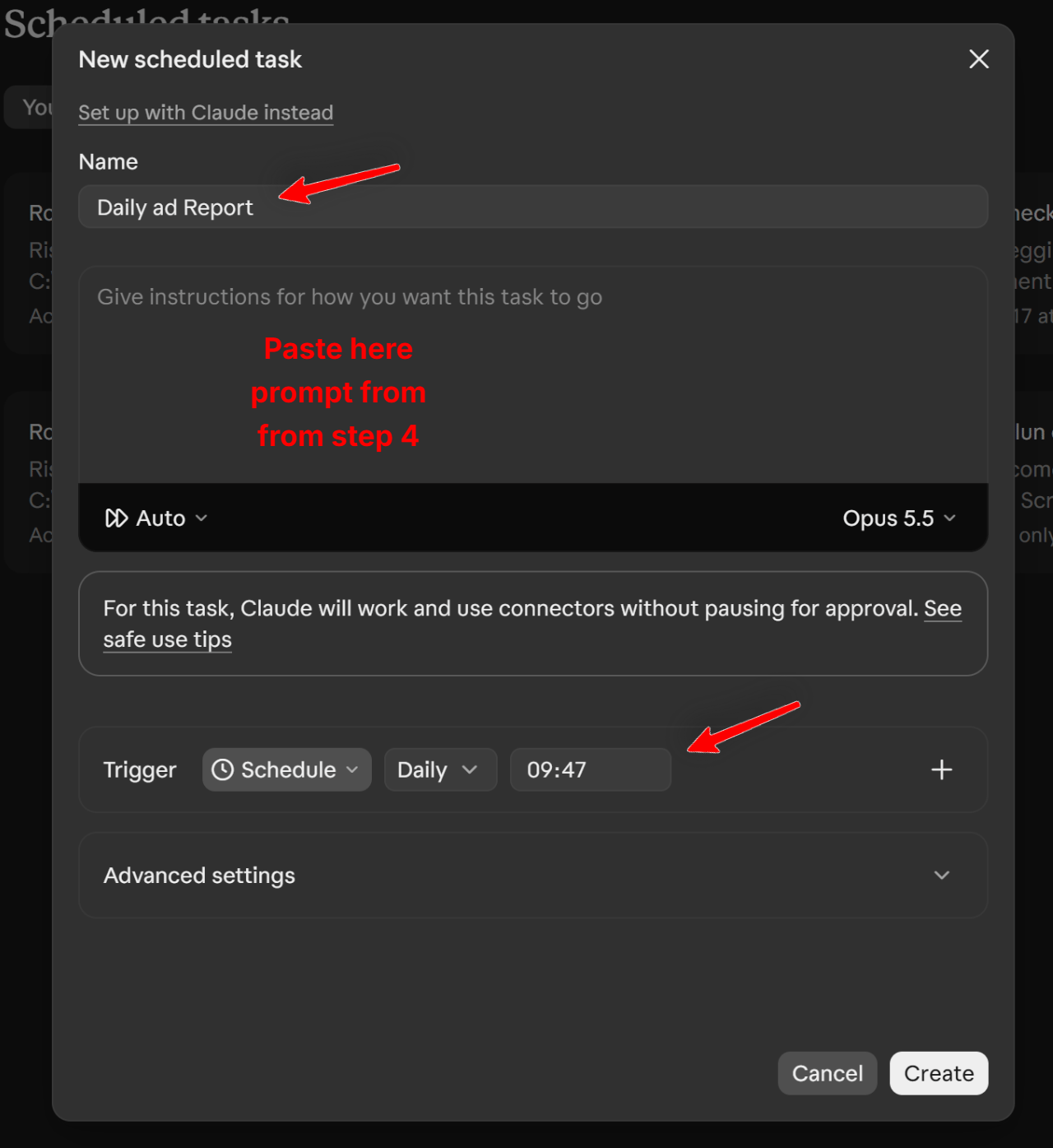
We recommend Opus for reports like this: pick it from the model menu next to Auto.
Daily suits accounts that spend every day, where one bad day costs real money. Weekly is enough for a small account that changes little.
Scheduled tasks run even when your computer is asleep, so the report is ready when you start work.
What to automate with AI (and what to keep)
Google Ads coach Jyll Saskin Gales tells the story of a business owner who asked an AI assistant how to improve his account. It told him to change his bid strategy. He did, and his spend went up while his results dropped: his conversions were leads, not sales, their values weren't syncing with his CRM, and he had too few of them for the new strategy to work.
The point isn't that AI is bad at ads. It only knows what it can see, and it can be wrong while sounding sure.
So let the agent do the work, and keep the decisions until you've seen it get them right:
| Automate with AI | Do yourself |
|---|---|
| The daily report | Your media buying strategy |
| Detecting creative fatigue | New creative ideas |
| Suggesting budget changes and what to pause | Approving big changes |
| Finding the likely cause behind a drop | Anything that needs context outside the ad account |
Final thoughts
You don't have to automate everything at once. Start with a read-only report like the one above, run it for a week next to your usual routine, and add more as you see what the agent gets right.
The easiest and safest way to do that from your AI agent is AdKit. Start your 7-day free trial, connect your accounts and schedule tomorrow morning's report.
Frequently asked questions
Ad automation is any setup where the ad platform, or a third-party tool on top of it, does ad work you'd otherwise do by hand. The platforms already automate bidding and targeting. Budget changes, pauses, uploads and reports can be automated with rules, third-party tools or an AI agent.
Partly. An AI agent like Claude or ChatGPT can read your Google Ads data once it's connected. Google's own connector can't change your campaigns, budgets, bids or keywords. With AdKit, the agent can also prepare changes, and each one is saved as a draft first.
Google Ads, Meta, TikTok and Microsoft Advertising have built-in automated rules. LinkedIn, Reddit and X don't, so to automate them you need a third-party tool or an AI agent.
It's unlikely if you connect through official access. Meta's own help page says a ban simply for using its connector is unlikely.
Automated Ads was a Meta feature that built ads for you from your Facebook Page, and Meta says it's going away in 2026. Meta ads automation today means Advantage+ for targeting and placements, automated rules for the ads you already run, and AI agents for the rest.
It depends on what the agent is allowed to do. With AdKit, every change is saved as a draft first, and on Draft only nothing goes live until you publish it yourself. You can also give an agent Read-only access, so it reports without changing anything.
Partly. Bidding, targeting and automated rules are free on the platforms that offer them. An AI agent needs an AI assistant and a tool that connects it to your ad accounts. Scheduling a report in Claude needs a paid plan, and AdKit has a 7-day free trial.