



Installing Meta Pixel in Next.js takes about 2 minutes: install the package, add the component to your layout, done. PageView tracking on route changes is automatic.
Prerequisites
- Next.js 13+ with App Router
- A Meta Pixel ID (how to get your Pixel ID)
Installation
npm install @adkit/meta-pixel-next
Setup
Add MetaPixel to your root layout:
import { MetaPixel } from '@adkit/meta-pixel-next';

export default function RootLayout({ children }: { children: React.ReactNode }) {
    return (
        <html>
            <body>
                <MetaPixel pixelId="YOUR_PIXEL_ID">{children}</MetaPixel>
            </body>
        </html>
    );
}
That's it! PageView is now tracked automatically on every route change.
Using Environment Variables
Instead of hardcoding your Pixel ID:
NEXT_PUBLIC_META_PIXEL_ID=123456789012345
<MetaPixel>{children}</MetaPixel> // Uses env var automatically
Tracking Events
Use the useMetaPixel hook in any client component:
'use client';

import { useMetaPixel } from '@adkit/meta-pixel-next';

export function CheckoutButton() {
    const meta = useMetaPixel();

    function handleClick() {
        meta.track('InitiateCheckout', { value: 99, currency: 'USD' });
    }

    return <button onClick={handleClick}>Checkout</button>;
}
Common Events
// Purchase completed
meta.track('Purchase', { value: 99.99, currency: 'USD' });

// Lead captured
meta.track('Lead');

// Content viewed
meta.track('ViewContent', { content_id: 'pricing-page' });

// Custom events
meta.trackCustom('VideoWatched', { video_id: 'intro' });
What Events to Track in Your SaaS
For a typical SaaS funnel, track these events:
| Event | When to Trigger |
|---|---|
ViewContent | On page load of blogs, pricing or features page |
Lead | On form submit (newsletter, lead magnet, waitlist) |
CompleteRegistration | After successful account creation |
StartTrial | When user activates free trial |
Subscribe / Purchase | On subscription success page (use eventID for deduplication) |
Focus on conversion events (Lead, StartTrial, Subscribe). These are what you'll optimize your ads for.
Testing
Enable localhost tracking and debug mode:
<MetaPixel pixelId="YOUR_PIXEL_ID" enableLocalhost={true} debug={true}>
    {children}
</MetaPixel>
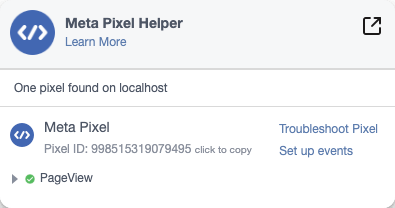
Verify with the Meta Pixel Helper Chrome extension:
Configuration Options
| Prop | Type | Default | Description |
|---|---|---|---|
pixelId | string | string[] | - | Your Pixel ID(s) or use env var |
debug | boolean | false | Enable console logging |
enableLocalhost | boolean | false | Enable tracking on localhost |
trackPageViews | boolean | true | Auto track PageView on route changes |
Common Issues
Enable localhost in your component:
<MetaPixel pixelId="YOUR_PIXEL_ID" enableLocalhost={true}>
- Use Meta Pixel Helper to verify events are firing
- Enable
debug={true}and check console - Events can take up to 20 minutes to appear in Events Manager
The useMetaPixel hook only works in client components. Add 'use client' at the top of your file:
'use client';

import { useMetaPixel } from '@adkit/meta-pixel-next';
Next Steps
- Set up conversion events in Events Manager
- Create custom audiences based on pixel data
- Use pixel events to optimize your ads
Resources
Frequently asked questions
Yes, the @adkit/meta-pixel-next package is built specifically for Next.js App Router and automatically tracks PageView on route changes.
By default, the pixel won't fire on localhost to avoid polluting your data. Add enableLocalhost={true} to your MetaPixel component to enable it during development.
No, the MetaPixel component automatically tracks PageView on every route change. Just wrap your app once and you're done.
Yes, set NEXT_PUBLIC_META_PIXEL_ID in your .env.local file. The component will use it automatically if no pixelId prop is provided.